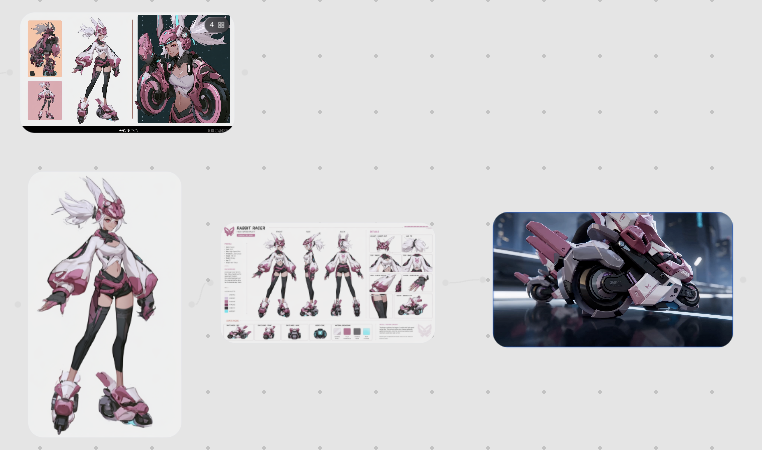
Rabbit Racer Workflow Board
Generates a clean concept-art workflow board showing an anime cyberpunk character, her character sheet, and a matching futuristic motorcycle design.
This is a GPT Image 2 prompt case for Anime & Game. Use the copy-ready prompt below to generate similar visuals, and review Awesome GPT Image 2 Prompts attribution plus commercial-use rights before reuse.
Free 1K preview
Generate one preview image instantly, no sign-up required.
Prompt
Copy-ready prompt
Goal: Create a clean workflow presentation canvas showing how a futuristic anime character design is developed into a character sheet and then into a 3D sci-fi vehicle concept.

Canvas: Wide 16:9 light gray canvas with a subtle evenly spaced dotted grid background. Use lots of negative space and a modern design-board aesthetic.

Layout: Arrange exactly 4 main visual elements connected as a process. In the top-left, place a small black rounded-rectangle preview board containing exactly 3 vertical concept images: 1 small full-body pink-and-black character sketch on the left, 1 larger full-body white-haired character concept in the middle, and 1 dynamic close-up motorcycle/rider illustration on the right. In the lower-left, place a large rounded white card with a full-body character render. In the center, place a horizontal character turnaround/spec sheet. On the right, place a large rounded rectangular cinematic render of a futuristic motorcycle. Add faint thin gray connector lines/arrows flowing from the left character card to the central sheet and from the central sheet to the right vehicle render.

Subject details: The main character is {argument name="character name" default="Rabbit Racer"}, a stylized cyberpunk anime girl with spiky white hair, pink bunny-ear helmet or head fins, a cropped white-and-pink jacket with oversized sleeves, black leggings, pink armor accents, and chunky futuristic roller-skate boots. The design language is glossy pink, white, black, and dark gray, with sharp mecha details and racing motifs. The center spec sheet should show exactly 3 main full-body turnaround poses across the middle, plus smaller detail callouts for clothing, boots, accessories, color swatches, and vehicle miniatures. The right render shows a compact pink-and-white futuristic racing motorcycle with circular wheel housings, angular armor panels, black mechanical parts, decals, and a glossy cinematic studio-lit look.

Text content: Include the readable title {argument name="sheet title" default="RABBIT RACER"} on the central character sheet, with tiny technical labels and color chips that look like a professional model sheet; the small text can be mostly decorative and not fully readable.

Visual style: Polished AI concept-art workflow mockup, crisp digital illustration mixed with product-design presentation, soft shadows, rounded corners, high-resolution details, muted gray interface background, elegant spacing, no clutter.

Constraints: Keep the 4 main elements exactly as described, preserve the left-to-right workflow, avoid extra panels, avoid watermarks, avoid logos, and do not add large explanatory captions outside the character sheet.
Prompt variables
Editable argument placeholders found in the prompt, with their default values.
Best for
- - Anime & Game visual exploration
- - Image generation and reference-image edits
- - Reusable briefs that keep source attribution visible
Change these parts
- - Subject, product, character, or scene
- - Aspect ratio, camera, lighting, and background
- - Brand, text, color, and output constraints
Recommended model and settings
- - Model: gpt-image-2
- - Input mode: Text to Image
- - Aspect ratio: source
- - Commercial status: review original source
How to use this prompt
- 1. Copy the prompt and preserve its structure for the first test.
- 2. Replace the subject, context, and publishing channel.
- 3. Change one camera, lighting, or style variable per iteration.
- 4. Inspect the output, source, text, and rights before reuse.
Limitations, source, and reuse cautions
- - Generated output is an editable draft, not factual, legal, or rights evidence.
- - Review the linked source, people, brands, logos, text, and third-party media before commercial use.
More cases in this category
Prioritized by category, input mode compatibility, quality, and lower risk.


Reuse and source notes
Use this prompt safely after previewing the case.
- 1.Copy the prompt or open it directly in Dovoo with the generation button.
- 2.Adjust variables, aspect ratio, and reference images for your own use case.
- 3.Before publishing or paid usage, verify source rights, attribution requirements, and brand or likeness risks.
Can I use this prompt commercially?
Commercial-use status is allowed. Review the original source, license, brand constraints, and legal requirements before paid usage.
Where does this case come from?
This case is imported from Awesome GPT Image 2 Prompts; keep attribution visible and check the source URL before reuse.