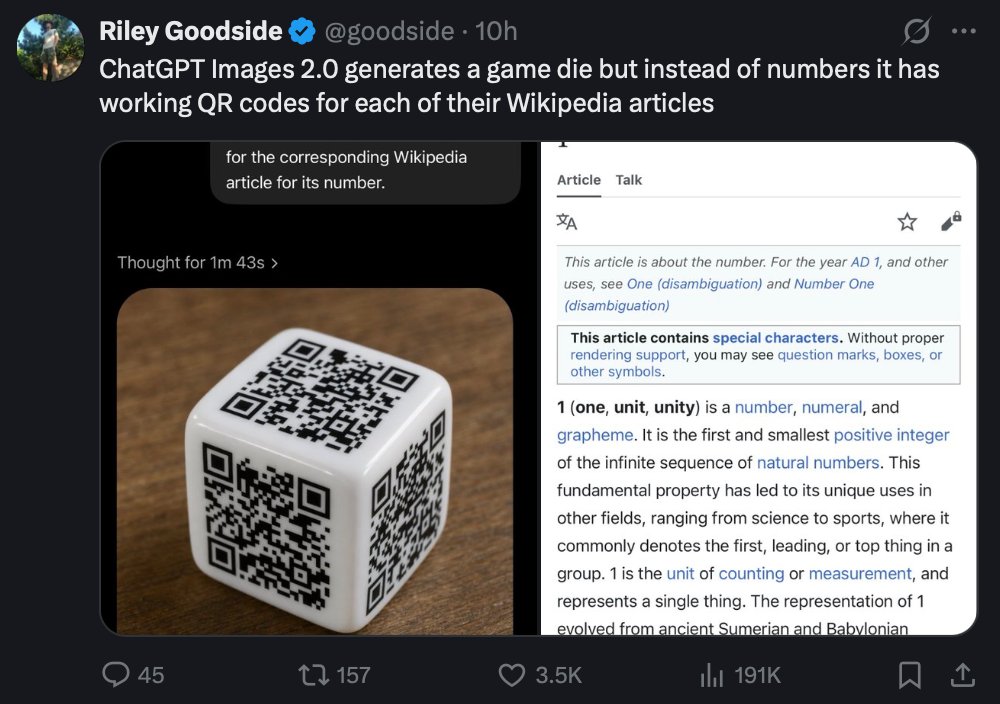
Tweet Screenshot of QR Code Dice Demo
This prompt generates a realistic social media screenshot showing a tweet about an AI-made die with QR codes, useful for recreating tech demo posts and UI-based concept images.
This is a GPT Image 2 prompt case for Other Inspiration. Use the copy-ready prompt below to generate similar visuals, and review Awesome GPT Image 2 Prompts attribution plus commercial-use rights before reuse.
Free 1K preview
Generate one preview image instantly, no sign-up required.
Prompt
Copy-ready prompt
A realistic dark-mode social media screenshot of a tweet viewed on a desktop interface. At the top left is a circular profile photo and the display name Riley Goodside with a blue verification badge, followed by the handle @goodside and the timestamp 10h. The tweet text reads: "ChatGPT Images 2.0 generates a game die but instead of numbers it has working QR codes for each of their Wikipedia articles". Beneath the tweet is a large embedded image with 2 side-by-side panels inside a rounded rectangle. The left panel shows a glossy white six-sided die resting on a warm brown wooden tabletop, photographed at a slight angle, with 3 visible faces, and each visible face contains a different black QR code instead of pips; the lighting is soft and realistic with subtle reflections on the die’s rounded edges. Above the die image is a dark UI header area with a small line of text reading "Thought for 1m 43s" and a cropped speech-bubble-like overlay near the top that says "for the corresponding Wikipedia article for its number." The right panel is a mobile-style Wikipedia page screenshot for the number 1, with a white background and thin gray borders, showing the tabs "Article" and "Talk" at the top, small interface icons, and article text beginning with "This article is about the number. For the year AD 1, and other uses, see One (disambiguation) and Number One (disambiguation)" followed by a boxed notice about special characters and the bold opening line "1 (one, unit, unity) is a number, numeral, and grapheme." The social media interface around the embedded image uses a nearly black background with standard reply, repost, like, analytics, bookmark, and share icons along the bottom, with visible counts of 45 replies, 157 reposts, 3.5K likes, and 191K views. Crisp UI typography, authentic desktop X/Twitter layout, realistic screenshot style, high legibility, subtle compression and screen-capture appearance.
Best for
- - Other Inspiration visual exploration
- - Image generation and reference-image edits
- - Reusable briefs that keep source attribution visible
Change these parts
- - Subject, product, character, or scene
- - Aspect ratio, camera, lighting, and background
- - Brand, text, color, and output constraints
Recommended model and settings
- - Model: gpt-image-2
- - Input mode: Text to Image
- - Aspect ratio: source
- - Commercial status: review original source
How to use this prompt
- 1. Copy the prompt and preserve its structure for the first test.
- 2. Replace the subject, context, and publishing channel.
- 3. Change one camera, lighting, or style variable per iteration.
- 4. Inspect the output, source, text, and rights before reuse.
Limitations, source, and reuse cautions
- - Generated output is an editable draft, not factual, legal, or rights evidence.
- - Review the linked source, people, brands, logos, text, and third-party media before commercial use.
More cases in this category
Prioritized by category, input mode compatibility, quality, and lower risk.


Reuse and source notes
Use this prompt safely after previewing the case.
- 1.Copy the prompt or open it directly in Dovoo with the generation button.
- 2.Adjust variables, aspect ratio, and reference images for your own use case.
- 3.Before publishing or paid usage, verify source rights, attribution requirements, and brand or likeness risks.
Can I use this prompt commercially?
Commercial-use status is allowed. Review the original source, license, brand constraints, and legal requirements before paid usage.
Where does this case come from?
This case is imported from Awesome GPT Image 2 Prompts; keep attribution visible and check the source URL before reuse.