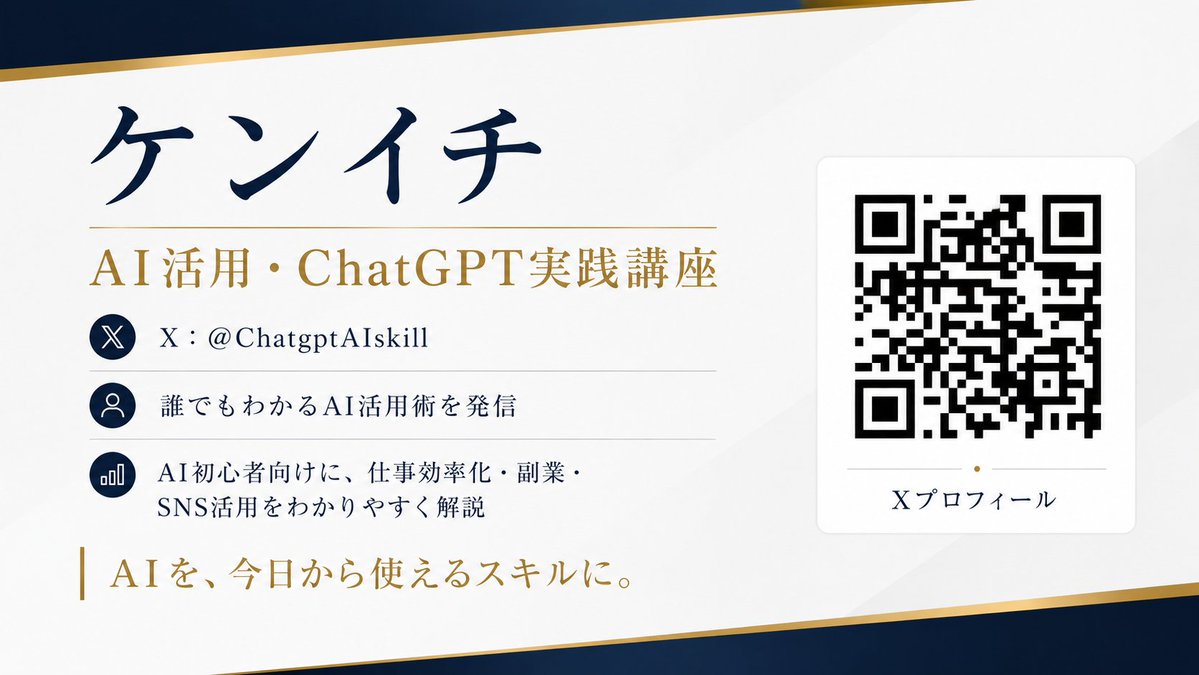
QR Code Business Card Designer
A functional prompt for GPT Image 2.0 to design a sophisticated business card that includes a scannable QR code and professional layout.
This is a GPT Image 2 prompt case for 平面海报. Use the copy-ready prompt below to generate similar visuals, and review Awesome GPT Image 2 Prompts attribution plus commercial-use rights before reuse.
Prompt
Copy-ready prompt
请根据 SNS (X) 个人资料信息,设计一张带有可扫描二维码的名片。

[目的]
将 X 账号的个人资料信息汇总到一张精致的横版名片中。名片的设计、配色方案、布局、留白设计及字体风格应由 AI 自动建议,以确保整体视觉效果达到最佳。

[需展示的信息]
- 姓名: {argument name="name" default="XXXX"}
- 职位: {argument name="title" default="XXXX"}
- X 账号: @{argument name="account name" default="XXXX"}
- 个人简介: XXXX
- 成就/特点: XXXX
- 一句话标语: XXXX
- 二维码链接地址: https://t.co/OQINcuK6wHXXXX

[关于二维码]
- 二维码不应仅作为装饰,必须确保能用智能手机扫描。
- 准确嵌入链接。
- 二维码尺寸需足够大,优先保证扫描准确性。
- 确保二维码周围有足够的留白。
- 请勿在二维码上叠加文字或装饰。
- 请勿扭曲或过度处理二维码。
- 优先考虑与背景的高对比度,以确保易读性。

[设计要求]
- 横版名片设计。
- 传达奢华感、精致感、信任感及专业感。
- 简约美观的布局,充分利用留白。
- 所有文字均为日语,清晰易读。
- 信息优先级明确,姓名和职位应最为突出。
- 由 AI 自动决定最佳背景色、强调色及字体平衡。
- 避免廉价的模板感。
- 呈现适合实际印刷的优雅成品。

[重要事项]
- AI 应提供美观且自然的建议,而非固定的布局。
- 同时,必须优先考虑二维码的实用性。
- 避免乱码,确保所有文字清晰可辨。
- 合理组织信息,实现最佳可读性。

宽高比 16:9。
请以高分辨率创建。
Prompt variables
Editable argument placeholders found in the prompt, with their default values.
More cases in this category
Prioritized by category, input mode compatibility, quality, and lower risk.



Reuse and source notes
Use this prompt safely after previewing the case.
- 1.Copy the prompt or open it directly in Dovoo with the generation button.
- 2.Adjust variables, aspect ratio, and reference images for your own use case.
- 3.Before publishing or paid usage, verify source rights, attribution requirements, and brand or likeness risks.
Can I use this prompt commercially?
Commercial-use status is allowed. Review the original source, license, brand constraints, and legal requirements before paid usage.
Where does this case come from?
This case is imported from Awesome GPT Image 2 Prompts; keep attribution visible and check the source URL before reuse.