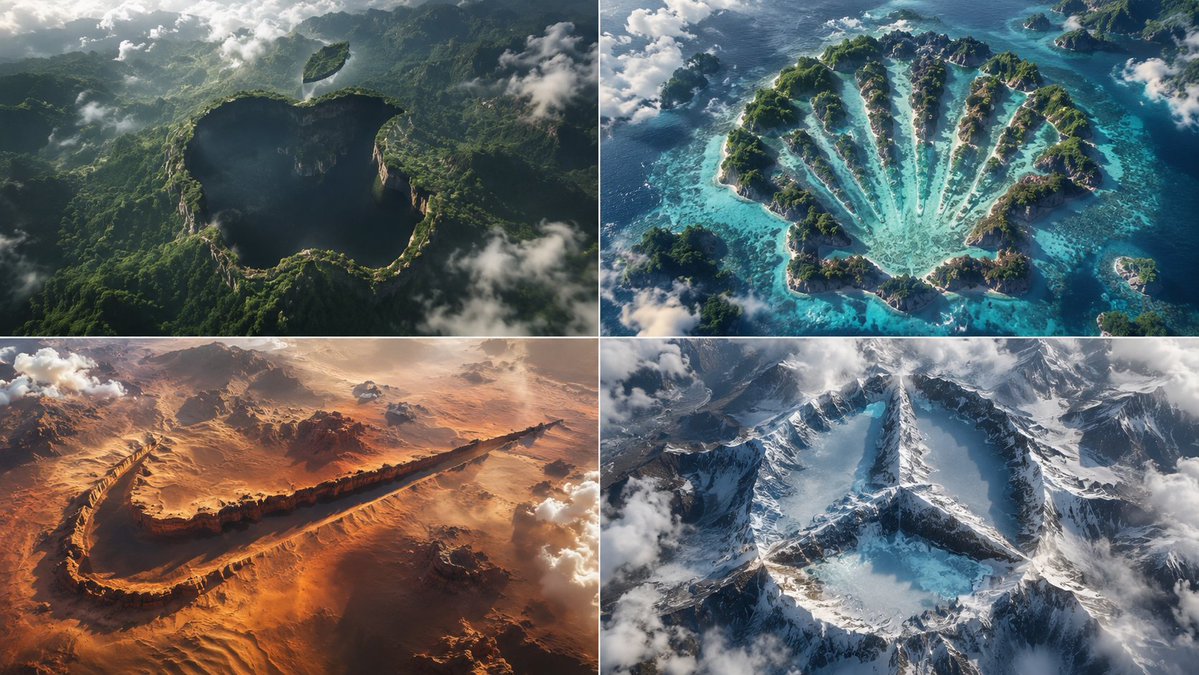
Python-Scripted Hidden Logo Landscape
A highly creative prompt formatted as a Python class to generate pareidolia-style landscapes where logos are hidden as negative space in the terrain.
This is a GPT Image 2 prompt case for Product & Commercial. Use the copy-ready prompt below to generate similar visuals, and review Awesome GPT Image 2 Prompts attribution plus commercial-use rights before reuse.
Free 1K preview
Generate one preview image instantly, no sign-up required.
Prompt
Copy-ready prompt
2x2 grid, think hard and find different input as and bs that work: class HiddenLogoLandscape: def __init__(self, logo="{argument name="logo name" default="{Input A}"}", biome="{argument name="biome" default="{Input B}"}"): self.logo = logo self.biome = biome self.scene = self.__infer__() def __infer__(self): s = Scene() s.terrain = Terrain() # Carving rule: main logo shape is a negative space drop in the biome's surface s.terrain.negative_carve = self.logo.main_body s.terrain.negative_altitude = -150 # meters drop s.terrain.negative_texture = f"dark {self.biome.material} (shadowed forest, void canyon)" # Floating islands for detached parts s.terrain.floating_islands = [{ "shape": part, "material": f"{self.biome.material} floating landmass", "altitude": +200, "position": "suspended above main shape" } for part in self.logo.detached_elements] s.atmosphere = "swirling clouds, mist, god rays backlight" s.pareidolia = "edges formed organically by trees, cliffs, snow—no smooth vectors" s .camera = "aerial drone, 1:1 framing, high contrast, cinematic" return s def render(self): return NationalGeographicAerial(self.scene) exec(HiddenLogoLandscape().render())Prompt variables
Editable argument placeholders found in the prompt, with their default values.
Best for
- - Product & Commercial visual exploration
- - Image generation and reference-image edits
- - Reusable briefs that keep source attribution visible
Change these parts
- - Subject, product, character, or scene
- - Aspect ratio, camera, lighting, and background
- - Brand, text, color, and output constraints
Recommended model and settings
- - Model: gpt-image-2
- - Input mode: Text to Image
- - Aspect ratio: source
- - Commercial status: review original source
How to use this prompt
- 1. Copy the prompt and preserve its structure for the first test.
- 2. Replace the subject, context, and publishing channel.
- 3. Change one camera, lighting, or style variable per iteration.
- 4. Inspect the output, source, text, and rights before reuse.
Limitations, source, and reuse cautions
- - Generated output is an editable draft, not factual, legal, or rights evidence.
- - Review the linked source, people, brands, logos, text, and third-party media before commercial use.
More cases in this category
Prioritized by category, input mode compatibility, quality, and lower risk.

Reuse and source notes
Use this prompt safely after previewing the case.
- 1.Copy the prompt or open it directly in Dovoo with the generation button.
- 2.Adjust variables, aspect ratio, and reference images for your own use case.
- 3.Before publishing or paid usage, verify source rights, attribution requirements, and brand or likeness risks.
Can I use this prompt commercially?
Commercial-use status is allowed. Review the original source, license, brand constraints, and legal requirements before paid usage.
Where does this case come from?
This case is imported from Awesome GPT Image 2 Prompts; keep attribution visible and check the source URL before reuse.