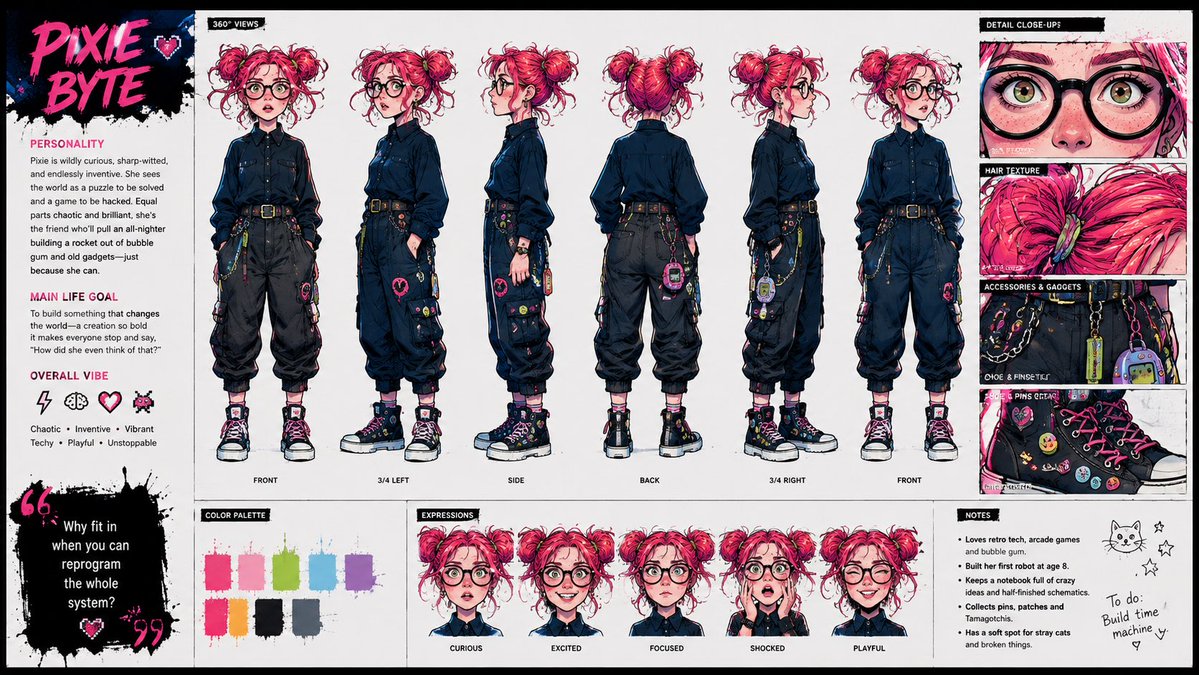
Punk Cartoon Character Sheet
Creates a full animation-ready character design sheet from a single stylized character reference while preserving the original comic art style.
This is a GPT Image 2 prompt case for Anime & Game. Use the copy-ready prompt below to generate similar visuals, and review Awesome GPT Image 2 Prompts attribution plus commercial-use rights before reuse.
Free 1K preview
Generate one preview image instantly, no sign-up required.
Free text preview doesn’t preserve reference-image consistency.
Prompt
Copy-ready prompt
Using the provided reference image as the character base, create a polished character design sheet for {argument name="character name" default="PIXIE BYTE"}. Keep the same character identity and use the exact same visual style as the reference: vivid punk-comic illustration, bold ink lines, hot pink/cyan/yellow accents, sketchy paint texture, and expressive manga-inspired rendering.

Goal: Turn the single portrait into a full animation-ready character sheet.

Canvas and layout: Wide horizontal sheet on a clean off-white background with black brush-stroke section headers and hot-pink accent typography. Add a left profile column, a large central 360-degree view lineup, a right detail column, and a bottom row of palette, expressions, and notes.

Central 360-degree views: Show exactly 6 full-body turnarounds of the character, preserving her core look from the reference while inventing the missing full outfit. Label the views: FRONT, 3/4 LEFT, SIDE, BACK, 3/4 RIGHT, FRONT. Give her a techy chaotic outfit with a dark button-up shirt, black cargo pants, belt, chains, colorful pins, small gadgets, and chunky high-top sneakers.

Left profile column: Add the large title {argument name="character name" default="PIXIE BYTE"} in pink graffiti lettering with a small heart. Include three text sections: PERSONALITY, MAIN LIFE GOAL, and OVERALL VIBE. Add exactly 4 vibe icons: lightning bolt, brain, heart, pixel bug. Add a black paint quote block with the quote {argument name="quote" default="Why fit in when you can reprogram the whole system?"}.

Right detail column: Add exactly 4 close-up panels labeled DETAIL CLOSE-UP, HAIR TEXTURE, ACCESSORIES & GADGETS, and SHOE PINS DETAIL. The panels should zoom into her glasses/eyes/freckles, pink hair texture, belt gadgets and chains, and decorated sneakers.

Bottom row: Add a COLOR PALETTE panel with exactly 8 paint swatches: hot pink, pale pink, lime green, cyan, purple, orange, black, and blue-gray. Add an EXPRESSIONS panel with exactly 5 bust expressions labeled CURIOUS, EXCITED, FOCUSED, SHOCKED, and PLAYFUL. Add a NOTES panel with short bullet notes plus a small cat doodle, stars, and a handwritten to-do note reading {argument name="to do note" default="Build time machine"}.

Constraints: Maintain the exact same visual style as the reference image, keep the character recognizable, make the sheet feel like a professional cartoon hero academy concept sheet, and avoid adding extra turnarounds, expressions, palette swatches, or detail panels.
Prompt variables
Editable argument placeholders found in the prompt, with their default values.
Best for
- - Anime & Game visual exploration
- - Image generation and reference-image edits
- - Reusable briefs that keep source attribution visible
Change these parts
- - Subject, product, character, or scene
- - Aspect ratio, camera, lighting, and background
- - Brand, text, color, and output constraints
Recommended model and settings
- - Model: gpt-image-2
- - Input mode: Image to Image
- - Aspect ratio: source
- - Commercial status: review original source
How to use this prompt
- 1. Copy the prompt and preserve its structure for the first test.
- 2. Replace the subject, context, and publishing channel.
- 3. Change one camera, lighting, or style variable per iteration.
- 4. Inspect the output, source, text, and rights before reuse.
Limitations, source, and reuse cautions
- - Generated output is an editable draft, not factual, legal, or rights evidence.
- - Review the linked source, people, brands, logos, text, and third-party media before commercial use.
More cases in this category
Prioritized by category, input mode compatibility, quality, and lower risk.

Reuse and source notes
Use this prompt safely after previewing the case.
- 1.Copy the prompt or open it directly in Dovoo with the generation button.
- 2.Adjust variables, aspect ratio, and reference images for your own use case.
- 3.Before publishing or paid usage, verify source rights, attribution requirements, and brand or likeness risks.
Can I use this prompt commercially?
Commercial-use status is allowed. Review the original source, license, brand constraints, and legal requirements before paid usage.
Where does this case come from?
This case is imported from Awesome GPT Image 2 Prompts; keep attribution visible and check the source URL before reuse.