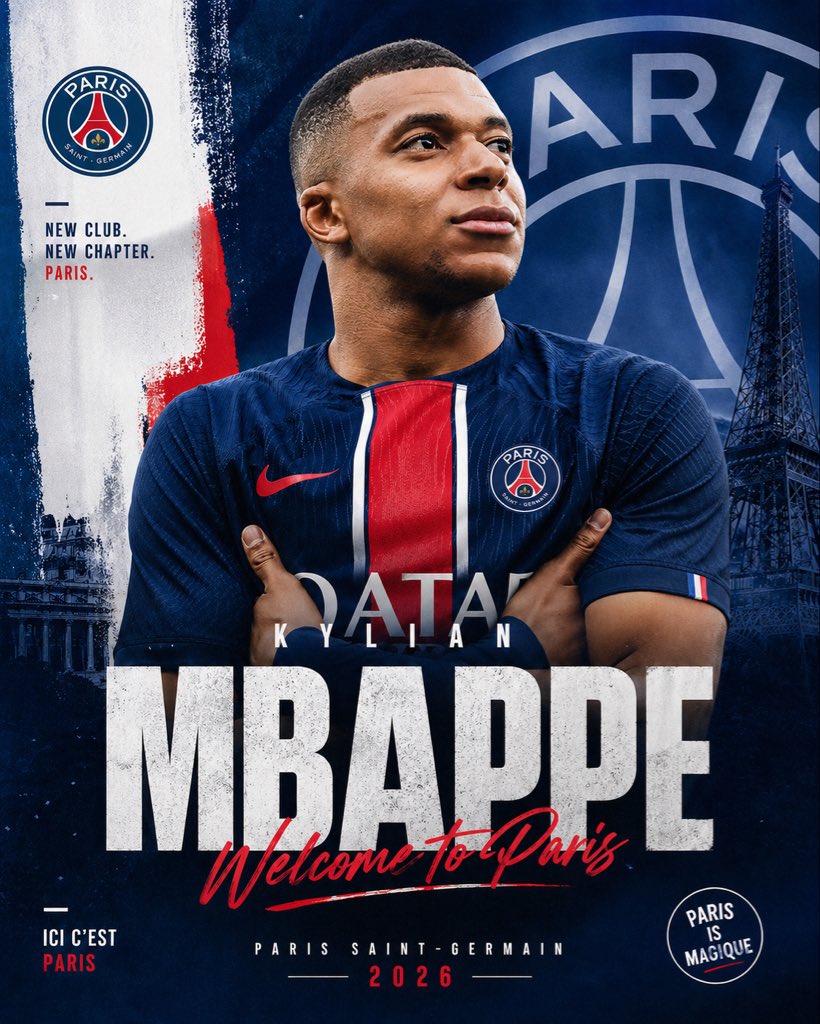
PSG Transfer Announcement Poster
A bold, professional football signing poster for announcing a player's move to Paris Saint-Germain on social media or sports promo graphics.
This is a GPT Image 2 prompt case for Graphic & Poster. Use the copy-ready prompt below to generate similar visuals, and review Awesome GPT Image 2 Prompts attribution plus commercial-use rights before reuse.
Free 1K preview
Generate one preview image instantly, no sign-up required.
Prompt
Copy-ready prompt
Create a dramatic football transfer announcement poster in a vertical social-media format, centered on a photorealistic adult male soccer player wearing a modern Paris Saint-Germain home jersey, arms crossed, chest-up framing, strong athletic build, face mostly obscured by a soft rectangular blur block for anonymity, short close-cropped hair visible around the edges. Use a deep navy blue PSG-themed color palette with bold red and white accents. The jersey should feature a central red vertical stripe bordered by white, a red swoosh-style sports logo on the left side from the viewer's perspective, the PSG crest on the opposite chest, and faint sponsor lettering across the torso. Place the player in front of a layered graphic background featuring an oversized faded PSG crest filling most of the upper-right background, a dark Eiffel Tower silhouette on the right side, painterly brush-stroke textures, subtle grunge, and a white vertical paint strip on the left with a rough red brush accent near the middle. Include the PSG club badge near the upper left. Add left-side stacked slogan text in bold uppercase sans serif reading: "NEW CLUB. NEW CHAPTER. PARIS." with the last word in red. Add a huge distressed white block headline across the lower middle reading "{argument name="player surname" default="MBAPPE"}", with smaller spaced uppercase first name above it reading "{argument name="player first name" default="KYLIAN"}". Overlay a red handwritten script across the big surname saying "{argument name="welcome text" default="Welcome To Paris"}". At the bottom center, add small uppercase text "PARIS SAINT-GERMAIN" and beneath it the year "{argument name="year" default="2026"}" in red with thin divider lines on each side. In the lower left, include small stacked text "ICI C'EST PARIS" with "PARIS" in red. In the lower right, add a circular stamp-style badge reading "PARIS IS MAGIQUE". Use cinematic lighting, high contrast, premium sports-brand poster design, sharp fabric texture, moody shadows, gritty editorial finish, and polished transfer-window announcement aesthetics.Prompt variables
Editable argument placeholders found in the prompt, with their default values.
Best for
- - Graphic & Poster visual exploration
- - Image generation and reference-image edits
- - Reusable briefs that keep source attribution visible
Change these parts
- - Subject, product, character, or scene
- - Aspect ratio, camera, lighting, and background
- - Brand, text, color, and output constraints
Recommended model and settings
- - Model: gpt-image-2
- - Input mode: Text to Image
- - Aspect ratio: source
- - Commercial status: review original source
How to use this prompt
- 1. Copy the prompt and preserve its structure for the first test.
- 2. Replace the subject, context, and publishing channel.
- 3. Change one camera, lighting, or style variable per iteration.
- 4. Inspect the output, source, text, and rights before reuse.
Limitations, source, and reuse cautions
- - Generated output is an editable draft, not factual, legal, or rights evidence.
- - Review the linked source, people, brands, logos, text, and third-party media before commercial use.
More cases in this category
Prioritized by category, input mode compatibility, quality, and lower risk.





Reuse and source notes
Use this prompt safely after previewing the case.
- 1.Copy the prompt or open it directly in Dovoo with the generation button.
- 2.Adjust variables, aspect ratio, and reference images for your own use case.
- 3.Before publishing or paid usage, verify source rights, attribution requirements, and brand or likeness risks.
Can I use this prompt commercially?
Commercial-use status is allowed. Review the original source, license, brand constraints, and legal requirements before paid usage.
Where does this case come from?
This case is imported from Awesome GPT Image 2 Prompts; keep attribution visible and check the source URL before reuse.