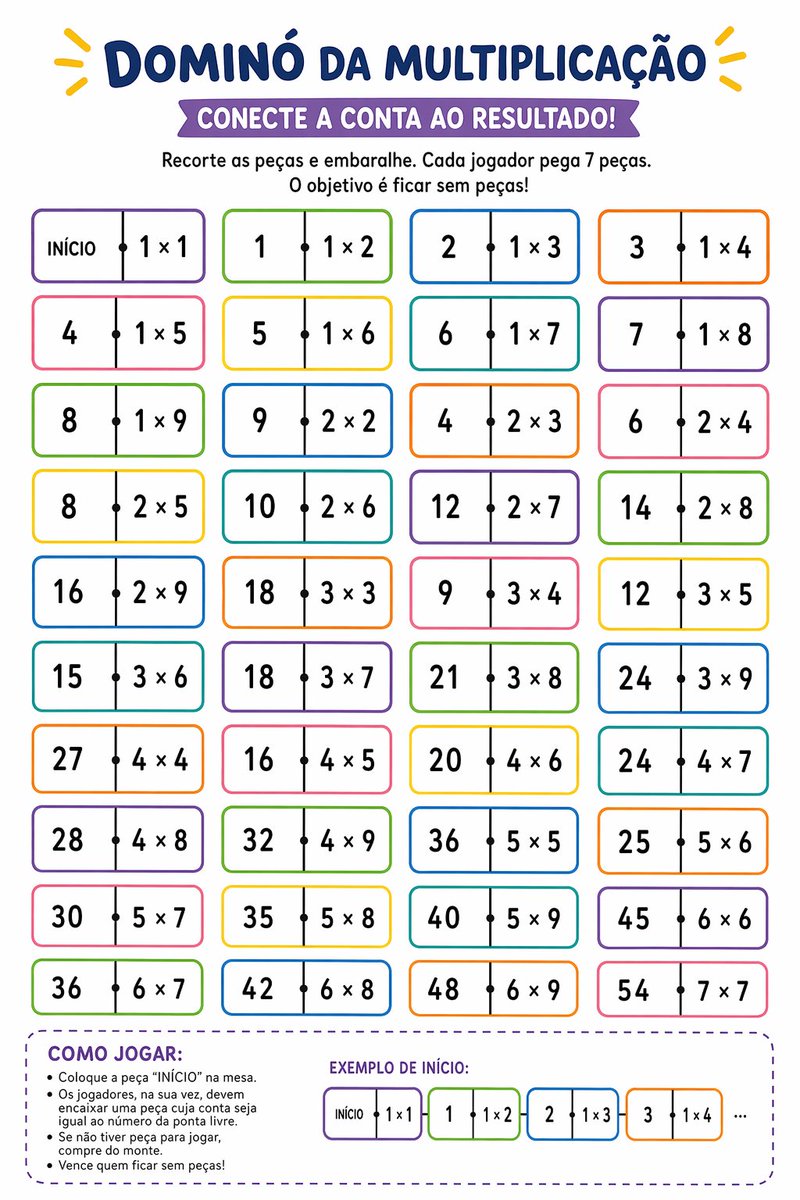
Printable Multiplication Domino Worksheet
A colorful Brazilian Portuguese classroom worksheet for practicing multiplication through a domino matching game, ideal for teachers, homeschooling, and printable math activities.
This is a GPT Image 2 prompt case for Graphic & Poster. Use the copy-ready prompt below to generate similar visuals, and review Awesome GPT Image 2 Prompts attribution plus commercial-use rights before reuse.
Free 1K preview
Generate one preview image instantly, no sign-up required.
Prompt
Copy-ready prompt
Create a vertical printable educational worksheet in Brazilian Portuguese, clean white background, playful classroom design, centered composition, bold rounded typography, bright kid-friendly colors. At the very top, a large navy-blue headline reading {argument name="headline text" default="DOMINÓ DA MULTIPLICAÇÃO"}, with small yellow decorative rays on both sides. Below it, a purple ribbon banner with white uppercase text reading {argument name="subtitle text" default="CONECTE A CONTA AO RESULTADO!"}. Under the banner, add two centered instruction lines in black: "Recorte as peças e embaralhe. Cada jogador pega 7 peças." and "O objetivo é ficar sem peças!". The main area shows 40 domino-style tiles arranged in a 4-column by 10-row grid, evenly spaced. Each tile is a horizontal rounded rectangle with a thin colorful outline, white fill, a vertical divider at the center, and a small black dot on the divider. The left half contains either a number result or the word "INÍCIO" on the first tile, and the right half contains a multiplication expression. Use alternating border colors across the grid such as purple, green, blue, orange, pink, and yellow. The 40 tiles, in row order from left to right, top to bottom, are: 1) "INÍCIO | 1 × 1", 2) "1 | 1 × 2", 3) "2 | 1 × 3", 4) "3 | 1 × 4", 5) "4 | 1 × 5", 6) "5 | 1 × 6", 7) "6 | 1 × 7", 8) "7 | 1 × 8", 9) "8 | 1 × 9", 10) "9 | 2 × 2", 11) "4 | 2 × 3", 12) "6 | 2 × 4", 13) "8 | 2 × 5", 14) "10 | 2 × 6", 15) "12 | 2 × 7", 16) "14 | 2 × 8", 17) "16 | 2 × 9", 18) "18 | 3 × 3", 19) "9 | 3 × 4", 20) "12 | 3 × 5", 21) "15 | 3 × 6", 22) "18 | 3 × 7", 23) "21 | 3 × 8", 24) "24 | 3 × 9", 25) "27 | 4 × 4", 26) "16 | 4 × 5", 27) "20 | 4 × 6", 28) "24 | 4 × 7", 29) "28 | 4 × 8", 30) "32 | 4 × 9", 31) "36 | 5 × 5", 32) "25 | 5 × 6", 33) "30 | 5 × 7", 34) "35 | 5 × 8", 35) "40 | 5 × 9", 36) "45 | 6 × 6", 37) "36 | 6 × 7", 38) "42 | 6 × 8", 39) "48 | 6 × 9", 40) "54 | 7 × 7". At the bottom, add a large rounded dashed purple box spanning most of the width. Inside the left side of this box, place the section title "COMO JOGAR:" in bold purple uppercase, followed by 5 bullet points in black: "Coloque a peça “INÍCIO” na mesa.", "Os jogadores, na sua vez, devem encaixar uma peça cuja conta seja igual ao número da ponta livre.", "Se não tiver peça para jogar, compre do monte.", and "Vence quem ficar sem peças!". On the right side of the same box, add the title "EXEMPLO DE INÍCIO:" in purple uppercase and show 4 small domino tiles in sequence plus ellipsis: "INÍCIO | 1 × 1", then "1 | 1 × 2", then "2 | 1 × 3", then "3 | 1 × 4", followed by "...". Keep the overall style crisp, vector-like, printable, friendly for elementary math practice, with balanced spacing and highly legible text.Prompt variables
Editable argument placeholders found in the prompt, with their default values.
Best for
- - Graphic & Poster visual exploration
- - Image generation and reference-image edits
- - Reusable briefs that keep source attribution visible
Change these parts
- - Subject, product, character, or scene
- - Aspect ratio, camera, lighting, and background
- - Brand, text, color, and output constraints
Recommended model and settings
- - Model: gpt-image-2
- - Input mode: Text to Image
- - Aspect ratio: source
- - Commercial status: review original source
How to use this prompt
- 1. Copy the prompt and preserve its structure for the first test.
- 2. Replace the subject, context, and publishing channel.
- 3. Change one camera, lighting, or style variable per iteration.
- 4. Inspect the output, source, text, and rights before reuse.
Limitations, source, and reuse cautions
- - Generated output is an editable draft, not factual, legal, or rights evidence.
- - Review the linked source, people, brands, logos, text, and third-party media before commercial use.
More cases in this category
Prioritized by category, input mode compatibility, quality, and lower risk.





Reuse and source notes
Use this prompt safely after previewing the case.
- 1.Copy the prompt or open it directly in Dovoo with the generation button.
- 2.Adjust variables, aspect ratio, and reference images for your own use case.
- 3.Before publishing or paid usage, verify source rights, attribution requirements, and brand or likeness risks.
Can I use this prompt commercially?
Commercial-use status is allowed. Review the original source, license, brand constraints, and legal requirements before paid usage.
Where does this case come from?
This case is imported from Awesome GPT Image 2 Prompts; keep attribution visible and check the source URL before reuse.