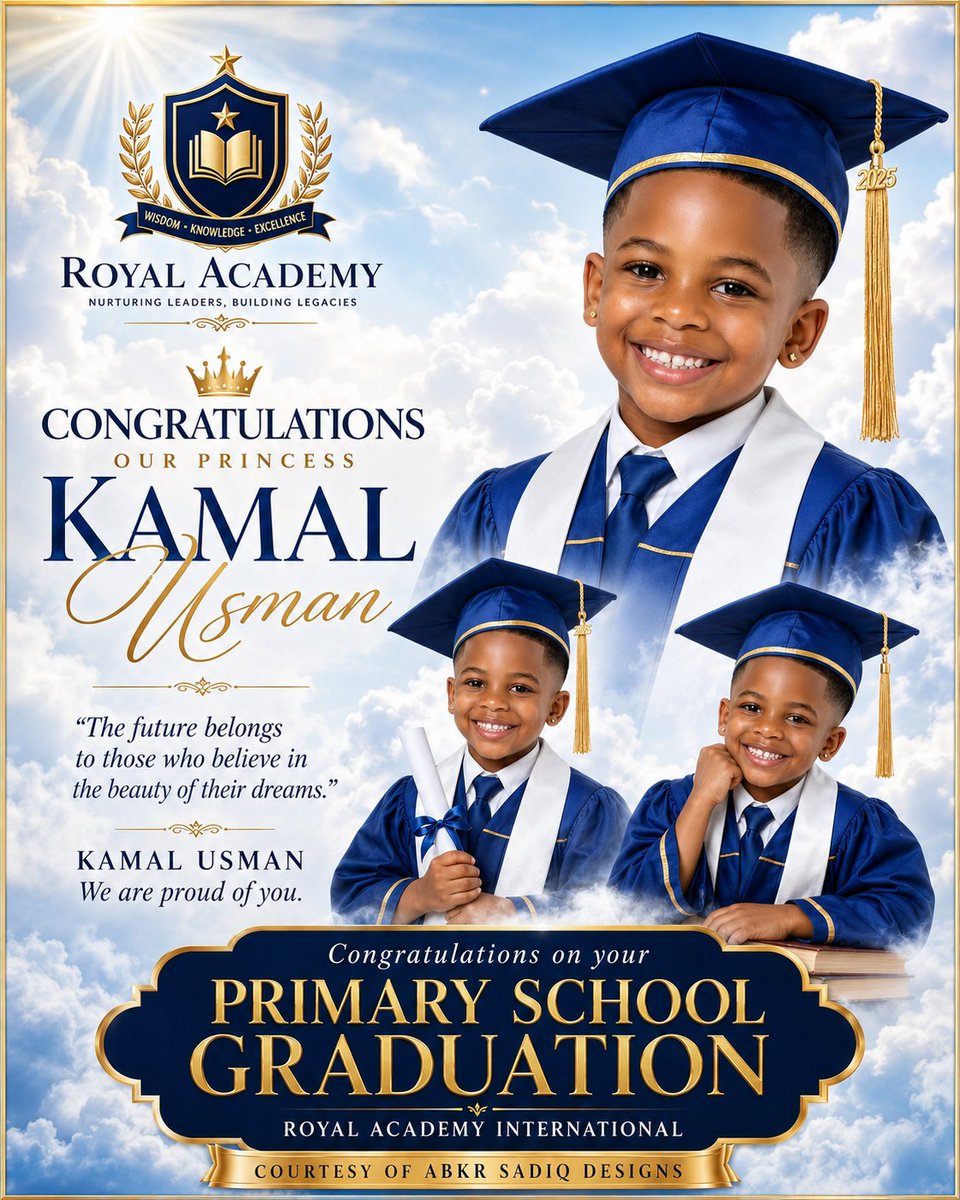
Royal Primary Graduation Poster
A premium royal blue and gold children’s graduation ceremony poster with three portraits, academy crest, clouds, and elegant congratulatory typography.
This is a GPT Image 2 prompt case for Graphic & Poster. Use the copy-ready prompt below to generate similar visuals, and review Awesome GPT Image 2 Prompts attribution plus commercial-use rights before reuse.
Free 1K preview
Generate one preview image instantly, no sign-up required.
Prompt
Copy-ready prompt
Goal: Create an ultra-premium children’s primary school graduation celebration poster for {argument name="school name" default="Royal Academy"}, using an elegant royal blue, white, and metallic gold academy theme.

Canvas: Square 1:1 poster, high-resolution print design, thin metallic gold border around the entire image. Background is a bright heavenly sky filled with soft white clouds, blue atmosphere, subtle light rays, and a strong sun flare in the upper left corner.

Layout: Place a large formal school crest in the upper left: navy shield with gold outline, open book icon, stars, laurel branches, and a small ribbon reading “WISDOM • KNOWLEDGE • EXCELLENCE.” Under it, add the school name “ROYAL ACADEMY” in refined navy serif capitals and the small motto “NURTURING LEADERS, BUILDING LEGACIES.” The right half is dominated by one large child portrait. The left middle contains the congratulatory typography and quote. The lower middle contains two smaller child portraits emerging from clouds. The bottom has a large ornate navy-and-gold plaque announcing the graduation.

Subject details: Show exactly 3 portraits of the same smiling young Black child graduate, around early primary-school age, warm brown skin, short black hair, small gold stud earrings, bright happy expression, wearing a royal blue graduation cap and gown with gold trim, white stole, white shirt, and navy tie. Portrait 1: large bust portrait on the upper right, facing forward, smiling broadly, cap tassel hanging on the right with a small gold “2025” charm. Portrait 2: smaller full upper-body portrait near the lower center-left, holding a rolled white diploma tied with a blue ribbon, smiling. Portrait 3: smaller upper-body portrait near the lower right, leaning on stacked books with one hand near the cheek, smiling. Blend all portraits softly into the cloud background with polished studio lighting and realistic photographic detail.

Text content: Use the following visible poster text with elegant hierarchy. Main crest area: “ROYAL ACADEMY” and “NURTURING LEADERS, BUILDING LEGACIES.” Main greeting: “CONGRATULATIONS” then small spaced text “OUR PRINCESS.” Graduate name: large navy serif first name “{argument name="graduate first name" default="KAMAL"}” with oversized gold cursive surname “{argument name="graduate surname" default="Usman"}” overlapping below it. Quote block: “The future belongs to those who believe in the beauty of their dreams.” Signature block: “KAMAL USMAN” and “We are proud of you.” Bottom plaque: small italic line “Congratulations on your,” huge gold serif words “PRIMARY SCHOOL GRADUATION,” then “ROYAL ACADEMY INTERNATIONAL.” Bottom ribbon: “COURTESY OF ABKR SADIQ DESIGNS.” Graduation year on tassel: {argument name="graduation year" default="2025"}.

Visual style: Luxury royal academy poster design, glossy premium finish, dramatic soft clouds, crisp cutout compositing, rich navy blue and gold palette, embossed metallic typography, ornamental gold flourishes, crown icon above the congratulations text, refined serif fonts mixed with elegant cursive script, celebratory and inspirational mood.

Constraints: Use exactly 3 child portraits, exactly 1 crest, exactly 1 crown icon above the main greeting, exactly 1 large bottom plaque, and exactly 1 bottom ribbon. Keep all text legible and centered as described. Do not add extra people, extra logos, watermarks, or unrelated decorations.
Prompt variables
Editable argument placeholders found in the prompt, with their default values.
Best for
- - Graphic & Poster visual exploration
- - Image generation and reference-image edits
- - Reusable briefs that keep source attribution visible
Change these parts
- - Subject, product, character, or scene
- - Aspect ratio, camera, lighting, and background
- - Brand, text, color, and output constraints
Recommended model and settings
- - Model: gpt-image-2
- - Input mode: Text to Image
- - Aspect ratio: source
- - Commercial status: review original source
How to use this prompt
- 1. Copy the prompt and preserve its structure for the first test.
- 2. Replace the subject, context, and publishing channel.
- 3. Change one camera, lighting, or style variable per iteration.
- 4. Inspect the output, source, text, and rights before reuse.
Limitations, source, and reuse cautions
- - Generated output is an editable draft, not factual, legal, or rights evidence.
- - Review the linked source, people, brands, logos, text, and third-party media before commercial use.
More cases in this category
Prioritized by category, input mode compatibility, quality, and lower risk.




Reuse and source notes
Use this prompt safely after previewing the case.
- 1.Copy the prompt or open it directly in Dovoo with the generation button.
- 2.Adjust variables, aspect ratio, and reference images for your own use case.
- 3.Before publishing or paid usage, verify source rights, attribution requirements, and brand or likeness risks.
Can I use this prompt commercially?
Commercial-use status is allowed. Review the original source, license, brand constraints, and legal requirements before paid usage.
Where does this case come from?
This case is imported from Awesome GPT Image 2 Prompts; keep attribution visible and check the source URL before reuse.