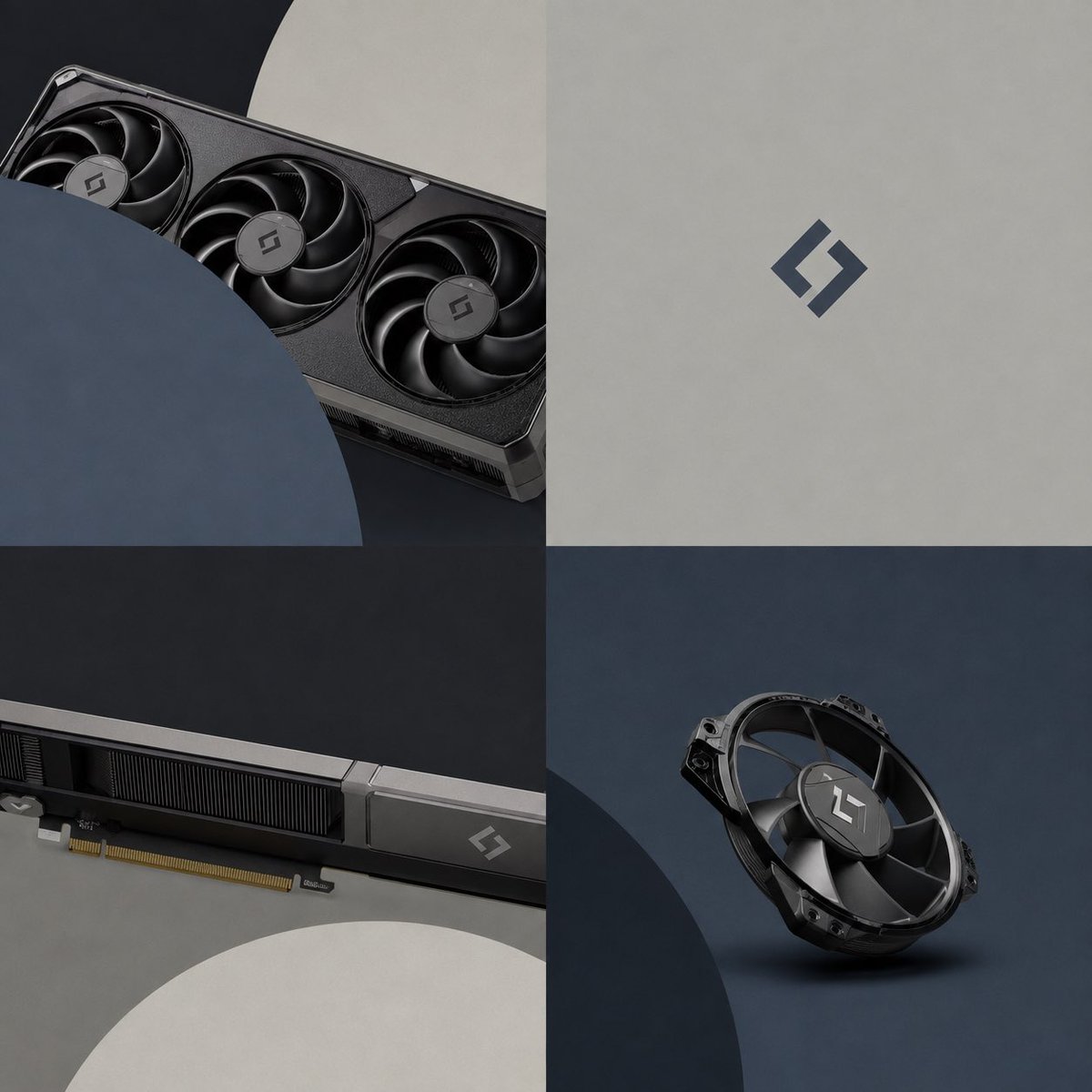
Premium GPU Branding Collage
A structured prompt for generating a sleek four-panel product branding collage featuring a graphics card, cooling fans, and a minimalist logo.
This is a GPT Image 2 prompt case for Product & Commercial. Use the copy-ready prompt below to generate similar visuals, and review Awesome GPT Image 2 Prompts attribution plus commercial-use rights before reuse.
Free 1K preview
Generate one preview image instantly, no sign-up required.
Prompt
Copy-ready prompt
Goal: Create a premium product-branding collage for a high-end computer graphics card and cooling fan, using {argument name="brand logo" default="a minimalist angular S-shaped monogram"} as the only visible logo mark.

Canvas: Square 1:1 image, divided into exactly 4 equal quadrants in a clean 2x2 grid with no gutters. Use a dark, modern studio aesthetic with matte textures and soft directional lighting.

Layout and visible elements: Top-left quadrant shows a close-up diagonal view of a black triple-fan graphics card partially cropped by large overlapping circular foreground shapes; include exactly 3 visible cooling fans on the card, with the logo centered on each fan hub. Top-right quadrant is a minimalist light gray matte background with a single centered dark blue-gray brand logo, no other objects or text. Bottom-left quadrant shows a long side/detail close-up of the graphics card running horizontally, including the PCIe gold connector along the lower edge, black heatsink fins, a metallic silver edge strip, and one small logo near the right end; a large pale circular shape is cropped into the lower foreground. Bottom-right quadrant shows exactly 1 standalone black cooling fan module floating or resting at a slight angle on a dark blue-gray studio surface, with the logo on its central hub and a soft shadow beneath it.

Visual style: Photorealistic 3D product render, premium tech hardware advertising, matte black metal, graphite gray, deep navy, soft beige-gray, subtle brushed and molded plastic textures, shallow shadows, crisp edges, restrained contrast, no clutter. Use geometric circular overlays as design elements: one large navy circle cropping into the top-left panel, one large pale gray circle cropping into the bottom-left panel, and one large dark circle cropping into the bottom-right panel.

Color palette: {argument name="primary hardware color" default="matte black and graphite"}, {argument name="accent color" default="dark blue-gray"}, {argument name="background color" default="warm light gray and deep charcoal"}.

Constraints: No readable text, no labels, no watermark, no people, no RGB lighting, no extra components beyond the graphics card, the single fan module, circular overlays, and the logo marks. Keep the composition minimal, balanced, and suitable for a sleek GPU launch campaign.
Prompt variables
Editable argument placeholders found in the prompt, with their default values.
Best for
- - Product & Commercial visual exploration
- - Image generation and reference-image edits
- - Reusable briefs that keep source attribution visible
Change these parts
- - Subject, product, character, or scene
- - Aspect ratio, camera, lighting, and background
- - Brand, text, color, and output constraints
Recommended model and settings
- - Model: gpt-image-2
- - Input mode: Text to Image
- - Aspect ratio: source
- - Commercial status: review original source
How to use this prompt
- 1. Copy the prompt and preserve its structure for the first test.
- 2. Replace the subject, context, and publishing channel.
- 3. Change one camera, lighting, or style variable per iteration.
- 4. Inspect the output, source, text, and rights before reuse.
Limitations, source, and reuse cautions
- - Generated output is an editable draft, not factual, legal, or rights evidence.
- - Review the linked source, people, brands, logos, text, and third-party media before commercial use.
More cases in this category
Prioritized by category, input mode compatibility, quality, and lower risk.


Reuse and source notes
Use this prompt safely after previewing the case.
- 1.Copy the prompt or open it directly in Dovoo with the generation button.
- 2.Adjust variables, aspect ratio, and reference images for your own use case.
- 3.Before publishing or paid usage, verify source rights, attribution requirements, and brand or likeness risks.
Can I use this prompt commercially?
Commercial-use status is allowed. Review the original source, license, brand constraints, and legal requirements before paid usage.
Where does this case come from?
This case is imported from Awesome GPT Image 2 Prompts; keep attribution visible and check the source URL before reuse.