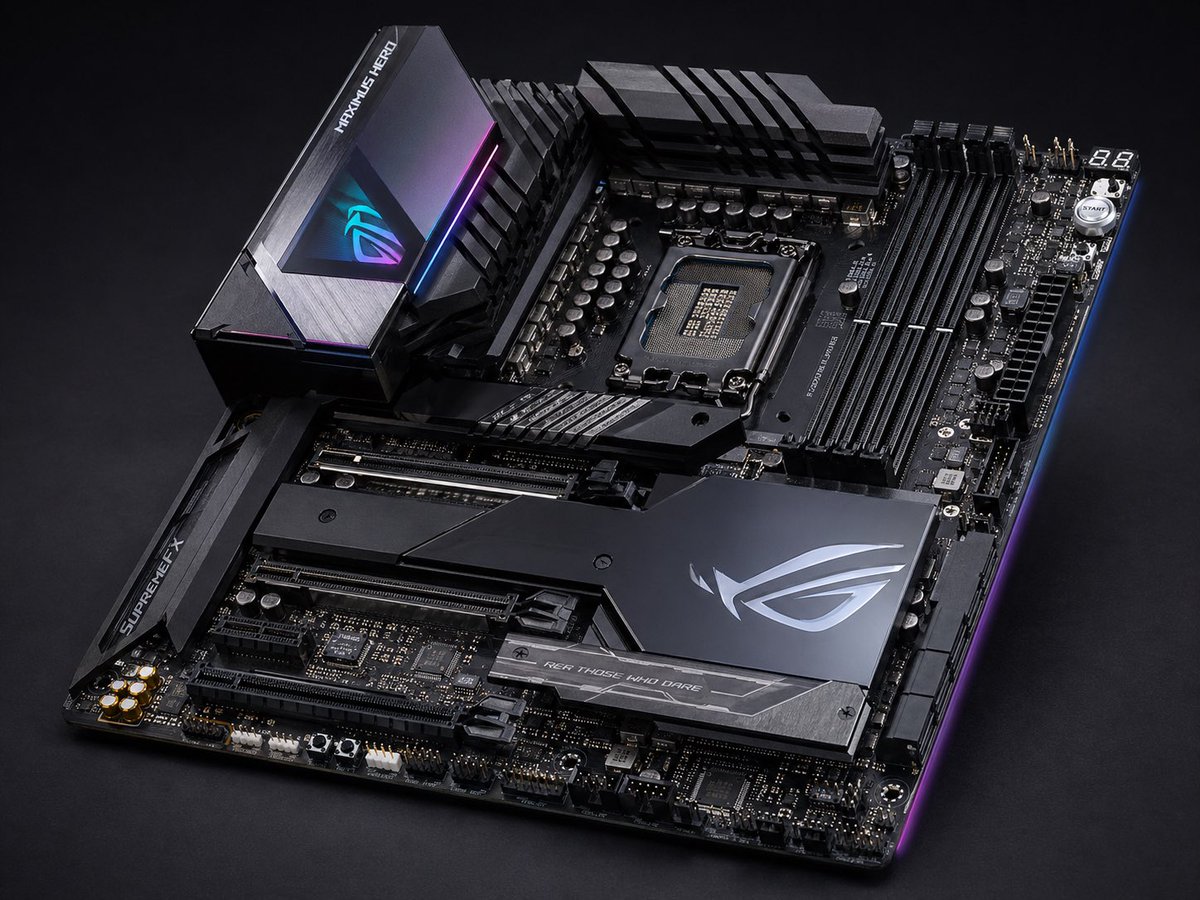
Premium Gaming Motherboard Studio Shot
This prompt generates a sleek, ultra-detailed studio product image of a high-end RGB gaming motherboard, ideal for tech advertising, hardware mockups, or product showcase visuals.
This is a GPT Image 2 prompt case for Product & Commercial. Use the copy-ready prompt below to generate similar visuals, and review Awesome GPT Image 2 Prompts attribution plus commercial-use rights before reuse.
Free 1K preview
Generate one preview image instantly, no sign-up required.
Prompt
Copy-ready prompt
A high-end enthusiast ATX gaming motherboard product photo on a dark studio background, shown in a three-quarter top-down perspective angled from the lower left toward the upper right. The board is mostly matte black and gunmetal with sharp geometric armor plates, brushed metal textures, and subtle RGB edge lighting in blue, purple, and magenta. Feature an exposed modern Intel-style CPU socket near the upper center, 4 black DIMM memory slots on the right, large VRM heatsinks across the top and upper left, and multiple reinforced PCIe slots in the lower half. Include 3 major branded heatsink zones: a tall rear I/O shroud at upper left with an illuminated RGB eye logo and the text "MAXIMUS HERO", a left-side chipset/slot armor piece with the text "SUPREMEFX", and a large angular lower-right chipset cover with a silver ROG-style emblem plus a lower strip that reads "FOR THOSE WHO DARE". Show detailed capacitors, headers, power connectors, debug display reading "88" at the top right, and a small round start button nearby. Ultra-detailed commercial product photography, crisp focus across the board, realistic reflections on metal, premium luxury tech aesthetic, dramatic low-key lighting, clean black seamless backdrop, no cables, no CPU, no RAM, no other objects.
Best for
- - Product & Commercial visual exploration
- - Image generation and reference-image edits
- - Reusable briefs that keep source attribution visible
Change these parts
- - Subject, product, character, or scene
- - Aspect ratio, camera, lighting, and background
- - Brand, text, color, and output constraints
Recommended model and settings
- - Model: gpt-image-2
- - Input mode: Text to Image
- - Aspect ratio: source
- - Commercial status: review original source
How to use this prompt
- 1. Copy the prompt and preserve its structure for the first test.
- 2. Replace the subject, context, and publishing channel.
- 3. Change one camera, lighting, or style variable per iteration.
- 4. Inspect the output, source, text, and rights before reuse.
Limitations, source, and reuse cautions
- - Generated output is an editable draft, not factual, legal, or rights evidence.
- - Review the linked source, people, brands, logos, text, and third-party media before commercial use.
More cases in this category
Prioritized by category, input mode compatibility, quality, and lower risk.




Reuse and source notes
Use this prompt safely after previewing the case.
- 1.Copy the prompt or open it directly in Dovoo with the generation button.
- 2.Adjust variables, aspect ratio, and reference images for your own use case.
- 3.Before publishing or paid usage, verify source rights, attribution requirements, and brand or likeness risks.
Can I use this prompt commercially?
Commercial-use status is allowed. Review the original source, license, brand constraints, and legal requirements before paid usage.
Where does this case come from?
This case is imported from Awesome GPT Image 2 Prompts; keep attribution visible and check the source URL before reuse.