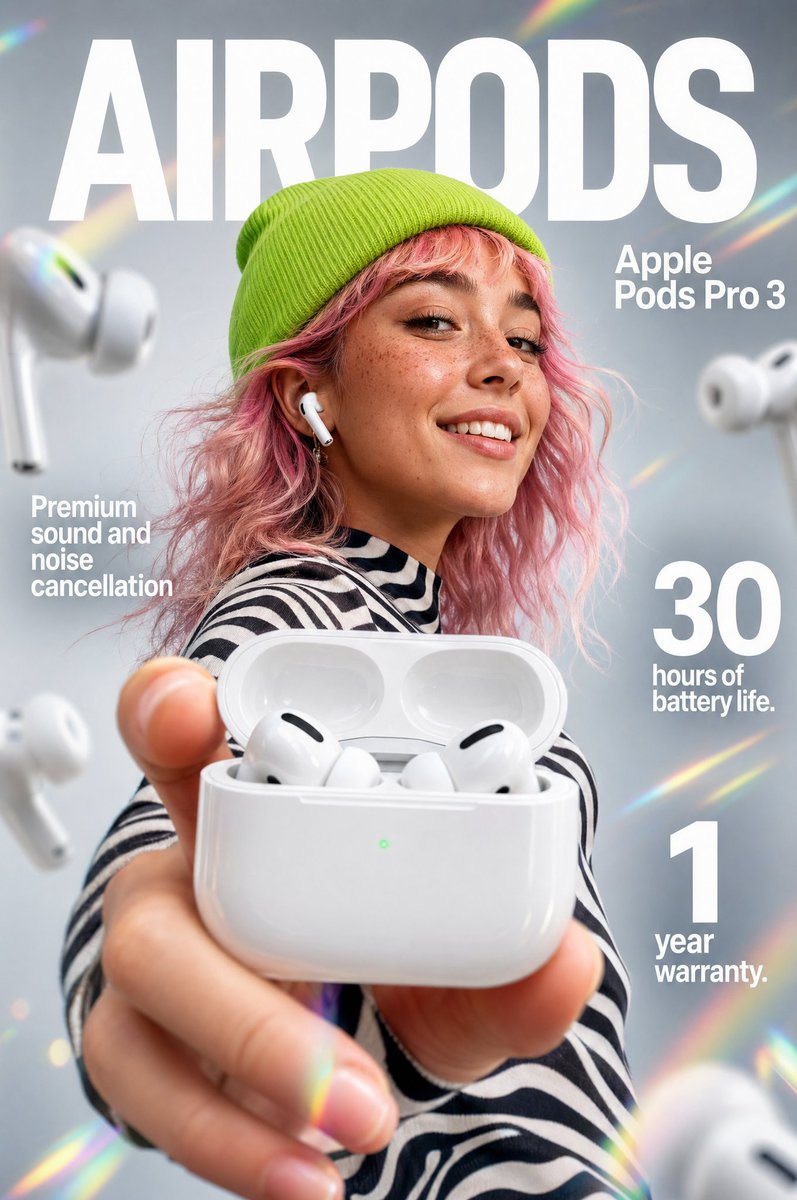
Premium Earbuds Ad Poster
This prompt generates a sleek photorealistic wireless-earbuds commercial poster for tech product ads, social campaigns, and magazine-style promotional visuals.
This is a GPT Image 2 prompt case for Product & Commercial. Use the copy-ready prompt below to generate similar visuals, and review Awesome GPT Image 2 Prompts attribution plus commercial-use rights before reuse.
Free 1K preview
Generate one preview image instantly, no sign-up required.
Prompt
Copy-ready prompt
Create a high-end futuristic product advertisement poster for {argument name="product name" default="Apple Pods Pro 3"}, styled like a premium tech magazine cover. Vertical composition, clean soft gray studio background with subtle rainbow prism lens flares around the edges. A fashionable young person is centered in the background, Show every face clearly with natural, detailed facial features, wearing a bright neon-lime knit beanie, wavy shoulder-length pink hair, and a black-and-white zebra striped top. One white wireless earbud is visible in their ear. In the extreme foreground, their hand is extended toward the camera holding an open glossy white charging case, shot with dramatic shallow depth of field and forced perspective so the case dominates the frame. Inside the open case, exactly 2 white earbuds are visible. Add 4 larger floating earbuds around the composition: 2 on the left side and 2 on the right side, softly blurred as if suspended in space. Place huge bold white sans-serif headline text across the top reading {argument name="headline text" default="AIRPODS"}. On the upper right, add smaller stacked white sans-serif product text reading {argument name="product label" default="Apple Pods Pro 3"}. On the left middle, add a white feature callout in stacked text: {argument name="left feature text" default="Premium sound and noise cancellation"}. On the right side, add 2 large numeric feature blocks in white: one reading "30" with smaller text "hours of battery life." beneath it, and one reading "1" with smaller text "year warranty." beneath it. Sleek commercial lighting, glossy reflections on the case, crisp product detail, modern fashion-tech aesthetic, polished Apple-inspired ad design, photorealistic, premium editorial finish.Prompt variables
Editable argument placeholders found in the prompt, with their default values.
Best for
- - Product & Commercial visual exploration
- - Image generation and reference-image edits
- - Reusable briefs that keep source attribution visible
Change these parts
- - Subject, product, character, or scene
- - Aspect ratio, camera, lighting, and background
- - Brand, text, color, and output constraints
Recommended model and settings
- - Model: gpt-image-2
- - Input mode: Text to Image
- - Aspect ratio: source
- - Commercial status: review original source
How to use this prompt
- 1. Copy the prompt and preserve its structure for the first test.
- 2. Replace the subject, context, and publishing channel.
- 3. Change one camera, lighting, or style variable per iteration.
- 4. Inspect the output, source, text, and rights before reuse.
Limitations, source, and reuse cautions
- - Generated output is an editable draft, not factual, legal, or rights evidence.
- - Review the linked source, people, brands, logos, text, and third-party media before commercial use.
More cases in this category
Prioritized by category, input mode compatibility, quality, and lower risk.






Reuse and source notes
Use this prompt safely after previewing the case.
- 1.Copy the prompt or open it directly in Dovoo with the generation button.
- 2.Adjust variables, aspect ratio, and reference images for your own use case.
- 3.Before publishing or paid usage, verify source rights, attribution requirements, and brand or likeness risks.
Can I use this prompt commercially?
Commercial-use status is allowed. Review the original source, license, brand constraints, and legal requirements before paid usage.
Where does this case come from?
This case is imported from Awesome GPT Image 2 Prompts; keep attribution visible and check the source URL before reuse.