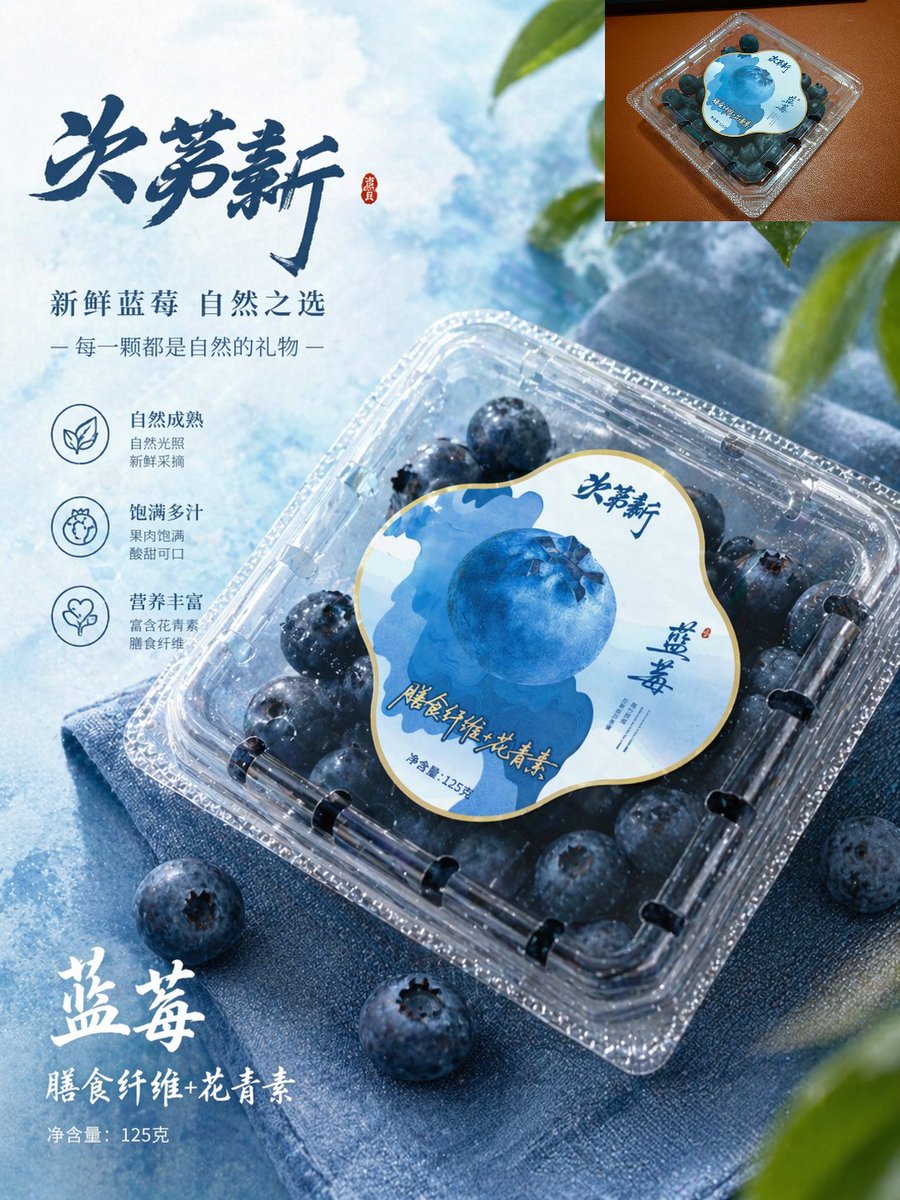
Premium Blueberry Product Poster
This prompt generates a polished Chinese-style e-commerce advertisement for packaged blueberries, suitable for supermarket branding, product listings, and promotional posters.
This is a GPT Image 2 prompt case for Product & Commercial. Use the copy-ready prompt below to generate similar visuals, and review Awesome GPT Image 2 Prompts attribution plus commercial-use rights before reuse.
Free 1K preview
Generate one preview image instantly, no sign-up required.
Prompt
Copy-ready prompt
A high-end blueberry e-commerce poster in a simple Chinese product advertising style. The main body showcases a box of blueberries in a transparent plastic container, placed diagonally from the lower left to the right on folded blue fabric, viewed from a slightly overhead angle. The packaging should be realistic and consistent: a transparent square container with rounded corners, filled with dark blue blueberries, topped with a large, irregularly shaped circular label in white, light blue, and dark blue, featuring a large blueberry illustration in the center and an elegant Chinese font brand name. The blueberries inside the box should appear larger, fuller, and fresher, covered with fine water droplets, while maintaining the realistic arrangement of the blueberries. The background is a translucent ice-blue desktop with a soft cloud texture, illuminated by cool-toned daylight, with a few blueberries scattered around the packaging. Add a small amount of blurred green leaves along the upper right and lower right edges to create a fresh and natural feel. Add 1 small embedded image in the upper right corner, showing a top view of the original product packaging on a warm brown surface, as a reference thumbnail. Design Chinese promotional typography on the left side, including a large, dark blue calligraphic title {argument name="headline text" default="Juemingxin"}, followed by two lines of smaller text: {argument name="subheadline text" default="Fresh Blueberries, Nature's Choice"} and {argument name="tagline text" default="Each one is a gift from nature"}. Below, arrange 3 functional icons and short Chinese descriptions vertically: a leaf icon representing natural maturity, a fruit icon representing juicy fullness, and a heart icon representing rich nutrition. Near the lower left corner, add prominent white brush-style Chinese text {argument name="product name" default="Blueberries"}, a second line of text {argument name="benefit text" default="Dietary Fiber + Anthocyanins"}, and a small line of text “Net content 125g”. Use a cool blue tone, presenting a crisp commercial lighting effect, with shiny highlights on the plastic lid, embodying high-end supermarket packaging aesthetics, rich in detail, and perfectly integrating realistic product photography with exquisite graphic design.Prompt variables
Editable argument placeholders found in the prompt, with their default values.
Best for
- - Product & Commercial visual exploration
- - Image generation and reference-image edits
- - Reusable briefs that keep source attribution visible
Change these parts
- - Subject, product, character, or scene
- - Aspect ratio, camera, lighting, and background
- - Brand, text, color, and output constraints
Recommended model and settings
- - Model: gpt-image-2
- - Input mode: Text to Image
- - Aspect ratio: source
- - Commercial status: review original source
How to use this prompt
- 1. Copy the prompt and preserve its structure for the first test.
- 2. Replace the subject, context, and publishing channel.
- 3. Change one camera, lighting, or style variable per iteration.
- 4. Inspect the output, source, text, and rights before reuse.
Limitations, source, and reuse cautions
- - Generated output is an editable draft, not factual, legal, or rights evidence.
- - Review the linked source, people, brands, logos, text, and third-party media before commercial use.
More cases in this category
Prioritized by category, input mode compatibility, quality, and lower risk.





Reuse and source notes
Use this prompt safely after previewing the case.
- 1.Copy the prompt or open it directly in Dovoo with the generation button.
- 2.Adjust variables, aspect ratio, and reference images for your own use case.
- 3.Before publishing or paid usage, verify source rights, attribution requirements, and brand or likeness risks.
Can I use this prompt commercially?
Commercial-use status is allowed. Review the original source, license, brand constraints, and legal requirements before paid usage.
Where does this case come from?
This case is imported from Awesome GPT Image 2 Prompts; keep attribution visible and check the source URL before reuse.