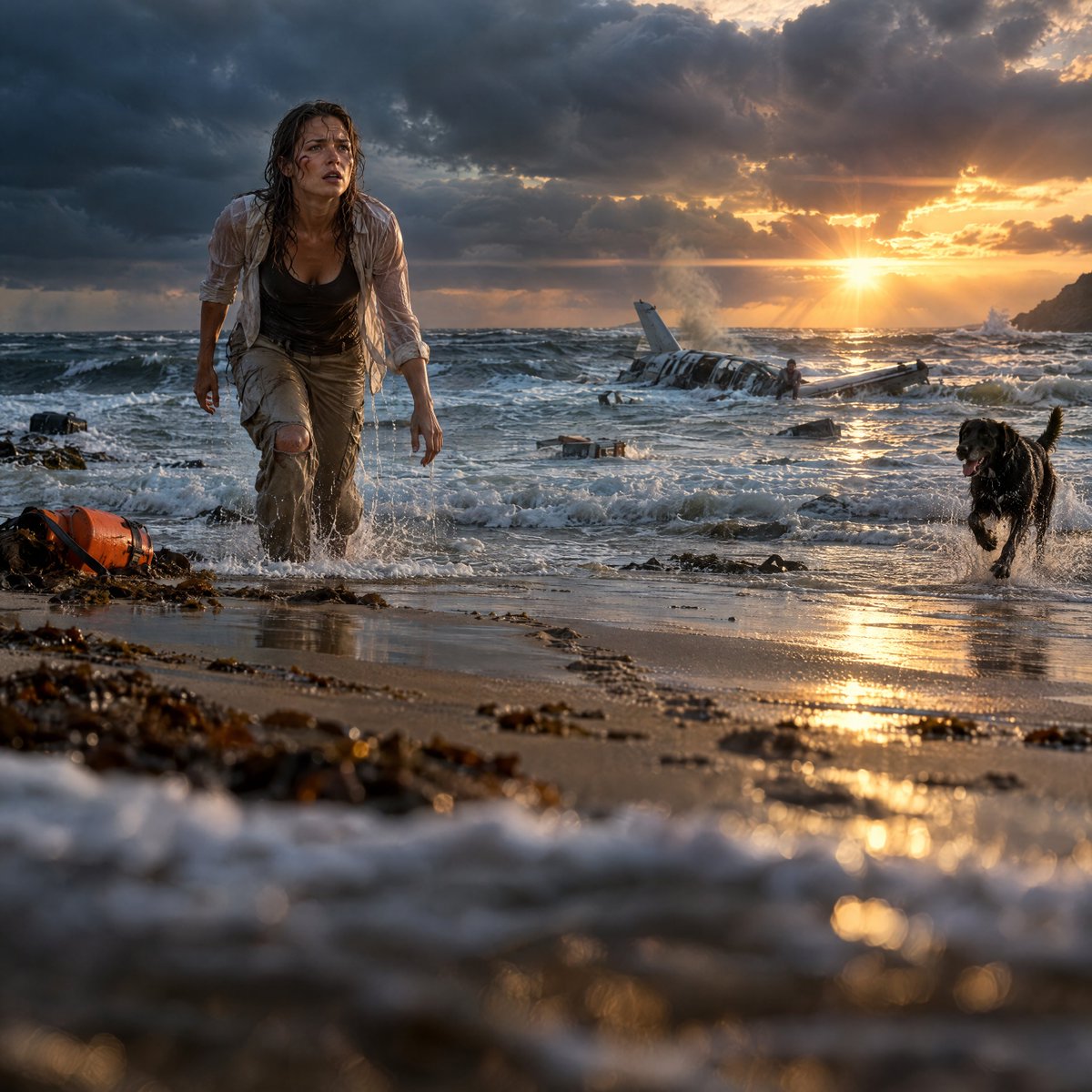
Cinematic Plane Crash Beach Survival
Transforms a reference survival scene into a more dramatic ultra-realistic cinematic beach thriller frame with intensified waves, sunset, wreckage, and action.
This is a GPT Image 2 prompt case for Landscape & Nature. Use the copy-ready prompt below to generate similar visuals, and review Awesome GPT Image 2 Prompts attribution plus commercial-use rights before reuse.
Free 1K preview
Generate one preview image instantly, no sign-up required.
Free text preview doesn’t preserve reference-image consistency.
Prompt
Copy-ready prompt
Using the provided reference image as the base, regenerate the same survival-thriller beach scene in a more ultra-realistic Hollywood cinematic style. Keep the core subjects and story intact: the soaked woman, the black dog, the wrecked small plane in the surf, the orange emergency flotation gear, stormy Atlantic beach, and golden sunset atmosphere. Increase the drama and immediacy: place the camera very low at water level with shallow depth of field, make the woman wade forward through foamy surf instead of walking on dry sand, and make the dog run through splashing water on the right. Intensify the ocean with rougher waves, more foam, wet reflective sand, scattered seaweed and debris, and stronger foreground blur. Move the plane wreck farther into the center background, partially submerged, smoking, with one survivor visible near it. Make the sky darker and more threatening on the left, with a brilliant low sun breaking through clouds on the right, strong lens flare, warm reflections on the wet beach, and a distant rocky headland at the far right. Preserve the woman’s distressed expression, wet clothing, and exhausted body language, but make the composition feel larger, more dynamic, and more cinematic, like a high-budget contemporary adventure thriller frame. No text, no watermark.
Best for
- - Landscape & Nature visual exploration
- - Image generation and reference-image edits
- - Reusable briefs that keep source attribution visible
Change these parts
- - Subject, product, character, or scene
- - Aspect ratio, camera, lighting, and background
- - Brand, text, color, and output constraints
Recommended model and settings
- - Model: gpt-image-2
- - Input mode: Image to Image
- - Aspect ratio: source
- - Commercial status: review original source
How to use this prompt
- 1. Copy the prompt and preserve its structure for the first test.
- 2. Replace the subject, context, and publishing channel.
- 3. Change one camera, lighting, or style variable per iteration.
- 4. Inspect the output, source, text, and rights before reuse.
Limitations, source, and reuse cautions
- - Generated output is an editable draft, not factual, legal, or rights evidence.
- - Review the linked source, people, brands, logos, text, and third-party media before commercial use.
More cases in this category
Prioritized by category, input mode compatibility, quality, and lower risk.

Reuse and source notes
Use this prompt safely after previewing the case.
- 1.Copy the prompt or open it directly in Dovoo with the generation button.
- 2.Adjust variables, aspect ratio, and reference images for your own use case.
- 3.Before publishing or paid usage, verify source rights, attribution requirements, and brand or likeness risks.
Can I use this prompt commercially?
Commercial-use status is allowed. Review the original source, license, brand constraints, and legal requirements before paid usage.
Where does this case come from?
This case is imported from Awesome GPT Image 2 Prompts; keep attribution visible and check the source URL before reuse.