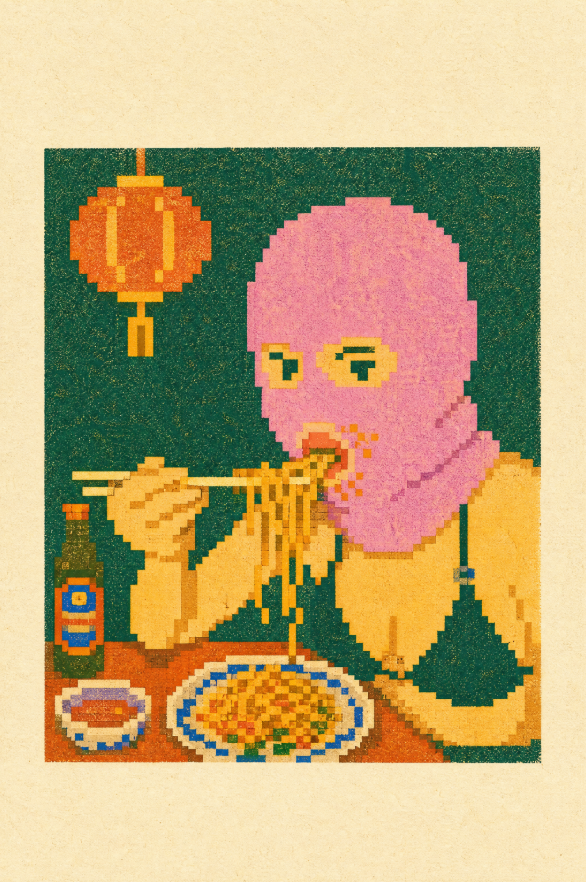
Pixel Risograph Noodle Diner
Generates a retro pixel-art risograph scene of a person eating noodles in a cozy restaurant setting.
This is a GPT Image 2 prompt case for Illustration & Art. Use the copy-ready prompt below to generate similar visuals, and review Awesome GPT Image 2 Prompts attribution plus commercial-use rights before reuse.
Free 1K preview
Generate one preview image instantly, no sign-up required.
Prompt
Copy-ready prompt
Create a retro pixel-art risograph print illustration on aged cream paper, showing {argument name="main subject" default="a person with a pink bob haircut eating noodles with chopsticks"} seated at a small restaurant table. Use a square dark teal-green background panel centered on the page with a thick cream paper margin, heavy risograph grain, imperfect ink registration, halftone speckles, and chunky low-resolution pixel edges. The subject should occupy the right half of the panel, wearing a {argument name="outfit" default="yellow sweater with a dark green pinafore-style apron"}; Show every face clearly with natural, detailed facial features. Show the person holding exactly 2 chopsticks horizontally in the left hand and lifting exactly 1 strand cluster of noodles with the right hand. Include exactly 4 main table items: 1 dark green bottle with a red-and-blue label on the left, 1 small oval side plate with a red rectangular food item, 1 large oval plate of yellow-orange fried noodles with blue rim details and small green garnish, and 1 brown tabletop spanning the bottom. Include exactly 1 hanging orange paper lantern in the upper left, attached by 1 thin vertical cord, with yellow highlights and pixelated edges. Use a limited risograph palette of deep teal, mustard yellow, orange, coral pink, red, cobalt blue, dark green, and cream paper, with no photorealism, no smooth vector lines, no extra people, no readable text, and no watermark.Prompt variables
Editable argument placeholders found in the prompt, with their default values.
Best for
- - Illustration & Art visual exploration
- - Image generation and reference-image edits
- - Reusable briefs that keep source attribution visible
Change these parts
- - Subject, product, character, or scene
- - Aspect ratio, camera, lighting, and background
- - Brand, text, color, and output constraints
Recommended model and settings
- - Model: gpt-image-2
- - Input mode: Text to Image
- - Aspect ratio: source
- - Commercial status: review original source
How to use this prompt
- 1. Copy the prompt and preserve its structure for the first test.
- 2. Replace the subject, context, and publishing channel.
- 3. Change one camera, lighting, or style variable per iteration.
- 4. Inspect the output, source, text, and rights before reuse.
Limitations, source, and reuse cautions
- - Generated output is an editable draft, not factual, legal, or rights evidence.
- - Review the linked source, people, brands, logos, text, and third-party media before commercial use.
More cases in this category
Prioritized by category, input mode compatibility, quality, and lower risk.



Reuse and source notes
Use this prompt safely after previewing the case.
- 1.Copy the prompt or open it directly in Dovoo with the generation button.
- 2.Adjust variables, aspect ratio, and reference images for your own use case.
- 3.Before publishing or paid usage, verify source rights, attribution requirements, and brand or likeness risks.
Can I use this prompt commercially?
Commercial-use status is allowed. Review the original source, license, brand constraints, and legal requirements before paid usage.
Where does this case come from?
This case is imported from Awesome GPT Image 2 Prompts; keep attribution visible and check the source URL before reuse.