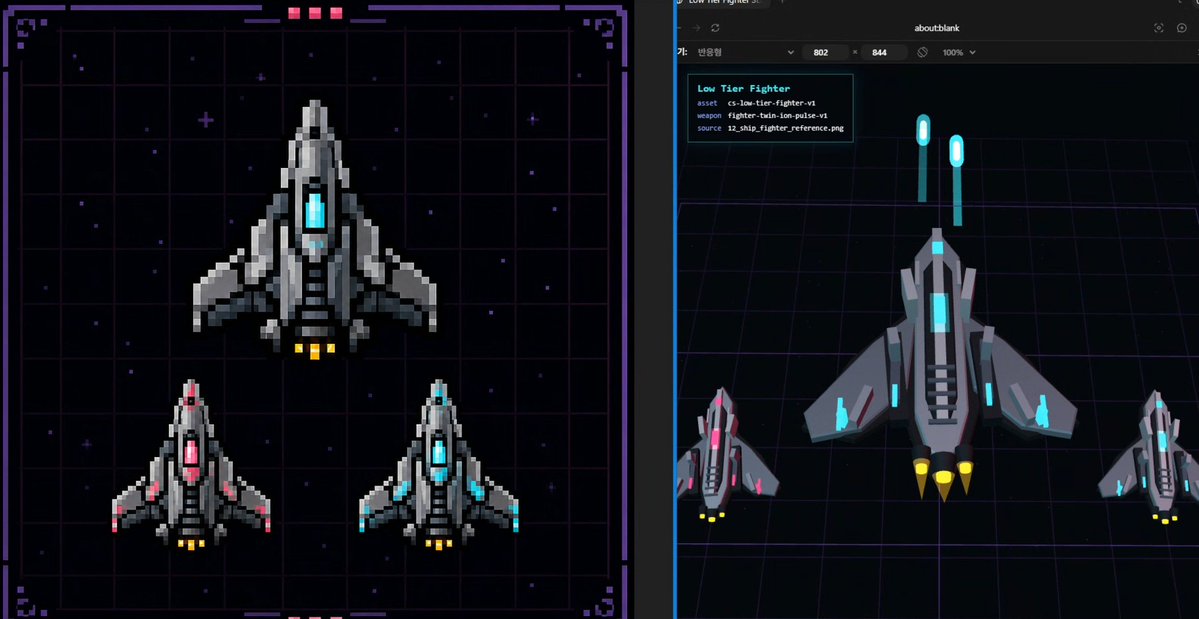
Pixel Fighter to 3D Asset Sheet
Generates a split-screen sci-fi spaceship design reference comparing pixel-art fighter sprites with a Three.js-style low-poly 3D conversion preview.
This is a GPT Image 2 prompt case for Anime & Game. Use the copy-ready prompt below to generate similar visuals, and review Awesome GPT Image 2 Prompts attribution plus commercial-use rights before reuse.
Free 1K preview
Generate one preview image instantly, no sign-up required.
Prompt
Copy-ready prompt
{
  "type": "split-screen sci-fi asset design benchmark sheet",
  "style": "dark cyberpunk game-development concept art, combining pixel-art reference and Three.js low-poly conversion preview",
  "canvas": "wide 16:9 image divided vertically into two equal panels with a thin dark separator",
  "subject": {
    "asset name": "{argument name=\"asset name\" default=\"Low Tier Fighter\"}",
    "vehicle": "small futuristic fighter spaceship",
    "faction style": "industrial gray armor plates with angular wings and cyan energy cores",
    "primary material": "matte and metallic dark gray hull with lighter gray highlights",
    "accent color": "{argument name=\"accent color\" default=\"cyan\"}",
    "thruster color": "{argument name=\"thruster color\" default=\"yellow\"}",
    "overall form": "top-down triangular spacecraft with pointed nose, central glowing cockpit/core, layered side fins, vented black intake slats, two to three rear engine nozzles"
  },
  "left panel": {
    "title": "pixel-art 2D reference board",
    "position": "left half",
    "background": "nearly black starfield over a purple neon grid, framed by a decorative sci-fi HUD border with corner brackets, small magenta status blocks at the top and bottom",
    "rendering": "crisp pixel art with chunky square pixels, no anti-aliasing, retro arcade spaceship sprite design",
    "count": 3,
    "ships": [
      {
        "description": "one large main fighter centered in the upper half, gray hull, cyan glowing center core, yellow engine flames"
      },
      {
        "description": "one smaller fighter in the lower left, same silhouette, pink/magenta glowing center and pink wing accents, yellow engine flames"
      },
      {
        "description": "one smaller fighter in the lower right, same silhouette, cyan glowing center and cyan wing accents, yellow engine flames"
      }
    ]
  },
  "right panel": {
    "title": "3D conversion preview",
    "position": "right half",
    "background": "dark browser-like viewport with an about:blank address area at the top, black 3D scene floor with purple perspective grid lines, subtle blue vertical viewport edge",
    "rendering": "low-poly Three.js style 3D models, flat shaded geometry, clean beveled silhouettes, top/front angled view",
    "count": 3,
    "ships": [
      {
        "description": "one large low-poly fighter centered, gray angular hull, cyan cockpit and cyan side lights, black vent strips, three yellow cone thrusters"
      },
      {
        "description": "one smaller magenta-accent fighter at bottom left, matching the 2D reference variant"
      },
      {
        "description": "one smaller cyan-accent fighter at bottom right, matching the 2D reference variant"
      }
    ],
    "floating elements": {
      "count": 2,
      "description": "two vertical cyan glowing capsule markers hovering above the main ship like reference beacons or UI measurement markers"
    },
    "info card": {
      "position": "upper left of right panel",
      "lines count": 4,
      "text lines": [
        "Low Tier Fighter",
        "asset  cs-low-tier-fighter-v1",
        "weapon  fighter-train-ion-pulse-v1",
        "source  12_ship_fighter_reference.png"
      ]
    }
  },
  "composition": "show a direct visual comparison between the 2D pixel sprite design on the left and its simplified 3D asset interpretation on the right, suitable as a design baseline for game asset production",
  "quality": "sharp, high contrast, neon sci-fi palette, readable UI text, balanced spacing, professional game dev presentation"
}
Prompt variables
Editable argument placeholders found in the prompt, with their default values.
Best for
- - Anime & Game visual exploration
- - Image generation and reference-image edits
- - Reusable briefs that keep source attribution visible
Change these parts
- - Subject, product, character, or scene
- - Aspect ratio, camera, lighting, and background
- - Brand, text, color, and output constraints
Recommended model and settings
- - Model: gpt-image-2
- - Input mode: Text to Image
- - Aspect ratio: source
- - Commercial status: review original source
How to use this prompt
- 1. Copy the prompt and preserve its structure for the first test.
- 2. Replace the subject, context, and publishing channel.
- 3. Change one camera, lighting, or style variable per iteration.
- 4. Inspect the output, source, text, and rights before reuse.
Limitations, source, and reuse cautions
- - Generated output is an editable draft, not factual, legal, or rights evidence.
- - Review the linked source, people, brands, logos, text, and third-party media before commercial use.
More cases in this category
Prioritized by category, input mode compatibility, quality, and lower risk.

Reuse and source notes
Use this prompt safely after previewing the case.
- 1.Copy the prompt or open it directly in Dovoo with the generation button.
- 2.Adjust variables, aspect ratio, and reference images for your own use case.
- 3.Before publishing or paid usage, verify source rights, attribution requirements, and brand or likeness risks.
Can I use this prompt commercially?
Commercial-use status is allowed. Review the original source, license, brand constraints, and legal requirements before paid usage.
Where does this case come from?
This case is imported from Awesome GPT Image 2 Prompts; keep attribution visible and check the source URL before reuse.