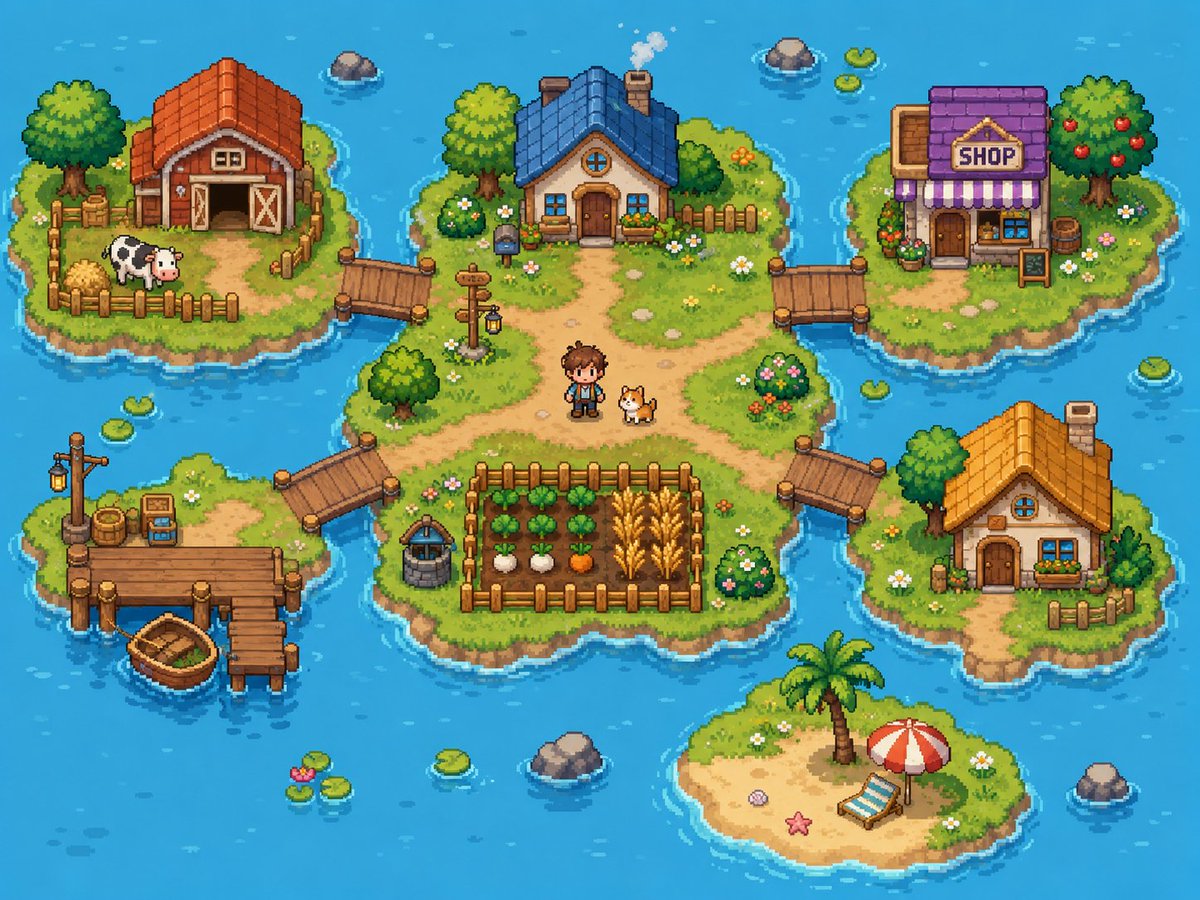
Cozy Pixel Farm Island Village
Generates a colorful top-down pixel-art farming village spread across connected ocean islands for game concept art or cozy worldbuilding.
This is a GPT Image 2 prompt case for Anime & Game. Use the copy-ready prompt below to generate similar visuals, and review Awesome GPT Image 2 Prompts attribution plus commercial-use rights before reuse.
Free 1K preview
Generate one preview image instantly, no sign-up required.
Prompt
Copy-ready prompt
Goal: Create a bright cozy pixel-art farming village map on small islands in a blue ocean, like a top-down/isometric 16-bit life-sim game screenshot.

Canvas: 4:3 landscape image, about 1024×768, crisp pixel art with no UI overlay, no borders, no watermark. Use a vibrant turquoise ocean background with gentle wave highlights, ripples around shores, scattered lily pads, and small rocks.

Layout: Show exactly 6 grassy/sandy islands connected by wooden bridges and docks. The largest central island sits in the middle and contains the main house, paths, a fenced crop field, a well, a signpost, a human character, and a dog. Four smaller grassy islands surround it at upper left, upper right, lower left, and right. One small sandy beach island sits near the bottom center.

Island count and contents:
1. Central island: irregular grassy island with dirt paths forming a crossroad. Place a cozy blue-roof cottage near the top center with a chimney puffing smoke, round attic window, wooden front door, flower boxes, shrubs, and a short fence behind it. Put a small pixel farmer character named {argument name="character name" default="young farmer"} standing slightly below center beside a corgi-like dog. Add a fenced crop plot at the lower center with exactly 4 crop rows: leafy green vegetables, white turnips, orange carrots, and golden wheat. Add a stone well to the left of the crop plot, a wooden signpost with a hanging lantern near the left-center path, bushes with flowers, small stones, and daisies.
2. Upper-left island: red-roof barn with open double doors, hay bales, a fenced pen, and exactly 1 black-and-white cow. Include a large leafy tree, crates, flowers, and a wooden bridge connecting to the central island.
3. Upper-right island: village shop with purple roof, striped purple-and-white awning, front door, window display, flower pots, barrel, and a freestanding signboard. The sign above the awning must read {argument name="shop sign text" default="SHOP"}. Include a fruit tree with red apples and a bridge connecting to the central island.
4. Lower-left island: fishing dock island with a wooden pier, a lamppost, barrels, crates, small tackle box/sign, and exactly 1 small wooden rowboat tied near the dock. Connect this island to the central island with a wooden bridge.
5. Right island: small orange-roof cottage with chimney, round attic window, front door, blue window, flower box, small fence, trees, flowers, and a wooden bridge connecting to the central island.
6. Bottom-center island: tiny sandy beach with a palm tree, red-and-white beach umbrella, blue-striped lounge chair, starfish, shell, and grass around the edges; it is not connected by a bridge.

Discrete element counts to preserve: exactly 6 islands, exactly 4 bridges connecting to the central island, exactly 4 buildings total (barn, blue-roof cottage, purple shop, orange-roof cottage), exactly 1 human character, exactly 2 animals (1 cow and 1 dog), exactly 1 rowboat, exactly 1 crop field with 4 visible crop types, exactly 1 well, exactly 1 signpost lantern, exactly 1 beach umbrella, exactly 1 lounge chair, exactly 1 palm tree.

Visual style: Cute high-detail pixel art, top-down three-quarter perspective, warm sunny daylight, saturated colors, soft shadows, chunky readable shapes, detailed grass texture, tiny flowers, rounded shoreline outlines, and animated-game charm. Use {argument name="water color" default="bright turquoise blue"} for the surrounding ocean, {argument name="main roof color" default="blue"} for the central cottage roof, and {argument name="overall mood" default="cheerful cozy farming adventure"} as the emotional tone.

Constraints: Keep the whole scene visible as a single map-like composition. Do not add interface buttons, text besides the shop sign, extra characters, extra animals, vehicles, modern objects, or photorealism.
Prompt variables
Editable argument placeholders found in the prompt, with their default values.
Best for
- - Anime & Game visual exploration
- - Image generation and reference-image edits
- - Reusable briefs that keep source attribution visible
Change these parts
- - Subject, product, character, or scene
- - Aspect ratio, camera, lighting, and background
- - Brand, text, color, and output constraints
Recommended model and settings
- - Model: gpt-image-2
- - Input mode: Text to Image
- - Aspect ratio: source
- - Commercial status: review original source
How to use this prompt
- 1. Copy the prompt and preserve its structure for the first test.
- 2. Replace the subject, context, and publishing channel.
- 3. Change one camera, lighting, or style variable per iteration.
- 4. Inspect the output, source, text, and rights before reuse.
Limitations, source, and reuse cautions
- - Generated output is an editable draft, not factual, legal, or rights evidence.
- - Review the linked source, people, brands, logos, text, and third-party media before commercial use.
More cases in this category
Prioritized by category, input mode compatibility, quality, and lower risk.

Reuse and source notes
Use this prompt safely after previewing the case.
- 1.Copy the prompt or open it directly in Dovoo with the generation button.
- 2.Adjust variables, aspect ratio, and reference images for your own use case.
- 3.Before publishing or paid usage, verify source rights, attribution requirements, and brand or likeness risks.
Can I use this prompt commercially?
Commercial-use status is allowed. Review the original source, license, brand constraints, and legal requirements before paid usage.
Where does this case come from?
This case is imported from Awesome GPT Image 2 Prompts; keep attribution visible and check the source URL before reuse.