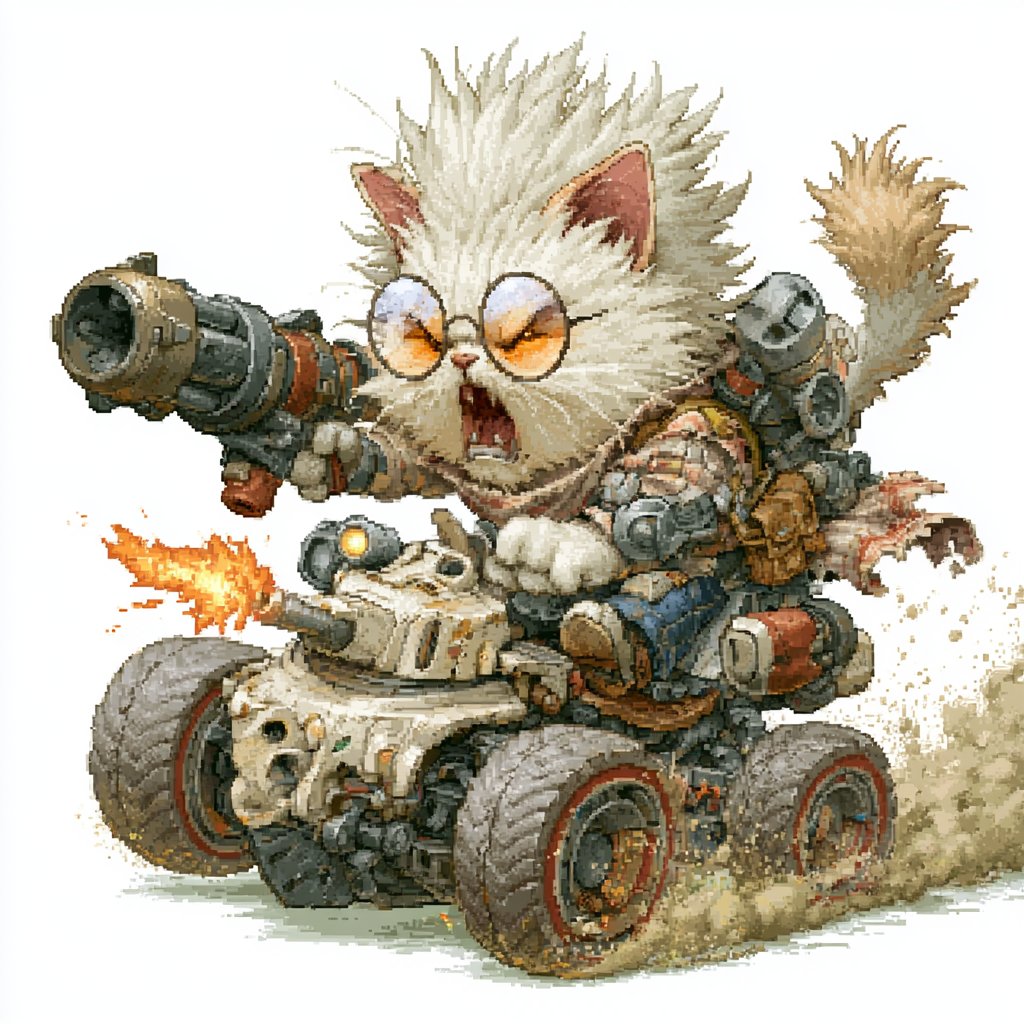
Pixel Art Battle Cat Buggy
Generates a detailed retro game-style illustration of a snarling armored cat riding a weaponized off-road combat buggy.
This is a GPT Image 2 prompt case for Anime & Game. Use the copy-ready prompt below to generate similar visuals, and review Awesome GPT Image 2 Prompts attribution plus commercial-use rights before reuse.
Free 1K preview
Generate one preview image instantly, no sign-up required.
Prompt
Copy-ready prompt
Create a highly detailed pixel-art style illustration of a ferocious fluffy {argument name="character species" default="white battle cat"} riding a compact armored combat buggy, isolated on a clean white background. The cat is centered and oversized compared with the vehicle, with wild spiky cream-white fur, upright pink ears, a raised fluffy tail, round orange-tinted goggles, an open snarling mouth with visible fangs, and white paws gripping the vehicle. The vehicle is a squat off-road mini tank buggy with exactly 4 large chunky wheels, red rim accents, dusty tires, a beige armored front body, exposed pipes, bolts, vents, skull-like front detailing, and heavy mechanical parts. Add exactly 3 main weapon systems: a huge cannon mounted over the cat’s left shoulder pointing toward the viewer, a smaller front turret on the vehicle firing a bright orange muzzle flash to the left, and a gray multi-barrel rocket pod mounted behind the cat on the right. Include additional steampunk/mecha details such as straps, brass fittings, small tanks, cables, rivets, and worn metal panels. Show the buggy speeding forward with beige dust clouds and gritty debris trailing behind the rear wheels, plus small sparks and exhaust effects. Use a nostalgic 16-bit/32-bit game sprite aesthetic with visible pixel dithering, crisp jagged edges, limited warm earthy colors, high contrast, and intricate hand-pixelled texture; no text, no logo, no frame, no background scenery.Prompt variables
Editable argument placeholders found in the prompt, with their default values.
Best for
- - Anime & Game visual exploration
- - Image generation and reference-image edits
- - Reusable briefs that keep source attribution visible
Change these parts
- - Subject, product, character, or scene
- - Aspect ratio, camera, lighting, and background
- - Brand, text, color, and output constraints
Recommended model and settings
- - Model: gpt-image-2
- - Input mode: Text to Image
- - Aspect ratio: source
- - Commercial status: review original source
How to use this prompt
- 1. Copy the prompt and preserve its structure for the first test.
- 2. Replace the subject, context, and publishing channel.
- 3. Change one camera, lighting, or style variable per iteration.
- 4. Inspect the output, source, text, and rights before reuse.
Limitations, source, and reuse cautions
- - Generated output is an editable draft, not factual, legal, or rights evidence.
- - Review the linked source, people, brands, logos, text, and third-party media before commercial use.
More cases in this category
Prioritized by category, input mode compatibility, quality, and lower risk.

Reuse and source notes
Use this prompt safely after previewing the case.
- 1.Copy the prompt or open it directly in Dovoo with the generation button.
- 2.Adjust variables, aspect ratio, and reference images for your own use case.
- 3.Before publishing or paid usage, verify source rights, attribution requirements, and brand or likeness risks.
Can I use this prompt commercially?
Commercial-use status is allowed. Review the original source, license, brand constraints, and legal requirements before paid usage.
Where does this case come from?
This case is imported from Awesome GPT Image 2 Prompts; keep attribution visible and check the source URL before reuse.