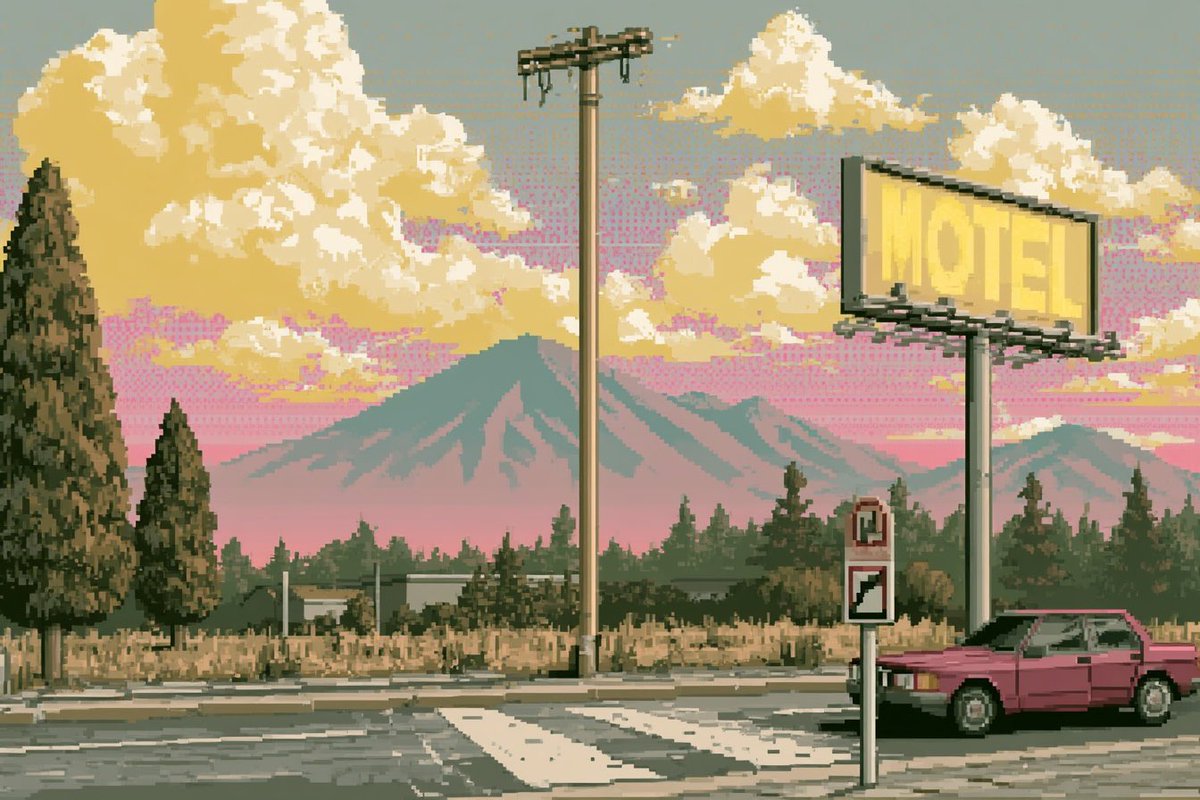
Pixel Art Retrowave Motel Roadside
Generates a crisp 16-bit style roadside motel landscape with vaporwave colors, mountains, a billboard, and a retro car for nostalgic game-background art.
This is a GPT Image 2 prompt case for Anime & Game. Use the copy-ready prompt below to generate similar visuals, and review Awesome GPT Image 2 Prompts attribution plus commercial-use rights before reuse.
Free 1K preview
Generate one preview image instantly, no sign-up required.
Prompt
Copy-ready prompt
Create a 3:2 wide pixel-art landscape in the style of a 1990s console JRPG background: a quiet roadside motel scene at sunset with crisp hand-placed pixels, a limited muted palette, no anti-aliasing, and subtle retrowave / vaporwave atmosphere. The foreground shows an asphalt road intersection with a white zebra crossing and cracked pavement. On the right, place a pink retro two-door sedan parked beside the road, partly cropped by the edge of the frame. Above it, a large elevated yellow billboard sign reads {argument name="billboard text" default="MOTEL"} in faint block letters, mounted on a tall pole with dark pixel shadows and braces. Near the center, include one tall utility pole with a small transformer crossbar and dangling wires. Add two small roadside signs in front of the car: one narrow sign with a red symbol and one diagonal stripe sign. The midground contains dry beige grass, low motel-like buildings, fences, and a dense row of dark evergreen trees. The left side has exactly 2 prominent pine trees: one very tall tree at the far left edge and one smaller tree just right of it. The background features layered blue-green mountains with a large central peak, set under a pink-to-gray sky filled with large golden cream clouds. Use {argument name="sky color mood" default="pink sunset with gray haze"}, {argument name="car color" default="magenta pink"}, {argument name="overall palette" default="muted pastel vaporwave yellows, pinks, sage greens, and dusty grays"}, and {argument name="art style" default="crisp 16-bit pixel art, retro JRPG game sprite background, lo-fi synthwave, no anti-aliasing"}. Keep the image purely environmental with no people, no modern UI, no watermark, and maintain visible square pixel structure throughout.Prompt variables
Editable argument placeholders found in the prompt, with their default values.
Best for
- - Anime & Game visual exploration
- - Image generation and reference-image edits
- - Reusable briefs that keep source attribution visible
Change these parts
- - Subject, product, character, or scene
- - Aspect ratio, camera, lighting, and background
- - Brand, text, color, and output constraints
Recommended model and settings
- - Model: gpt-image-2
- - Input mode: Text to Image
- - Aspect ratio: source
- - Commercial status: review original source
How to use this prompt
- 1. Copy the prompt and preserve its structure for the first test.
- 2. Replace the subject, context, and publishing channel.
- 3. Change one camera, lighting, or style variable per iteration.
- 4. Inspect the output, source, text, and rights before reuse.
Limitations, source, and reuse cautions
- - Generated output is an editable draft, not factual, legal, or rights evidence.
- - Review the linked source, people, brands, logos, text, and third-party media before commercial use.
More cases in this category
Prioritized by category, input mode compatibility, quality, and lower risk.
Reuse and source notes
Use this prompt safely after previewing the case.
- 1.Copy the prompt or open it directly in Dovoo with the generation button.
- 2.Adjust variables, aspect ratio, and reference images for your own use case.
- 3.Before publishing or paid usage, verify source rights, attribution requirements, and brand or likeness risks.
Can I use this prompt commercially?
Commercial-use status is allowed. Review the original source, license, brand constraints, and legal requirements before paid usage.
Where does this case come from?
This case is imported from Awesome GPT Image 2 Prompts; keep attribution visible and check the source URL before reuse.