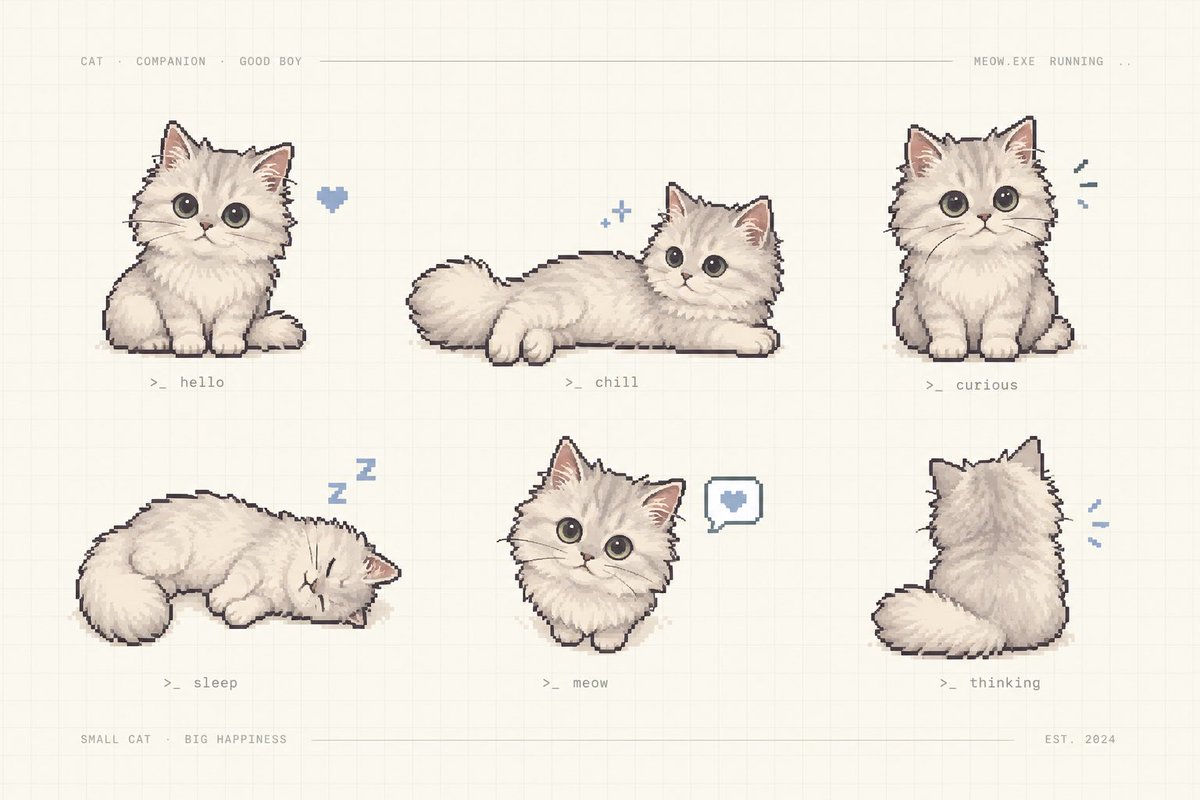
Pixel Art Kitten Companion Sheet
A cozy retro pixel-art sheet showing six labeled poses of a fluffy cream kitten companion for game assets or character design.
This is a GPT Image 2 prompt case for Anime & Game. Use the copy-ready prompt below to generate similar visuals, and review Awesome GPT Image 2 Prompts attribution plus commercial-use rights before reuse.
Free 1K preview
Generate one preview image instantly, no sign-up required.
Prompt
Copy-ready prompt
Goal: Create a charming pixel-art character sheet of {argument name="character name" default="a fluffy cream kitten"} as a cute virtual companion, arranged like a retro game asset preview.

Canvas: Horizontal 3:2 composition on a warm off-white paper background with a faint square grid, subtle beige texture, and thin pale divider lines near the top and bottom.

Layout: Show exactly 6 separate kitten sprites in a clean 3-column by 2-row grid with generous spacing. Add tiny monospaced gray interface text across the top: “CAT · COMPANION · GOOD BOY” on the left, a long thin horizontal line through the middle, and “MEOW.EXE RUNNING ..” on the right. Add bottom text: “SMALL CAT · BIG HAPPINESS” on the left, a thin line across the center, and “EST. 2024” on the right.

Subject details: The kitten is extremely fluffy, cream-white with soft beige shading, round oversized dark gray eyes, small pink nose, triangular ears with pink inner ears, tiny paws, plush tail, and a slightly dark pixel-outline. Use hand-painted pixel art with soft dithering and a cozy pastel palette.

Exactly 6 poses and labels:
1. Top left: sitting front-facing kitten, a small blue pixel heart floating to its right, label “>_ hello”.
2. Top center: kitten lying stretched horizontally with tail to the left and head to the right, two tiny blue sparkle icons above, label “>_ chill”.
3. Top right: sitting front-facing kitten looking curious, three small blue motion marks to its right, label “>_ curious”.
4. Bottom left: kitten curled up sleeping with eyes closed, blue “Z z” symbols above, label “>_ sleep”.
5. Bottom center: small front-facing kitten bust/sitting pose with a speech bubble containing a blue heart to its right, label “>_ meow”.
6. Bottom right: kitten viewed from behind, fluffy tail curled left, small blue motion marks to its right, label “>_ thinking”.

Visual style: Nostalgic cozy pixel art, soft hand-drawn shading, muted cream, gray, beige, pink, and powder-blue accents; all labels in tiny gray terminal-style monospaced text.

Constraints: Keep the image uncluttered, no photorealism, no extra kittens, no additional labels beyond the specified interface text and six pose labels, no watermark.
Prompt variables
Editable argument placeholders found in the prompt, with their default values.
Best for
- - Anime & Game visual exploration
- - Image generation and reference-image edits
- - Reusable briefs that keep source attribution visible
Change these parts
- - Subject, product, character, or scene
- - Aspect ratio, camera, lighting, and background
- - Brand, text, color, and output constraints
Recommended model and settings
- - Model: gpt-image-2
- - Input mode: Text to Image
- - Aspect ratio: source
- - Commercial status: review original source
How to use this prompt
- 1. Copy the prompt and preserve its structure for the first test.
- 2. Replace the subject, context, and publishing channel.
- 3. Change one camera, lighting, or style variable per iteration.
- 4. Inspect the output, source, text, and rights before reuse.
Limitations, source, and reuse cautions
- - Generated output is an editable draft, not factual, legal, or rights evidence.
- - Review the linked source, people, brands, logos, text, and third-party media before commercial use.
More cases in this category
Prioritized by category, input mode compatibility, quality, and lower risk.

Reuse and source notes
Use this prompt safely after previewing the case.
- 1.Copy the prompt or open it directly in Dovoo with the generation button.
- 2.Adjust variables, aspect ratio, and reference images for your own use case.
- 3.Before publishing or paid usage, verify source rights, attribution requirements, and brand or likeness risks.
Can I use this prompt commercially?
Commercial-use status is allowed. Review the original source, license, brand constraints, and legal requirements before paid usage.
Where does this case come from?
This case is imported from Awesome GPT Image 2 Prompts; keep attribution visible and check the source URL before reuse.