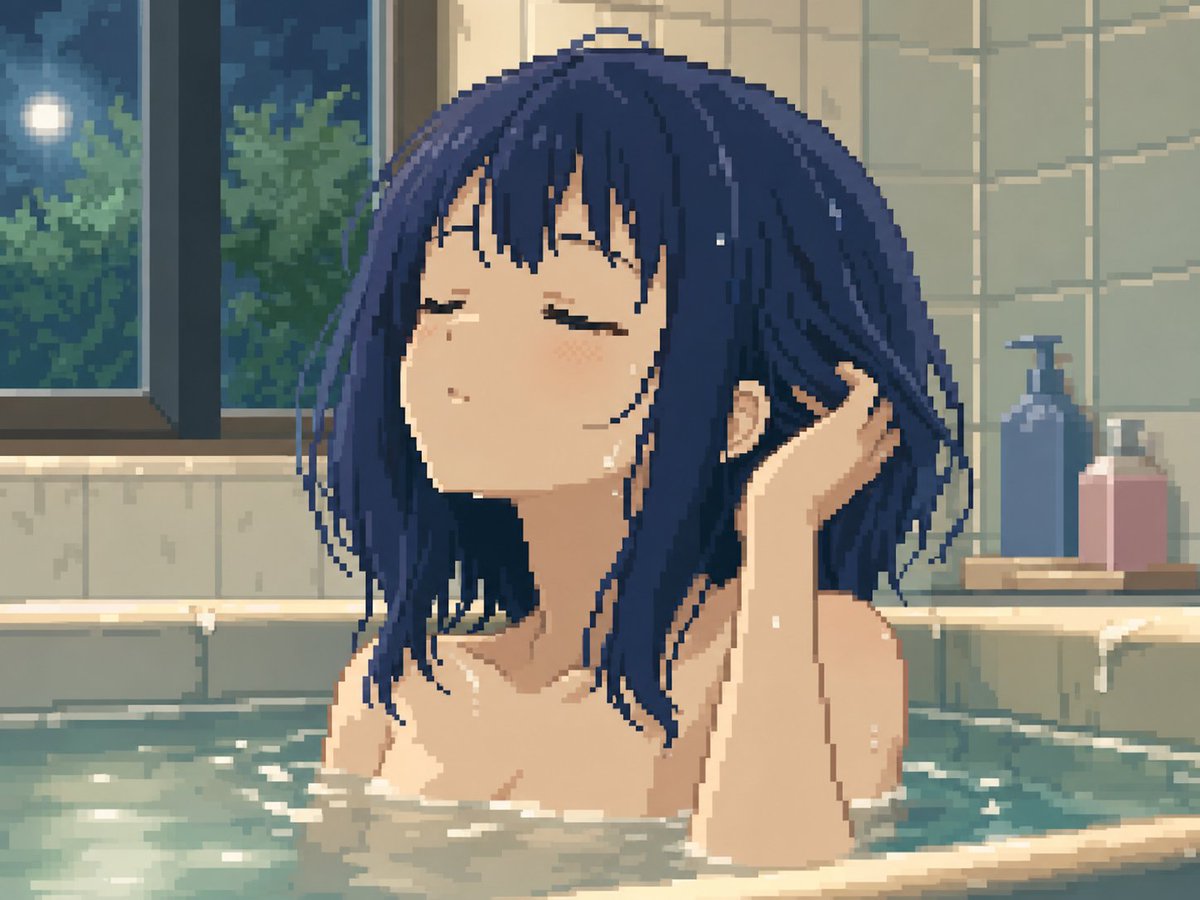
Moonlit Pixel Art Bath Scene
A tasteful pixel-art anime bathroom scene showing a serene woman relaxing in a moonlit bath, useful for nostalgic game-style illustration.
This is a GPT Image 2 prompt case for Anime & Game. Use the copy-ready prompt below to generate similar visuals, and review Awesome GPT Image 2 Prompts attribution plus commercial-use rights before reuse.
Free 1K preview
Generate one preview image instantly, no sign-up required.
Prompt
Copy-ready prompt
Create a high-quality pixel art anime illustration of a young adult woman relaxing in a bathtub at night. She has {argument name="hair color" default="deep navy blue"} shoulder-length messy bob hair with long strands and bangs, wet and slightly clinging to her face and neck. Her eyes are closed, expression calm and peaceful, head tilted slightly upward, with one hand raised behind her head as if combing through her wet hair. Show only her head, neck, bare shoulders, upper arms, and the top of her chest mostly hidden by opaque bathwater and foam; keep the scene tasteful and non-explicit. The setting is a cozy tiled bathroom with pale green-gray wall tiles, a large dark-framed window on the left showing a moonlit night sky and leafy trees outside, and soft reflections on the glass. On the right rear ledge, include exactly 2 bath bottles: one tall blue pump bottle and one shorter pink rectangular bottle. The bathtub water is muted turquoise with shimmering highlights, small ripples, and scattered white foam along the edges. Use a nostalgic 16-bit / 32-bit pixel art style with visible square pixels, soft dithering, limited color palette, gentle bloom lighting, and warm indoor bathroom illumination mixed with cool blue moonlight. Composition is a close-up bust view centered on the woman, 4:3 landscape canvas, intimate tranquil atmosphere, no text, no watermark, no extra characters.Prompt variables
Editable argument placeholders found in the prompt, with their default values.
Best for
- - Anime & Game visual exploration
- - Image generation and reference-image edits
- - Reusable briefs that keep source attribution visible
Change these parts
- - Subject, product, character, or scene
- - Aspect ratio, camera, lighting, and background
- - Brand, text, color, and output constraints
Recommended model and settings
- - Model: gpt-image-2
- - Input mode: Text to Image
- - Aspect ratio: source
- - Commercial status: review original source
How to use this prompt
- 1. Copy the prompt and preserve its structure for the first test.
- 2. Replace the subject, context, and publishing channel.
- 3. Change one camera, lighting, or style variable per iteration.
- 4. Inspect the output, source, text, and rights before reuse.
Limitations, source, and reuse cautions
- - Generated output is an editable draft, not factual, legal, or rights evidence.
- - Review the linked source, people, brands, logos, text, and third-party media before commercial use.
More cases in this category
Prioritized by category, input mode compatibility, quality, and lower risk.

Reuse and source notes
Use this prompt safely after previewing the case.
- 1.Copy the prompt or open it directly in Dovoo with the generation button.
- 2.Adjust variables, aspect ratio, and reference images for your own use case.
- 3.Before publishing or paid usage, verify source rights, attribution requirements, and brand or likeness risks.
Can I use this prompt commercially?
Commercial-use status is allowed. Review the original source, license, brand constraints, and legal requirements before paid usage.
Where does this case come from?
This case is imported from Awesome GPT Image 2 Prompts; keep attribution visible and check the source URL before reuse.