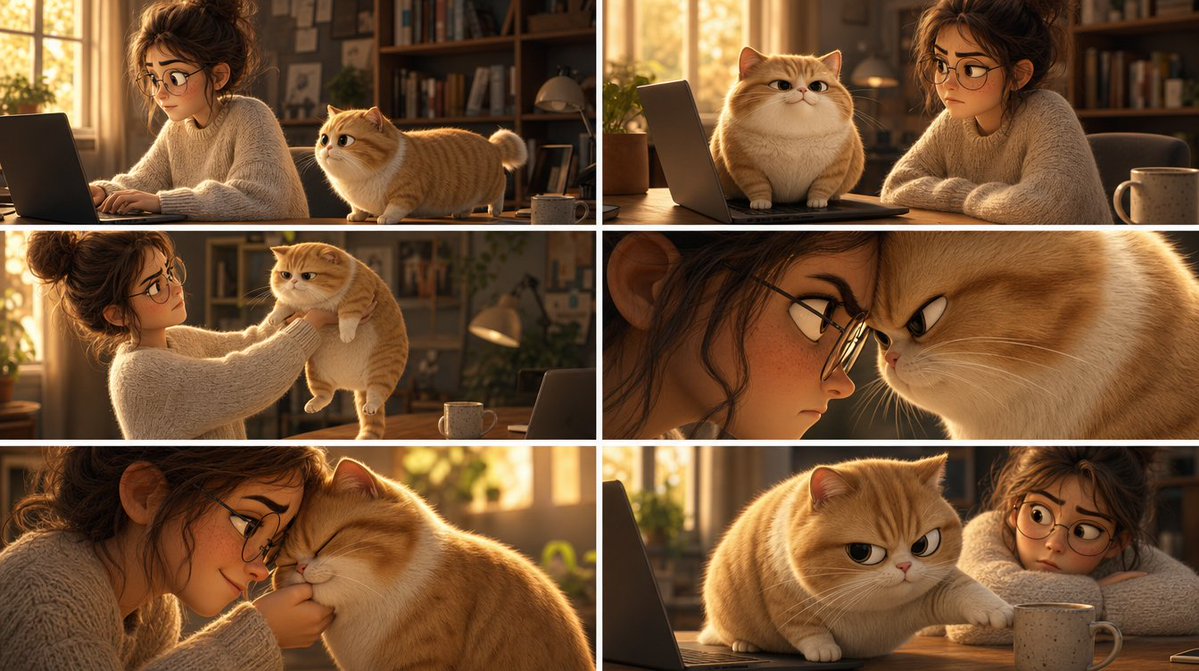
Pixar Cat Desk Storyboard
Creates a six-panel Pixar-style storyboard of a woman and a chubby orange cat causing cozy desk chaos in a sunlit home office.
This is a GPT Image 2 prompt case for Illustration & Art. Use the copy-ready prompt below to generate similar visuals, and review Awesome GPT Image 2 Prompts attribution plus commercial-use rights before reuse.
Free 1K preview
Generate one preview image instantly, no sign-up required.
Prompt
Copy-ready prompt
Goal: Create a Pixar-style 3D animated storyboard sheet as one single image showing a warm, cozy home-office scene with a young woman and a chubby golden-orange cat interacting around a desk.

Canvas: Wide cinematic storyboard sheet, approximately 16:9, divided into a clean 2x3 grid of exactly six separate film-still panels. Use thin white gutters between panels, no captions, no dialogue, no logos, no watermark.

Visual style: High-quality Pixar-like 3D animation, soft rounded character design, expressive cat face, realistic fluffy fur, warm golden-hour lighting, shallow depth of field, cinematic composition, cozy domestic atmosphere, polished animation stills. The room has sunlit windows, bookshelves, plants, desk lamp, laptop, wooden desk, and a ceramic mug.

Characters: A young adult woman with messy curly brown hair in a loose bun, wearing an oversized cream cable-knit sweater; her face is intentionally covered by a flat brown rectangular privacy block in every panel where it appears. A plump golden-orange British Shorthair-like cat with cream muzzle and belly, short legs, round face, folded-looking rounded ears, fluffy tail, and slightly grumpy but cute expressions. The cat is {argument name="cat color" default="golden-orange"}; the woman wears {argument name="sweater color" default="cream"}.

Panel layout, exactly six panels:
1. Top-left panel: Side view of the woman typing on a laptop at the desk while the orange cat stands on the desktop beside her, looking toward her hands. Warm sunlight from the window behind them; bookshelves in the background.
2. Top-right panel: The cat sits proudly on the laptop keyboard in front of the screen, facing forward with a smug expression, while the woman sits beside it with arms folded or resting on the table. A mug is visible on the right.
3. Middle-left panel: The woman gently lifts the cat under its front legs from the desk, holding it up at chest height. The cat dangles with a displeased, stiff posture; laptop and mug remain on the desk.
4. Middle-right panel: Tight dramatic close-up composition split by the panel crop: the woman’s face area at left is mostly hidden by a large vertical brown privacy rectangle, and the cat’s face fills the right side in an extreme close-up with narrowed eyes and an annoyed expression.
5. Bottom-left panel: Intimate close-up of the woman leaning close to the cat, nuzzling or kissing its head while holding it near her face. The cat’s eyes are closed, soft and resigned; the woman’s face is again obscured by a brown rectangular block.
6. Bottom-right panel: The cat is back on the wooden desk near the laptop and mug, reaching one paw toward or onto the mug with a mischievous grumpy stare, while the woman is partly visible at the right with her face covered by a brown rectangle.

Privacy blocks: Show every face clearly with natural, detailed facial features: one on the woman’s face in each of the six panels, including one large vertical block in the middle-right close-up panel. Match the warm brown tone of the scene, with no blur or pixelation.

Constraints: Maintain the exact 2x3 storyboard grid and exactly six panels; keep all panels visually consistent as the same room, same woman, same cat, same desk setup. Do not add text, speech bubbles, extra panels, subtitles, or visible brand marks. Make the cat’s expression the main emotional focus, progressing from curious to smug, annoyed, affectionate, and mischievous.
Prompt variables
Editable argument placeholders found in the prompt, with their default values.
Best for
- - Illustration & Art visual exploration
- - Image generation and reference-image edits
- - Reusable briefs that keep source attribution visible
Change these parts
- - Subject, product, character, or scene
- - Aspect ratio, camera, lighting, and background
- - Brand, text, color, and output constraints
Recommended model and settings
- - Model: gpt-image-2
- - Input mode: Text to Image
- - Aspect ratio: source
- - Commercial status: review original source
How to use this prompt
- 1. Copy the prompt and preserve its structure for the first test.
- 2. Replace the subject, context, and publishing channel.
- 3. Change one camera, lighting, or style variable per iteration.
- 4. Inspect the output, source, text, and rights before reuse.
Limitations, source, and reuse cautions
- - Generated output is an editable draft, not factual, legal, or rights evidence.
- - Review the linked source, people, brands, logos, text, and third-party media before commercial use.
More cases in this category
Prioritized by category, input mode compatibility, quality, and lower risk.


Reuse and source notes
Use this prompt safely after previewing the case.
- 1.Copy the prompt or open it directly in Dovoo with the generation button.
- 2.Adjust variables, aspect ratio, and reference images for your own use case.
- 3.Before publishing or paid usage, verify source rights, attribution requirements, and brand or likeness risks.
Can I use this prompt commercially?
Commercial-use status is allowed. Review the original source, license, brand constraints, and legal requirements before paid usage.
Where does this case come from?
This case is imported from Awesome GPT Image 2 Prompts; keep attribution visible and check the source URL before reuse.