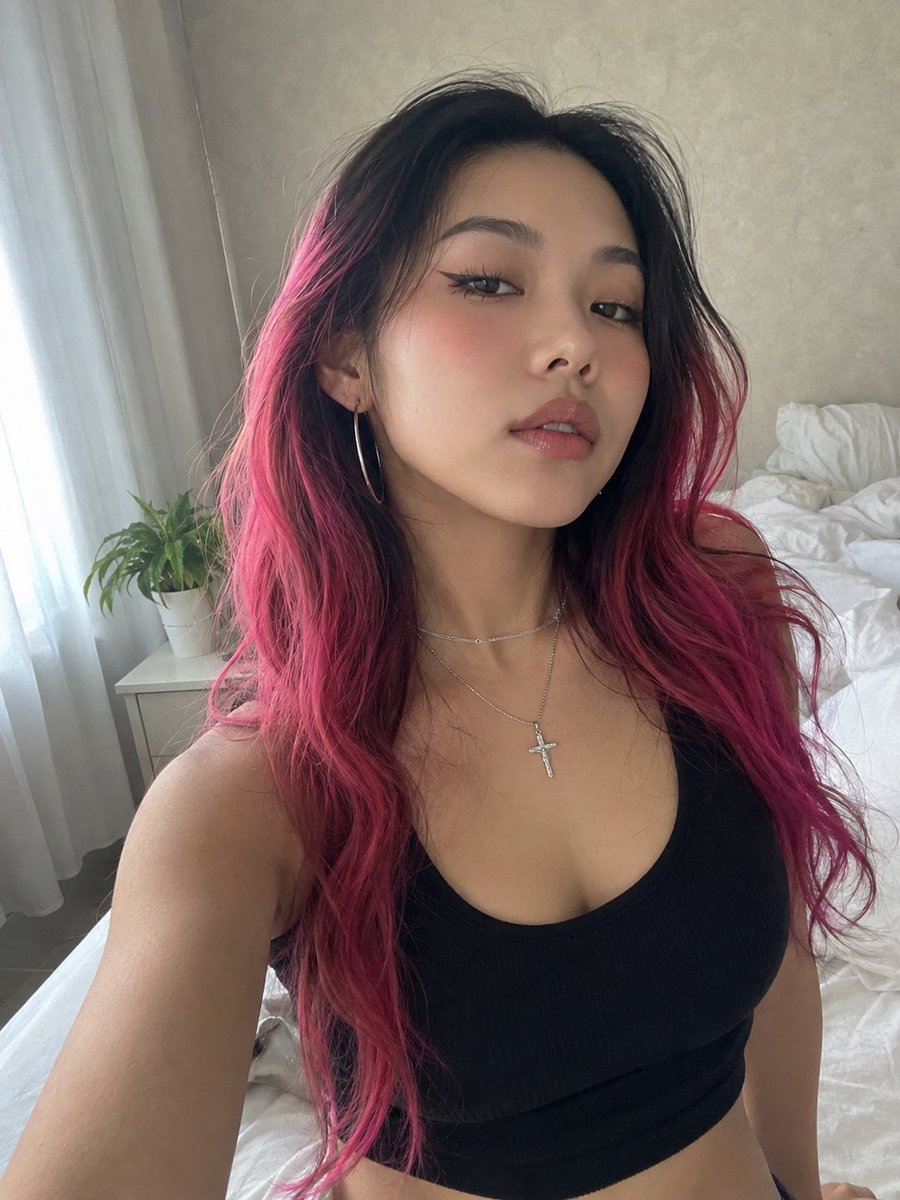
Pink Hair Bedroom Selfie Photography
A prompt for a raw, unretouched smartphone selfie featuring a woman with two-tone pink and black hair in a bedroom setting.
This is a GPT Image 2 prompt case for Portrait & Character. Use the copy-ready prompt below to generate similar visuals, and review Awesome GPT Image 2 Prompts attribution plus commercial-use rights before reuse.
Free 1K preview
Generate one preview image instantly, no sign-up required.
Prompt
Copy-ready prompt
RAW 8K smartphone photograph with an authentic, unretouched front-camera look. Preserve the subject’s identity with exact facial geometry and recognizable features—no beautification, face reshaping, skin smoothing, or artificial perfection. Natural pores, fine lines, subtle skin variations, tiny imperfections, realistic hair texture, and mild smartphone sensor grain should remain visible. Avoid any CGI, overly polished, or synthetic appearance.

A young woman takes an intimate close-range bedroom selfie from a slightly upward camera angle. Her face is angled subtly upward, with her head turned just enough to create a natural candid composition. She maintains relaxed eye contact with the lens and a calm, self-assured expression.

Her hair is long, thick, and naturally wavy, featuring a {argument name="hair color" default="dramatic two-tone color treatment: deep black at the roots gradually blending into vivid hot-pink and magenta"}. The hair is parted near the center, with loose strands, flyaways, uneven texture, and individually defined strands for believable realism.

Makeup features a modern East Asian-inspired Douyin aesthetic: luminous but naturally textured skin, softly sculpted brows with a feathered finish, elongated black winged eyeliner, delicate separated lower lashes, a subtle rosy flush across the upper cheeks, and glossy pink gradient lips with realistic moisture.

She wears a {argument name="outfit" default="fitted black ribbed cotton scoop-neck crop tank"}, paired with a fine layered silver necklace and a small crystal-detailed crucifix pendant. Large minimalist silver hoop earrings complete the look.

The {argument name="setting" default="setting is an ordinary lived-in bedroom"} rather than a studio. Soft daylight enters from a nearby window on the left through translucent white curtains. A small white bedside table holds a leafy green houseplant. Behind her are naturally rumpled white bedsheets and a softly textured pale neutral wall.

Use realistic smartphone front-camera optics, slight natural lens distortion, imperfect exposure, subtle grain, authentic depth separation, and believable daylight. The final image should feel like an unedited personal selfie captured spontaneously on a real phone—raw, intimate, imperfect, and completely photorealistic.
Prompt variables
Editable argument placeholders found in the prompt, with their default values.
Best for
- - Portrait & Character visual exploration
- - Image generation and reference-image edits
- - Reusable briefs that keep source attribution visible
Change these parts
- - Subject, product, character, or scene
- - Aspect ratio, camera, lighting, and background
- - Brand, text, color, and output constraints
Recommended model and settings
- - Model: gpt-image-2
- - Input mode: Text to Image
- - Aspect ratio: source
- - Commercial status: review original source
How to use this prompt
- 1. Copy the prompt and preserve its structure for the first test.
- 2. Replace the subject, context, and publishing channel.
- 3. Change one camera, lighting, or style variable per iteration.
- 4. Inspect the output, source, text, and rights before reuse.
Limitations, source, and reuse cautions
- - Generated output is an editable draft, not factual, legal, or rights evidence.
- - Review the linked source, people, brands, logos, text, and third-party media before commercial use.
More cases in this category
Prioritized by category, input mode compatibility, quality, and lower risk.

Reuse and source notes
Use this prompt safely after previewing the case.
- 1.Copy the prompt or open it directly in Dovoo with the generation button.
- 2.Adjust variables, aspect ratio, and reference images for your own use case.
- 3.Before publishing or paid usage, verify source rights, attribution requirements, and brand or likeness risks.
Can I use this prompt commercially?
Commercial-use status is allowed. Review the original source, license, brand constraints, and legal requirements before paid usage.
Where does this case come from?
This case is imported from Awesome GPT Image 2 Prompts; keep attribution visible and check the source URL before reuse.