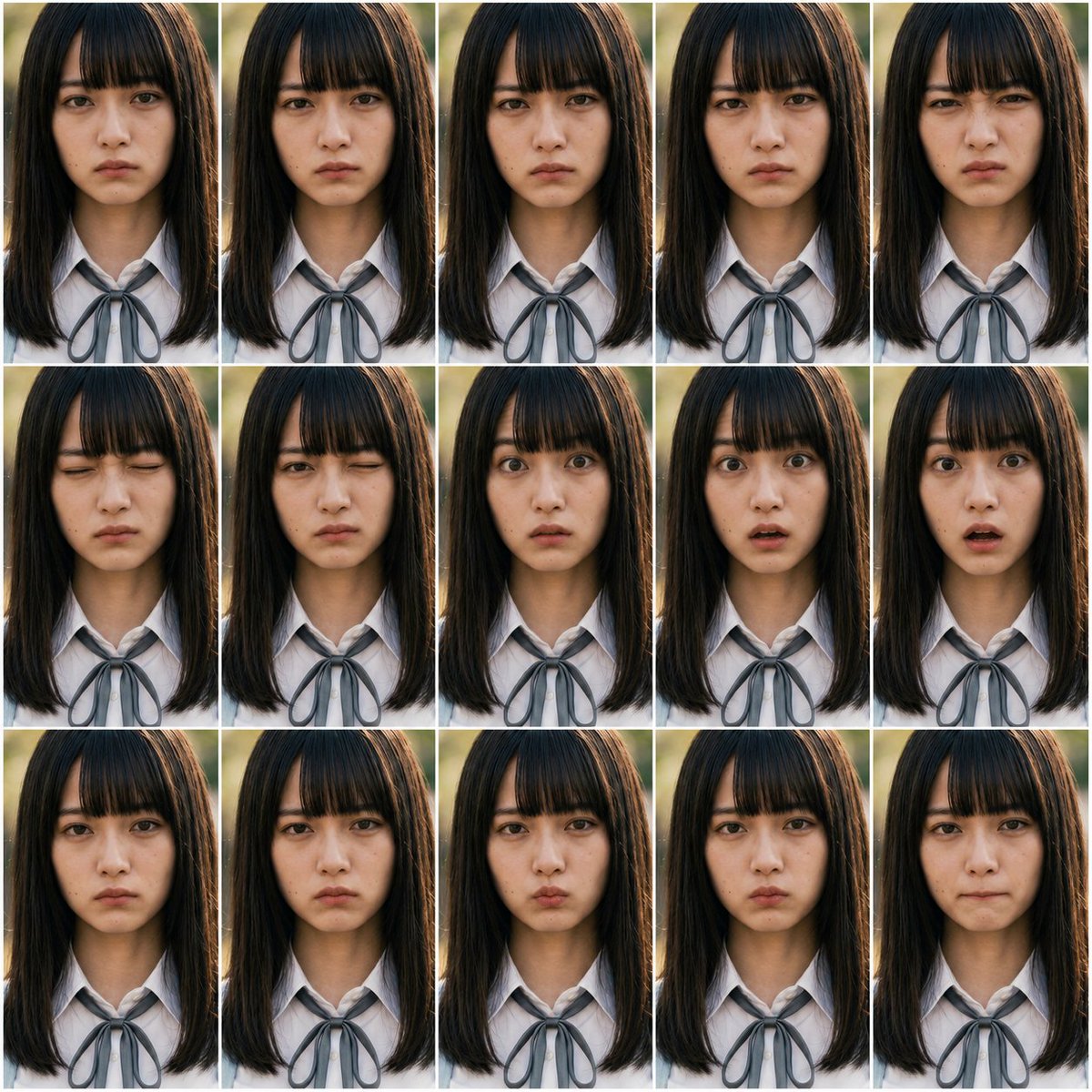
Photoreal FACS Expression Grid
Creates a 15-panel photorealistic portrait grid for testing controlled facial-expression changes using FACS action units.
This is a GPT Image 2 prompt case for 人像角色. Use the copy-ready prompt below to generate similar visuals, and review Awesome GPT Image 2 Prompts attribution plus commercial-use rights before reuse.
Need the full prompt set? Use the 人像角色 topic hub for more related examples, or open the GPT Image 2 prompt library for the full example index, reusable structures, and source attribution.
Prompt
Copy-ready prompt
以 REFERENCE_0 和 REFERENCE_1 作为 FACS 动作单元指南,创建一个照片级真实感的表情控制测试表,而非插画图表。生成 {argument name="grid layout" default="3 行 5 列的 15 个画面网格"},在每个画面中重复展示相同的 {argument name="subject" default="写实的年轻女学生"},并保持构图、光照、发型和 {argument name="outfit" default="带有灰色丝带领结的白色校服衬衫"} 完全一致。基于这些 {argument name="FACS action units" default="AU1, AU2, AU4, AU5, AU6, AU7, AU9, AU10, AU12, AU15, AU17, AU20, AU23, AU24, AU25"},为每个画面应用不同的细微面部表情变化,同时保持人物身份的一致性,并将变化限制在面部区域。使用从上胸部到头顶的正面特写肖像剪裁,采用自然户外背光、浅景深效果,并在画面之间添加细白分割线。不要包含任何图表标题、标签、AU 文字、说明或日语文本。Prompt variables
Editable argument placeholders found in the prompt, with their default values.
Variable
grid layout
Default
A grid of 15 images arranged in 3 rows and 5 columns.
Variable
subject
Default
Realistic young female students
Variable
outfit
Default
White school uniform shirt with a gray silk bow tie
Variable
FACS action units
Default
AU1, AU2, AU4, AU5, AU6, AU7, AU9, AU10, AU12, AU15, AU17, AU20, AU23, AU24, AU25
More cases in this category
Prioritized by category, input mode compatibility, quality, and lower risk.

Reuse and source notes
Use this prompt safely after previewing the case.
- 1.Copy the prompt or open it directly in Dovoo with the generation button.
- 2.Adjust variables, aspect ratio, and reference images for your own use case.
- 3.Before publishing or paid usage, verify source rights, attribution requirements, and brand or likeness risks.
Can I use this prompt commercially?
Commercial-use status is allowed. Review the original source, license, brand constraints, and legal requirements before paid usage.
Where does this case come from?
This case is imported from Awesome GPT Image 2 Prompts; keep attribution visible and check the source URL before reuse.