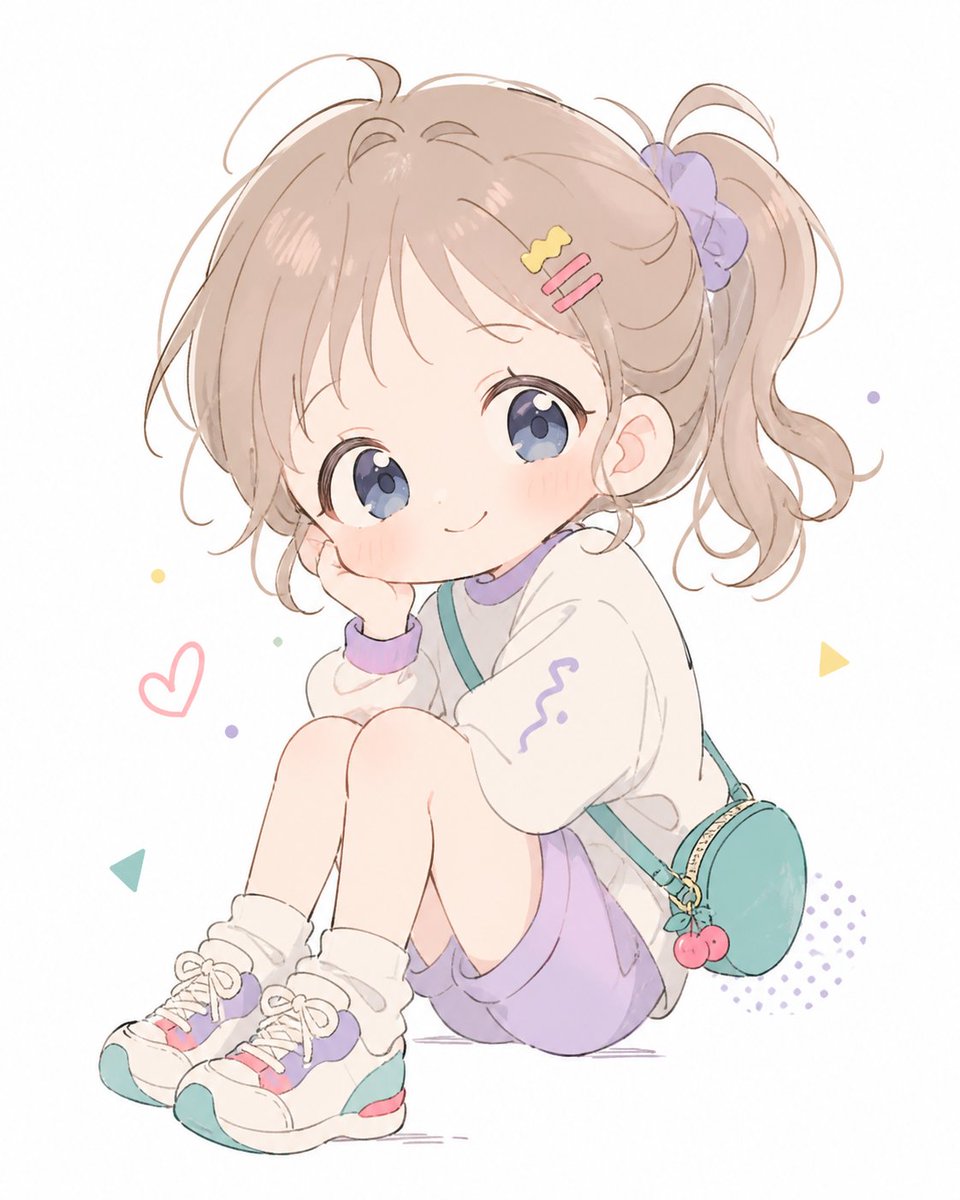
Pastel Chibi Girl Sitting Portrait
This prompt generates a soft pastel anime-style portrait of an adorable seated little girl, ideal for cute character art, avatar illustrations, and kawaii social media visuals.
This is a GPT Image 2 prompt case for Portrait & Character. Use the copy-ready prompt below to generate similar visuals, and review Awesome GPT Image 2 Prompts attribution plus commercial-use rights before reuse.
Free 1K preview
Generate one preview image instantly, no sign-up required.
Prompt
Copy-ready prompt
A soft pastel anime illustration of a cute little girl sitting on the floor in a compact pose with both knees pulled up, one cheek resting on one hand, smiling gently at the viewer. She has {argument name="hair color" default="light ash beige brown"} hair styled in a high side ponytail tied with a lavender scrunchie, with wispy bangs and loose curls framing her face. She has very large glossy {argument name="eye color" default="blue-violet"} eyes, a tiny nose, rosy cheeks, and a sweet chibi-inspired face. She wears 2 hair clips on the side of her bangs, one yellow wavy clip and one pink double-bar clip. Her outfit is a cozy oversized white sweatshirt with lavender trim at the collar and cuffs and a small purple squiggle motif on one sleeve, loose {argument name="bottom color" default="lavender"} shorts, white slouch socks, and chunky white sneakers accented with teal, lavender, and pink. She also wears a small round teal crossbody bag with a gold zipper and a cherry charm hanging from it. Use a clean white background with sparse playful doodle elements: 1 pink heart outline, 2 small yellow triangle shapes, 1 teal triangle shape, several tiny pastel confetti dots, and 1 lavender halftone dot patch near the lower right. Render in a delicate airy watercolor-like manga style with thin sketchy linework, soft shading, muted candy colors, lots of negative space, and a gentle innocent mood.Prompt variables
Editable argument placeholders found in the prompt, with their default values.
Best for
- - Portrait & Character visual exploration
- - Image generation and reference-image edits
- - Reusable briefs that keep source attribution visible
Change these parts
- - Subject, product, character, or scene
- - Aspect ratio, camera, lighting, and background
- - Brand, text, color, and output constraints
Recommended model and settings
- - Model: gpt-image-2
- - Input mode: Text to Image
- - Aspect ratio: source
- - Commercial status: review original source
How to use this prompt
- 1. Copy the prompt and preserve its structure for the first test.
- 2. Replace the subject, context, and publishing channel.
- 3. Change one camera, lighting, or style variable per iteration.
- 4. Inspect the output, source, text, and rights before reuse.
Limitations, source, and reuse cautions
- - Generated output is an editable draft, not factual, legal, or rights evidence.
- - Review the linked source, people, brands, logos, text, and third-party media before commercial use.
More cases in this category
Prioritized by category, input mode compatibility, quality, and lower risk.





Reuse and source notes
Use this prompt safely after previewing the case.
- 1.Copy the prompt or open it directly in Dovoo with the generation button.
- 2.Adjust variables, aspect ratio, and reference images for your own use case.
- 3.Before publishing or paid usage, verify source rights, attribution requirements, and brand or likeness risks.
Can I use this prompt commercially?
Commercial-use status is allowed. Review the original source, license, brand constraints, and legal requirements before paid usage.
Where does this case come from?
This case is imported from Awesome GPT Image 2 Prompts; keep attribution visible and check the source URL before reuse.