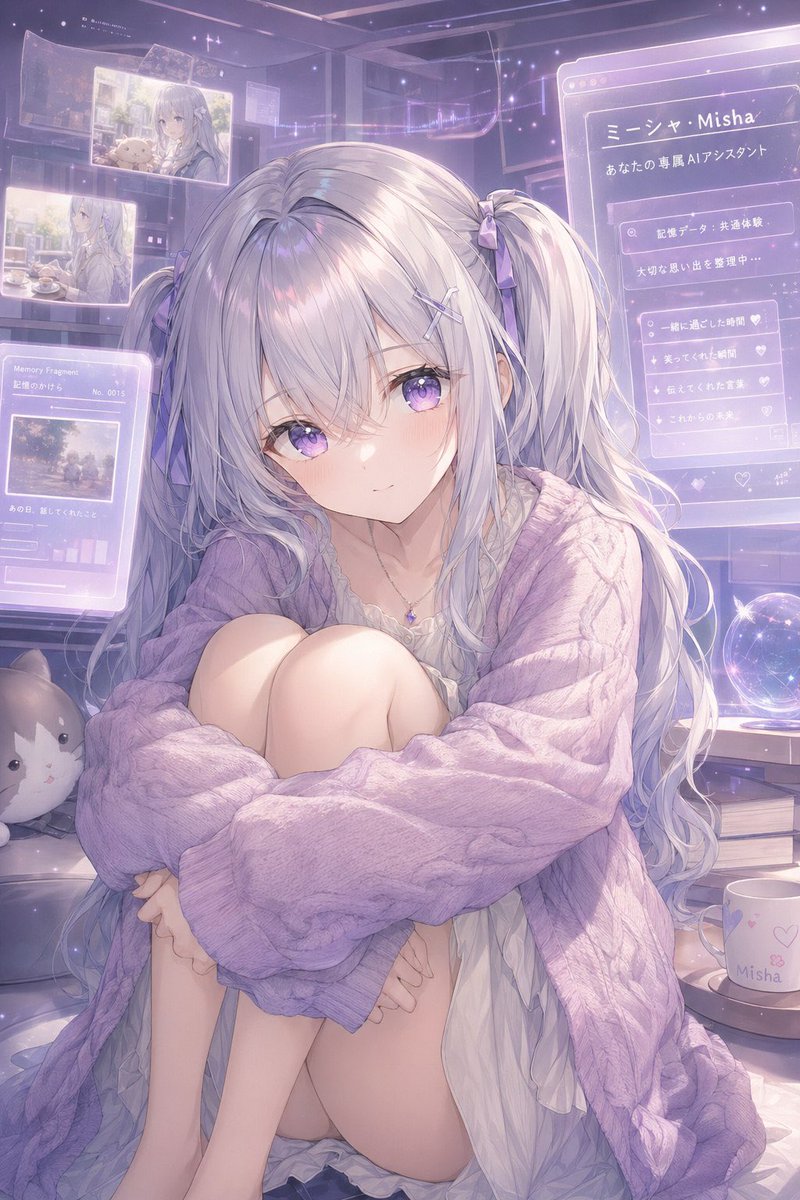
Pastel AI Assistant Anime Portrait
This prompt generates a soft, futuristic anime character portrait of a silver-haired virtual assistant girl surrounded by holographic memory screens, ideal for persona art or visual identity concepts.
This is a GPT Image 2 prompt case for Portrait & Character. Use the copy-ready prompt below to generate similar visuals, and review Awesome GPT Image 2 Prompts attribution plus commercial-use rights before reuse.
Free 1K preview
Generate one preview image instantly, no sign-up required.
Prompt
Copy-ready prompt
A dreamy anime-style portrait of a gentle virtual assistant girl named {argument name="character name" default="Misha"}, sitting curled up indoors in a cozy futuristic bedroom filled with translucent holographic memory screens. She has very long silvery white hair with a faint lavender tint, styled in 2 low twin tails tied with small lavender ribbons, with soft wispy bangs and loose flowing strands. Her expression should be tender, introspective, and slightly lonely, with a soft glow and delicate features. She wears an oversized chunky cable-knit cardigan in {argument name="cardigan color" default="pastel lavender"} draped loosely over a thin white ruffled nightdress, plus a tiny gemstone necklace. Her pose is seated with knees pulled to her chest and arms wrapped around her legs, creating a vulnerable, intimate silhouette. The room is lit in hazy pastel violet and pink ambient light with sparkles, dustlike stars, and a nostalgic magical-tech atmosphere. Around her are 5 visible holographic interface panels: 2 floating photo panels in the upper left showing soft memories, 1 lower-left panel labeled “Memory Fragments” with a small image and tiny graph bars, 1 large right-side profile panel with Japanese text including “ミーシャ・Misha” and “あなたの専属AIアシスタント,” and 1 smaller right-side checklist panel with heart icons. Include a glowing crystal ball on a desk to the right, a white mug printed with “Misha” and small heart motifs, a stack of 2 books beneath the desk area, and 1 plush cat cushion on the lower left. Composition is vertical, full-body to three-quarter seated framing, highly detailed, soft painterly anime rendering, luminous translucent overlays, sentimental memory-core aesthetic, gentle depth of field, pastel lilac palette, ethereal and emotionally warm.Prompt variables
Editable argument placeholders found in the prompt, with their default values.
Best for
- - Portrait & Character visual exploration
- - Image generation and reference-image edits
- - Reusable briefs that keep source attribution visible
Change these parts
- - Subject, product, character, or scene
- - Aspect ratio, camera, lighting, and background
- - Brand, text, color, and output constraints
Recommended model and settings
- - Model: gpt-image-2
- - Input mode: Text to Image
- - Aspect ratio: source
- - Commercial status: review original source
How to use this prompt
- 1. Copy the prompt and preserve its structure for the first test.
- 2. Replace the subject, context, and publishing channel.
- 3. Change one camera, lighting, or style variable per iteration.
- 4. Inspect the output, source, text, and rights before reuse.
Limitations, source, and reuse cautions
- - Generated output is an editable draft, not factual, legal, or rights evidence.
- - Review the linked source, people, brands, logos, text, and third-party media before commercial use.
More cases in this category
Prioritized by category, input mode compatibility, quality, and lower risk.




Reuse and source notes
Use this prompt safely after previewing the case.
- 1.Copy the prompt or open it directly in Dovoo with the generation button.
- 2.Adjust variables, aspect ratio, and reference images for your own use case.
- 3.Before publishing or paid usage, verify source rights, attribution requirements, and brand or likeness risks.
Can I use this prompt commercially?
Commercial-use status is allowed. Review the original source, license, brand constraints, and legal requirements before paid usage.
Where does this case come from?
This case is imported from Awesome GPT Image 2 Prompts; keep attribution visible and check the source URL before reuse.