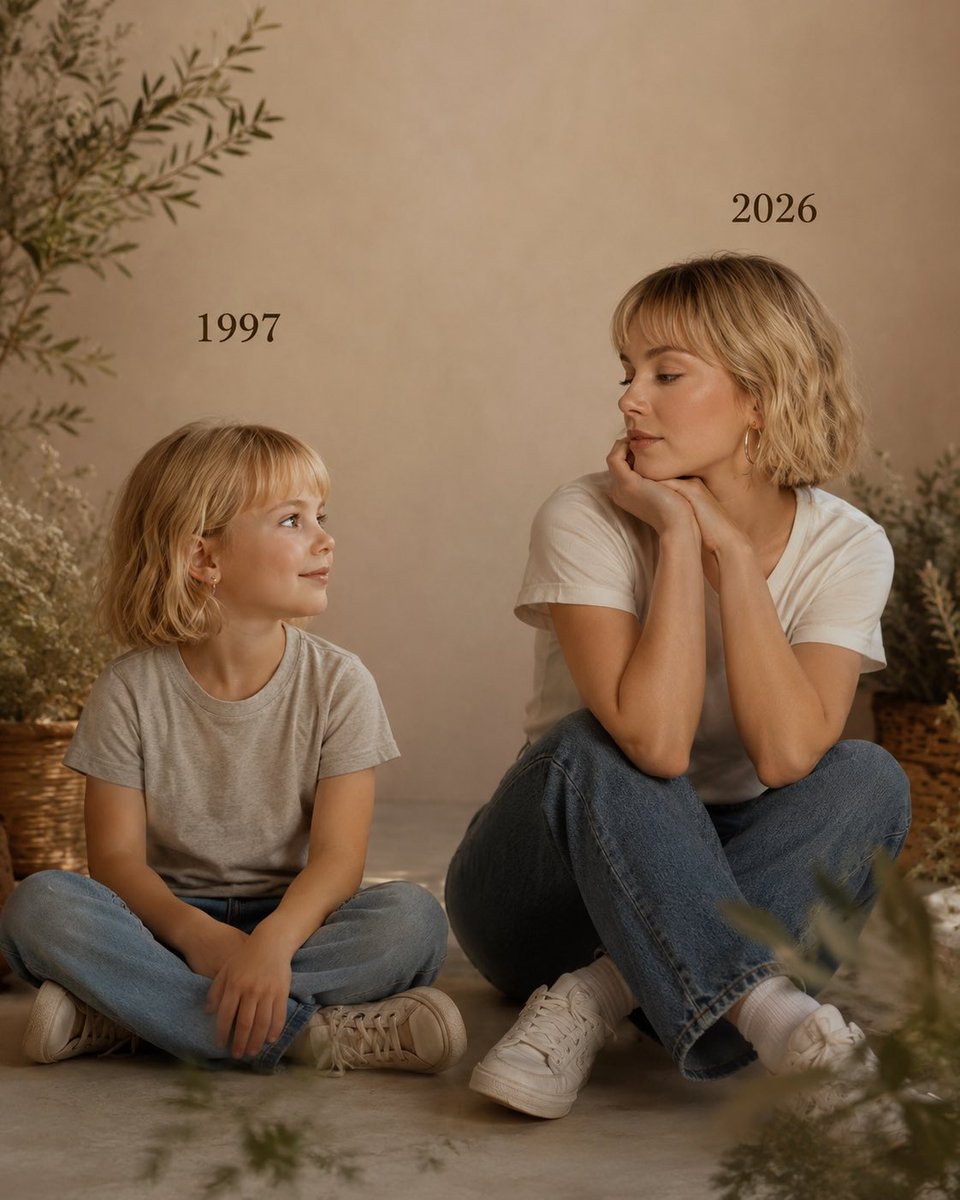
Past vs Present Portrait
A nostalgic prompt that creates a cinematic side-by-side portrait of a person as a child in 1997 and as their present self in 2026.
This is a GPT Image 2 prompt case for 人像角色. Use the copy-ready prompt below to generate similar visuals, and review Awesome GPT Image 2 Prompts attribution plus commercial-use rights before reuse.
Free 1K preview
Generate one preview image instantly, no sign-up required.
2 free previews per device every 30 days
Prompt
Copy-ready prompt
创建一张包含以下细节的图片:
左侧:童年时期的我,带着天真的微笑看向右侧,上方写着 {argument name="past year" default="1997"},身穿 {argument name="child clothing" default="浅灰色 T 恤和蓝色牛仔裤"}。
右侧:现在的我(面部特征匹配),双手托腮,带着平静的微笑注视着童年的自己,上方写着 "{argument name="present year" default="2026"}",身穿白色 T 恤和蓝色牛仔裤。
摄影棚背景:简洁柔和(摄影棚背景)。
光影:柔和、电影感、温暖(即使是黑白照片)。风格:专业、极简、情感摄影,侧重于情感表达以及两个版本之间的视觉互动。
让图片看起来像真实的摄影作品一样逼真。
保持我原始的面部特征,不要改变。
照片比例 4:5
Prompt variables
Editable argument placeholders found in the prompt, with their default values.
Best for
- - 人像角色 visual exploration
- - Image generation and reference-image edits
- - Reusable briefs that keep source attribution visible
Change these parts
- - Subject, product, character, or scene
- - Aspect ratio, camera, lighting, and background
- - Brand, text, color, and output constraints
Recommended model and settings
- - Model: gpt-image-2
- - Input mode: Text to Image
- - Aspect ratio: source
- - Commercial status: review original source
How to use this prompt
- 1. Copy the prompt and preserve its structure for the first test.
- 2. Replace the subject, context, and publishing channel.
- 3. Change one camera, lighting, or style variable per iteration.
- 4. Inspect the output, source, text, and rights before reuse.
Limitations, source, and reuse cautions
- - Generated output is an editable draft, not factual, legal, or rights evidence.
- - Review the linked source, people, brands, logos, text, and third-party media before commercial use.
More cases in this category
Prioritized by category, input mode compatibility, quality, and lower risk.
Reuse and source notes
Use this prompt safely after previewing the case.
- 1.Copy the prompt or open it directly in Dovoo with the generation button.
- 2.Adjust variables, aspect ratio, and reference images for your own use case.
- 3.Before publishing or paid usage, verify source rights, attribution requirements, and brand or likeness risks.
Can I use this prompt commercially?
Commercial-use status is allowed. Review the original source, license, brand constraints, and legal requirements before paid usage.
Where does this case come from?
This case is imported from Awesome GPT Image 2 Prompts; keep attribution visible and check the source URL before reuse.