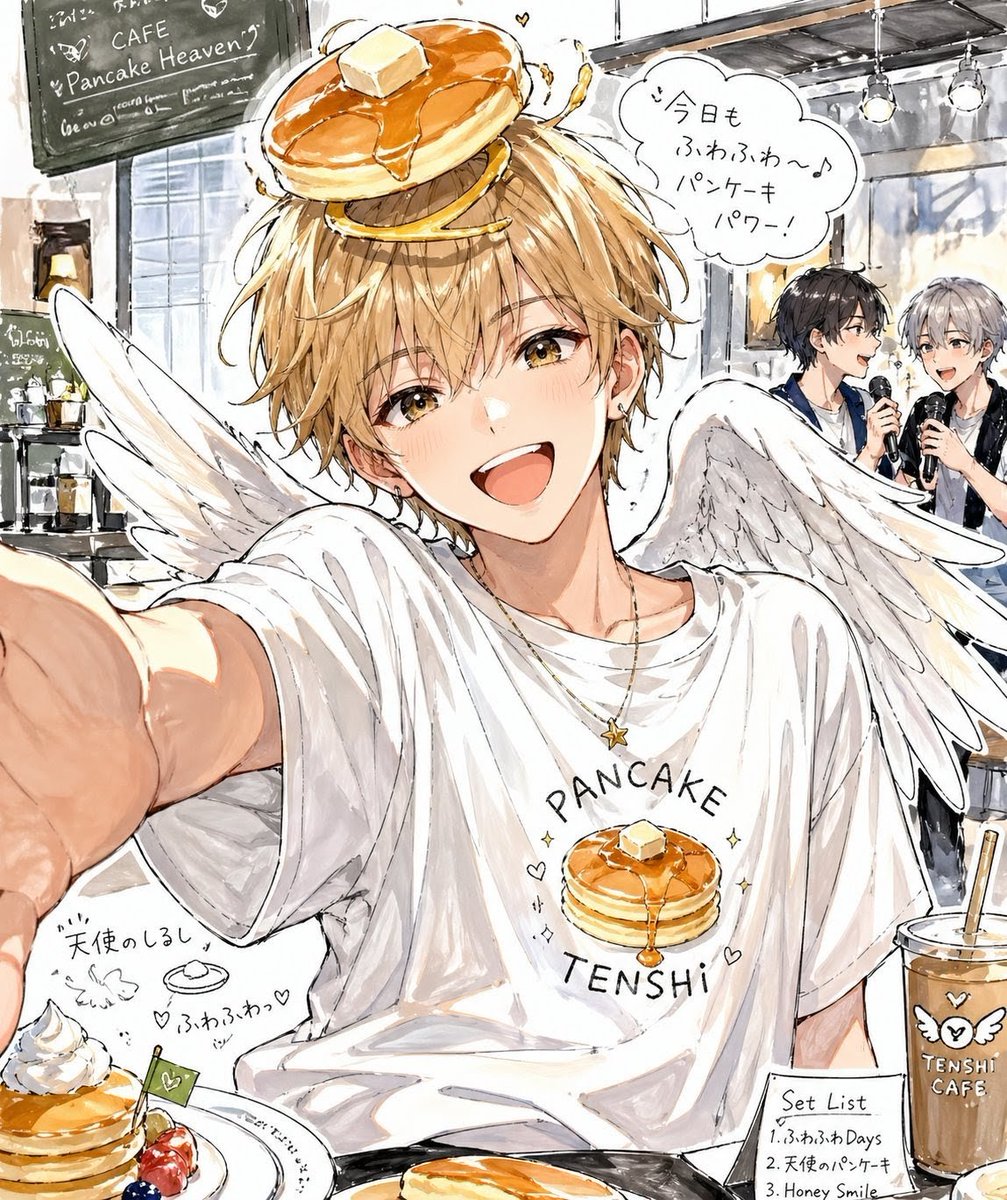
Pancake Angel Idol Café Selfie
This prompt generates a whimsical anime-style watercolor café selfie of a winged male idol with pancake-themed styling, ideal for character art or social-media-style key visuals.
This is a GPT Image 2 prompt case for Portrait & Character. Use the copy-ready prompt below to generate similar visuals, and review Awesome GPT Image 2 Prompts attribution plus commercial-use rights before reuse.
Free 1K preview
Generate one preview image instantly, no sign-up required.
Prompt
Copy-ready prompt
A loose watercolor-and-ink anime illustration of a youthful male idol styled as a pancake angel taking a selfie inside a trendy café. He is centered in a close, slightly wide-angle selfie composition with one arm reaching toward the viewer from the left foreground, creating a casual fan-service snapshot feel. He has messy short blond hair and a soft, pretty-boy look, with large white angel wings spreading behind him. On top of his head sits a whimsical stack of {argument name="head accessory" default="golden pancakes with syrup and a square of butter"} like a halo. He wears an oversized white T-shirt printed with the words {argument name="shirt text" default="PANCAKE TENSHI"} and a pancake illustration, plus a thin necklace with a small star charm. The mood is cheerful, dreamy, and slightly idol-like. A hand-drawn speech bubble near his head contains the Japanese text {argument name="speech bubble text" default="今日もふわふわ〜♪ パンケーキパワー!"}. The café interior behind him is bright and sketchy, with a blackboard sign reading {argument name="cafe sign" default="CAFE Pancake Heaven"}, shelves and windows on the left, and 2 background idol performers on the right holding microphones on a tiny stage under hanging lights. In the foreground, show 3 plated or served pancake-themed items: one small decorated pancake dessert with whipped cream and berries at bottom left, one cropped pancake plate at bottom center, and one iced drink in a plastic cup at bottom right labeled {argument name="cup text" default="TENSHI CAFE"} with a tiny wing icon. Add hand-drawn doodles, tiny hearts, sparkles, and handwritten Japanese menu notes around the food, including a small “Set List” card at the lower right. Use expressive pencil lines, soft beige and honey tones, white highlights, slightly messy café sketchbook energy, and charming editorial illustration quality.Prompt variables
Editable argument placeholders found in the prompt, with their default values.
Best for
- - Portrait & Character visual exploration
- - Image generation and reference-image edits
- - Reusable briefs that keep source attribution visible
Change these parts
- - Subject, product, character, or scene
- - Aspect ratio, camera, lighting, and background
- - Brand, text, color, and output constraints
Recommended model and settings
- - Model: gpt-image-2
- - Input mode: Text to Image
- - Aspect ratio: source
- - Commercial status: review original source
How to use this prompt
- 1. Copy the prompt and preserve its structure for the first test.
- 2. Replace the subject, context, and publishing channel.
- 3. Change one camera, lighting, or style variable per iteration.
- 4. Inspect the output, source, text, and rights before reuse.
Limitations, source, and reuse cautions
- - Generated output is an editable draft, not factual, legal, or rights evidence.
- - Review the linked source, people, brands, logos, text, and third-party media before commercial use.
More cases in this category
Prioritized by category, input mode compatibility, quality, and lower risk.






Reuse and source notes
Use this prompt safely after previewing the case.
- 1.Copy the prompt or open it directly in Dovoo with the generation button.
- 2.Adjust variables, aspect ratio, and reference images for your own use case.
- 3.Before publishing or paid usage, verify source rights, attribution requirements, and brand or likeness risks.
Can I use this prompt commercially?
Commercial-use status is allowed. Review the original source, license, brand constraints, and legal requirements before paid usage.
Where does this case come from?
This case is imported from Awesome GPT Image 2 Prompts; keep attribution visible and check the source URL before reuse.