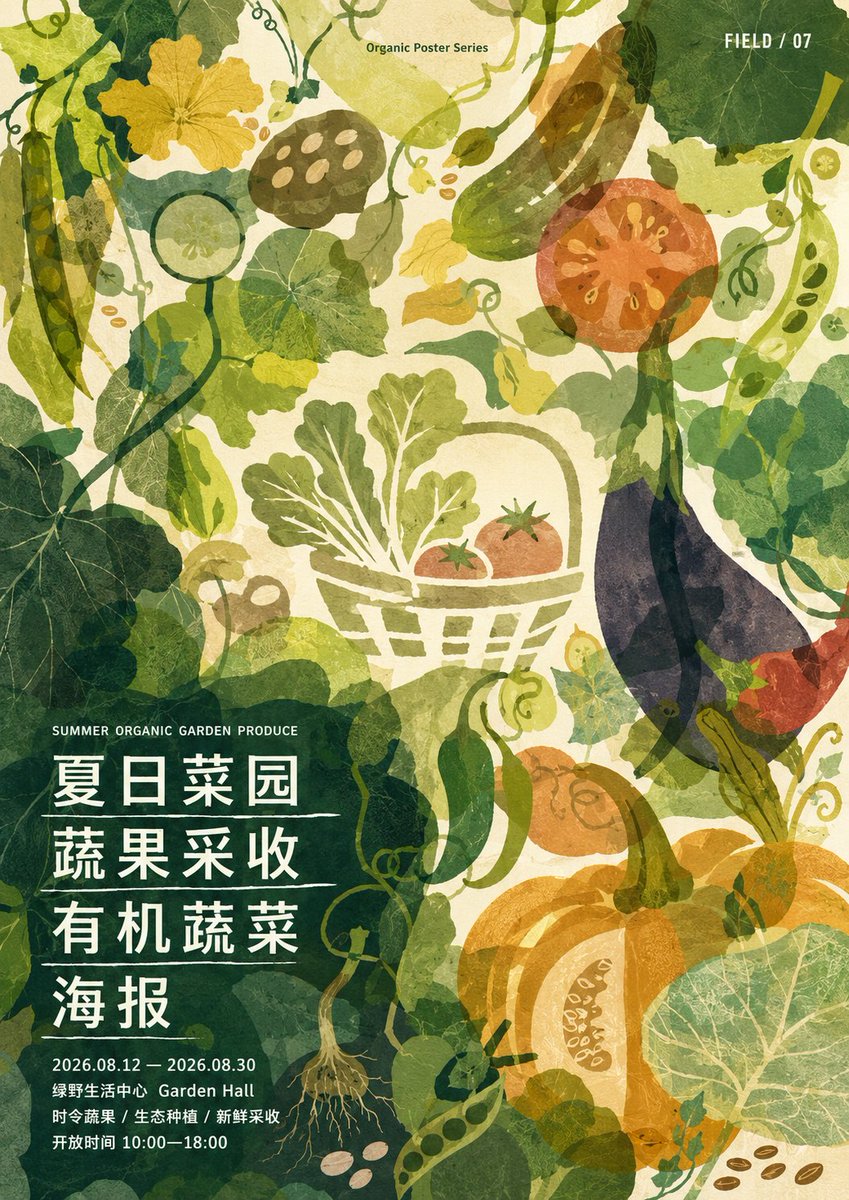
Dense Organic Garden Harvest Poster
Generates a textured vertical botanical event poster with layered vegetable silhouettes and Chinese harvest festival typography.
This is a GPT Image 2 prompt case for Graphic & Poster. Use the copy-ready prompt below to generate similar visuals, and review Awesome GPT Image 2 Prompts attribution plus commercial-use rights before reuse.
Free 1K preview
Generate one preview image instantly, no sign-up required.
Prompt
Copy-ready prompt
Objective: Create a tightly composed organic plant poster for a summer garden produce event, featuring layered vegetable silhouettes and a translucent watercolor texture.

Canvas: Vertical poster, 2:3 aspect ratio, warm cream-colored paper background with a fine texture, full bleed illustration, no borders.

Layout: Fill the entire poster with hand-drawn style organic silhouettes, vines, leaves, vegetables, seeds, and tendrils. Reserve a dark green translucent foliage area in the lower left corner for the main event text. Place a small series title in the center at the top and the venue number in the upper right corner.

Visual Style: Organic poster series aesthetic, Japanese/Chinese editorial poster texture, screen printing collage, translucent watercolor rendering, rough paper texture, plant silhouettes, soft greens paired with mustard yellow, ochre, orange, tomato red, cyan, and eggplant purple. Employ high-density coverage, layered transparency, visible veins, imperfect handmade edges, soft ink smudges, and flat graphic composition.

Text Content: Small text centered at the top: “Organic Poster Series”. Small text in the upper right corner: “FIELD / 07”. Small English subtitle in the lower left corner: “SUMMER ORGANIC GARDEN PRODUCE”. The main title is a stacked four-line Chinese character, separated by thin horizontal lines: {argument name="main poster title" default="Summer Vegetable Garden
Harvesting Vegetables and Fruits
Organic Vegetables
Poster"}. Bottom information text: {argument name="event date" default="2026.08.12 — 2026.08.30"}, followed by “Green Field Life Center Garden Hall”, “Seasonal Vegetables / Ecological Cultivation / Freshly Harvested”, and “Opening Hours 10:00—18:00”. The main title uses bold white Chinese characters, and the details use compact white sans-serif characters, left-aligned.

Illustration Element Count: Includes 16 main agricultural elements: 1 pod on the far left, 1 yellow squash blossom on the upper left, 1 cucumber slice in the upper left center, 1 lotus root slice in the upper center left, 1 cucumber in the upper center right, 1 tomato cross-section in the upper right corner, 1 pod on the far right, 1 basket of green leafy vegetables in the center, 2 small tomatoes inside the basket, 1 large eggplant on the right, 1 green pepper in the lower left center, 1 orange carrot/root vegetable in the lower right center, 1 large pumpkin in the lower right corner, 1 pumpkin wedge, and 1 large circular nasturtium-style leaf in the lower right corner. Add plenty of curling vines and leaf clusters as a background texture, but do not add any additional major types of agricultural products.

Main Details: The basket should be a light green line drawing containing arugula-like leaves and two red tomatoes. The eggplant should be dark purple with a green stem, partially transparent and overlapping with vines. The pumpkin should be orange and gold, large, round, and translucent, with visible light-colored seeded cross-sections. The nasturtium-style leaf should be represented as a circular green disc with radial veins. Vines should meander vertically and diagonally throughout the composition.

Customizable Palette: Use {argument name="color palette" default="Moss green, olive green, mustard yellow, ochre orange, tomato red, eggplant purple, warm cream color"}.

Constraints: Maintain a flat and illustrative feel for the poster, do not be realistic. Maintain a tight organic coverage on the canvas, with layered transparency and paper texture. Ensure all typography is clear and readable, especially the four-line Chinese main title. The image does not contain people, watermarks, or mock-up borders.
Prompt variables
Editable argument placeholders found in the prompt, with their default values.
Best for
- - Graphic & Poster visual exploration
- - Image generation and reference-image edits
- - Reusable briefs that keep source attribution visible
Change these parts
- - Subject, product, character, or scene
- - Aspect ratio, camera, lighting, and background
- - Brand, text, color, and output constraints
Recommended model and settings
- - Model: gpt-image-2
- - Input mode: Text to Image
- - Aspect ratio: source
- - Commercial status: review original source
How to use this prompt
- 1. Copy the prompt and preserve its structure for the first test.
- 2. Replace the subject, context, and publishing channel.
- 3. Change one camera, lighting, or style variable per iteration.
- 4. Inspect the output, source, text, and rights before reuse.
Limitations, source, and reuse cautions
- - Generated output is an editable draft, not factual, legal, or rights evidence.
- - Review the linked source, people, brands, logos, text, and third-party media before commercial use.
More cases in this category
Prioritized by category, input mode compatibility, quality, and lower risk.





Reuse and source notes
Use this prompt safely after previewing the case.
- 1.Copy the prompt or open it directly in Dovoo with the generation button.
- 2.Adjust variables, aspect ratio, and reference images for your own use case.
- 3.Before publishing or paid usage, verify source rights, attribution requirements, and brand or likeness risks.
Can I use this prompt commercially?
Commercial-use status is allowed. Review the original source, license, brand constraints, and legal requirements before paid usage.
Where does this case come from?
This case is imported from Awesome GPT Image 2 Prompts; keep attribution visible and check the source URL before reuse.