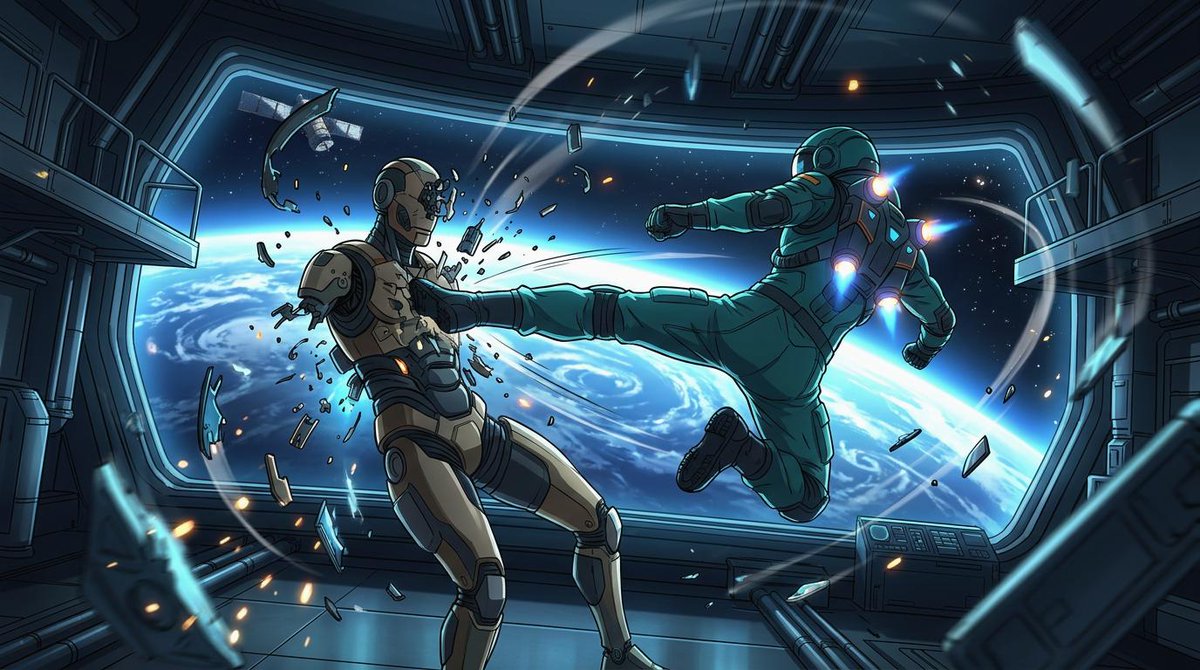
Orbital Station Zero-G Kick
A cinematic anime sci-fi action scene showing two armored fighters battling in zero gravity inside a space station above Earth.
This is a GPT Image 2 prompt case for Anime & Game. Use the copy-ready prompt below to generate similar visuals, and review Awesome GPT Image 2 Prompts attribution plus commercial-use rights before reuse.
Free 1K preview
Generate one preview image instantly, no sign-up required.
Prompt
Copy-ready prompt
Create a cinematic widescreen sci-fi anime action illustration inside a damaged orbital space station corridor, with Earth and deep space visible through a huge panoramic window. The scene shows exactly two armored figures in zero gravity: on the right, {argument name="attacking astronaut suit color" default="teal green"} powered astronaut armor with glowing blue-white jet thrusters on the back, shoulders, and boots, flying horizontally from right to left and delivering a full-force side kick; on the left, {argument name="defender armor color" default="beige and dark gray"} humanoid combat android or armored astronaut recoils from the kick, chest shattered with fragments and sparks bursting outward. The attacker’s leg is fully extended into the defender’s torso, one arm punched forward and the other pulled back, body tilted dynamically as if propelled by suit jets. Count the major visible subjects and effects precisely: 2 armored figures, 1 enormous curved observation window, 1 view of Earth’s blue horizon with swirling clouds, 1 small satellite outside the window, 2 side balcony platforms, 1 control console at lower right, many floating metal shards and glass fragments, and multiple orange sparks and blue energy streaks arcing through the room. Use a polished Japanese anime / graphic novel style with crisp ink outlines, dramatic perspective, high contrast cel shading, detailed mechanical panels, pipes, rails, and sci-fi wall seams. Lighting should be cold cyan from Earth and the window, accented by orange impact sparks and vivid blue thruster glows. Make the composition dynamic and diagonal, with debris trails and motion arcs emphasizing weightless movement. Canvas: {argument name="aspect ratio" default="16:9 widescreen"}. Mood: {argument name="mood" default="intense orbital combat"}. No text, no logos, no watermark.Prompt variables
Editable argument placeholders found in the prompt, with their default values.
Best for
- - Anime & Game visual exploration
- - Image generation and reference-image edits
- - Reusable briefs that keep source attribution visible
Change these parts
- - Subject, product, character, or scene
- - Aspect ratio, camera, lighting, and background
- - Brand, text, color, and output constraints
Recommended model and settings
- - Model: gpt-image-2
- - Input mode: Text to Image
- - Aspect ratio: source
- - Commercial status: review original source
How to use this prompt
- 1. Copy the prompt and preserve its structure for the first test.
- 2. Replace the subject, context, and publishing channel.
- 3. Change one camera, lighting, or style variable per iteration.
- 4. Inspect the output, source, text, and rights before reuse.
Limitations, source, and reuse cautions
- - Generated output is an editable draft, not factual, legal, or rights evidence.
- - Review the linked source, people, brands, logos, text, and third-party media before commercial use.
More cases in this category
Prioritized by category, input mode compatibility, quality, and lower risk.



Reuse and source notes
Use this prompt safely after previewing the case.
- 1.Copy the prompt or open it directly in Dovoo with the generation button.
- 2.Adjust variables, aspect ratio, and reference images for your own use case.
- 3.Before publishing or paid usage, verify source rights, attribution requirements, and brand or likeness risks.
Can I use this prompt commercially?
Commercial-use status is allowed. Review the original source, license, brand constraints, and legal requirements before paid usage.
Where does this case come from?
This case is imported from Awesome GPT Image 2 Prompts; keep attribution visible and check the source URL before reuse.