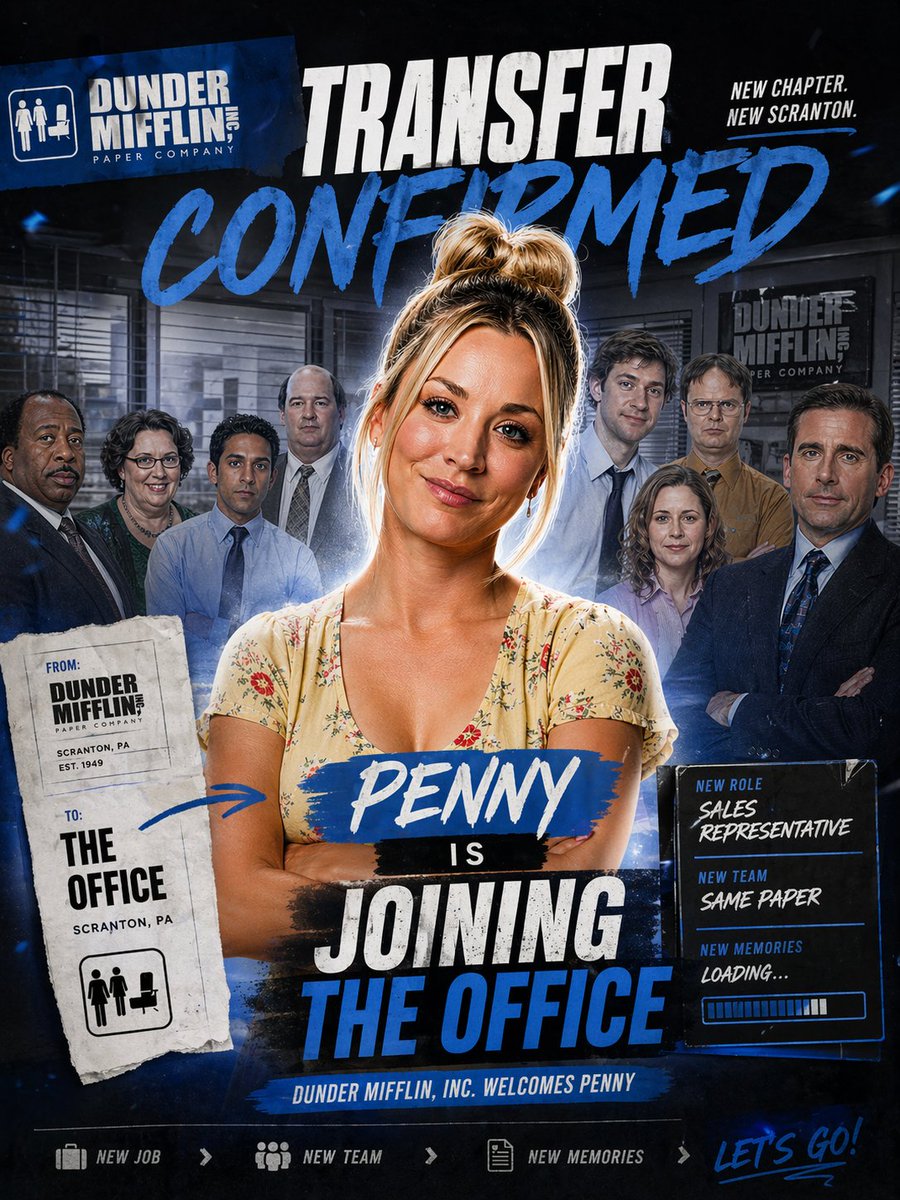
Office Transfer Announcement Poster
A bold TV-style ensemble poster announcing a new character joining an office team, ideal for fan edits, parody promos, or cast reveal graphics.
This is a GPT Image 2 prompt case for Graphic & Poster. Use the copy-ready prompt below to generate similar visuals, and review Awesome GPT Image 2 Prompts attribution plus commercial-use rights before reuse.
Free 1K preview
Generate one preview image instantly, no sign-up required.
Free text preview doesn’t preserve reference-image consistency.
Prompt
Copy-ready prompt
Design a dramatic square promotional poster in the style of a TV sitcom cast transfer announcement, with a dark navy and black office-themed background, gritty sports-poster energy, bold blue paint strokes, white distressed typography, and layered collage composition. At the center, place a confident woman named {argument name="character name" default="Penny"} standing from the waist up with arms crossed, wearing a light cream floral V-neck dress, messy blonde hair in a high bun, softly rim-lit with a subtle glow around her silhouette. Behind her, show exactly 8 office coworkers arranged as a blurred ensemble cast in staggered rows inside a corporate office interior with blinds, desks, and framed company signage; keep them secondary and slightly shadowed so the central woman dominates the composition. At the top left, include a tilted blue company logo block reading "DUNDER MIFFLIN INC. PAPER COMPANY" with a small office icon. Across the top center, add a huge distressed white headline "TRANSFER" and beneath it an even larger blue brush-script word "CONFIRMED". At the top right, add the small stacked slogan "NEW CHAPTER. NEW SCRANTON." On the left side, place a torn-paper transfer slip with a stamped, photocopied look; it should contain exactly 2 labeled sections, "FROM:" with "DUNDER MIFFLIN PAPER COMPANY, SCRANTON, PA, EST. 1949" and "TO:" with "THE OFFICE, SCRANTON, PA", plus a small office icon at the bottom. Add a hand-drawn blue arrow from this slip pointing toward the central woman. Across the woman's torso, place a blue paint-stroke nameplate with "{argument name="character name" default="Penny"}" in white script, followed by a small black strip with "IS", then a large stacked headline in distressed white and blue block text reading "JOINING THE OFFICE". On the right side, add a glowing dark info panel with exactly 3 labeled lines: "NEW ROLE" with "{argument name="job title" default="SALES REPRESENTATIVE"}", "NEW TEAM" with "{argument name="team tagline" default="SAME PAPER"}", and "NEW MEMORIES" with "LOADING...", plus a horizontal progress bar beneath. Along the bottom center, include a narrow blue banner reading "DUNDER MIFFLIN, INC. WELCOMES {argument name="character name" default="Penny"}". At the very bottom, create a footer strip with exactly 4 elements: a briefcase icon and "NEW JOB", a team icon and "NEW TEAM", a document icon and "NEW MEMORIES", and on the far right a handwritten blue script phrase "{argument name="footer text" default="LET'S GO!"}". Use a high-contrast blue-white-black palette, cinematic compositing, subtle dust and texture overlays, energetic paint smears, and a premium fan-edit social media announcement aesthetic.Prompt variables
Editable argument placeholders found in the prompt, with their default values.
Best for
- - Graphic & Poster visual exploration
- - Image generation and reference-image edits
- - Reusable briefs that keep source attribution visible
Change these parts
- - Subject, product, character, or scene
- - Aspect ratio, camera, lighting, and background
- - Brand, text, color, and output constraints
Recommended model and settings
- - Model: gpt-image-2
- - Input mode: Image to Image
- - Aspect ratio: source
- - Commercial status: review original source
How to use this prompt
- 1. Copy the prompt and preserve its structure for the first test.
- 2. Replace the subject, context, and publishing channel.
- 3. Change one camera, lighting, or style variable per iteration.
- 4. Inspect the output, source, text, and rights before reuse.
Limitations, source, and reuse cautions
- - Generated output is an editable draft, not factual, legal, or rights evidence.
- - Review the linked source, people, brands, logos, text, and third-party media before commercial use.
More cases in this category
Prioritized by category, input mode compatibility, quality, and lower risk.




Reuse and source notes
Use this prompt safely after previewing the case.
- 1.Copy the prompt or open it directly in Dovoo with the generation button.
- 2.Adjust variables, aspect ratio, and reference images for your own use case.
- 3.Before publishing or paid usage, verify source rights, attribution requirements, and brand or likeness risks.
Can I use this prompt commercially?
Commercial-use status is allowed. Review the original source, license, brand constraints, and legal requirements before paid usage.
Where does this case come from?
This case is imported from Awesome GPT Image 2 Prompts; keep attribution visible and check the source URL before reuse.