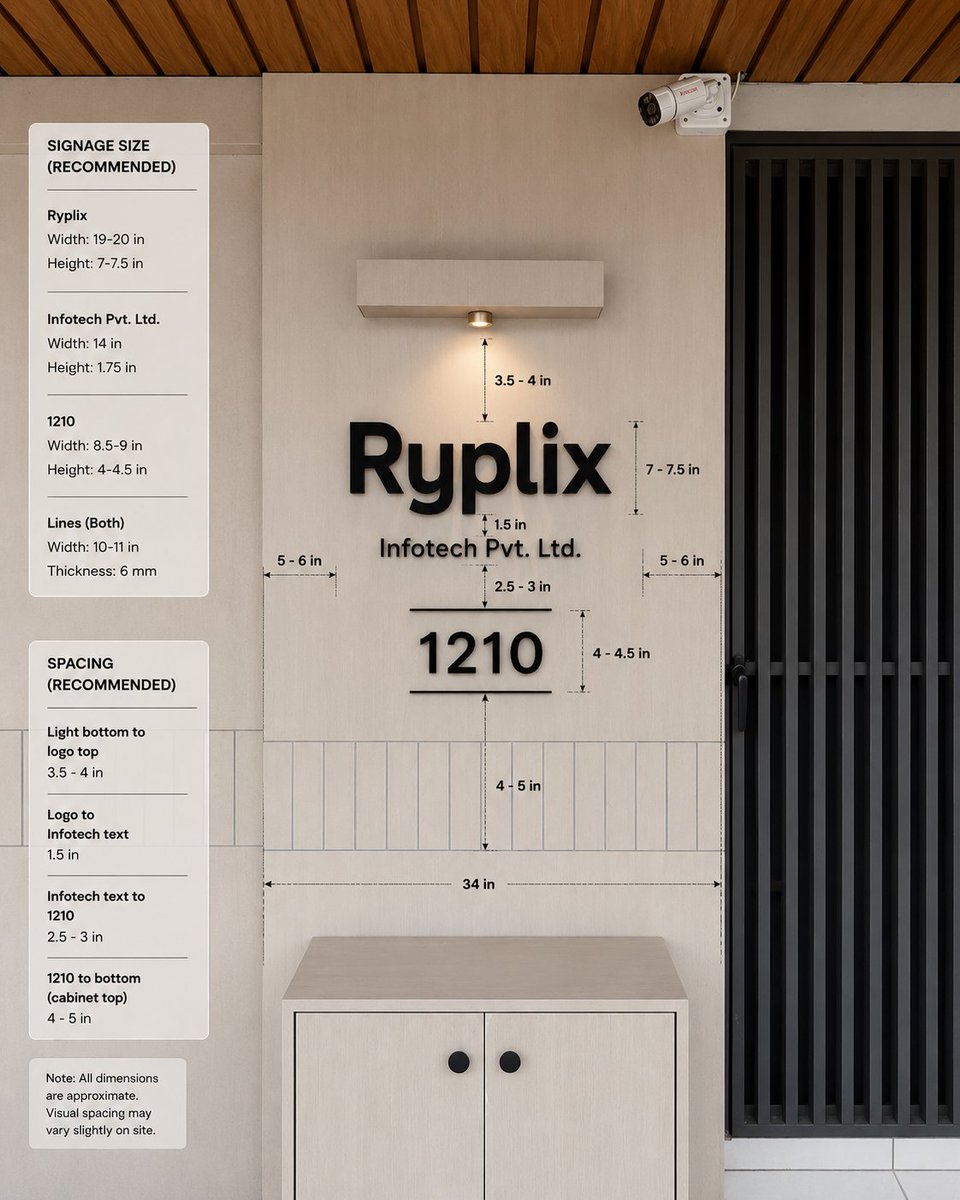
Office Signage Dimension Mockup
A photorealistic office entrance signage specification mockup with dimension guides and recommended sizing notes for client approval.
This is a GPT Image 2 prompt case for 产品商业. Use the copy-ready prompt below to generate similar visuals, and review Awesome GPT Image 2 Prompts attribution plus commercial-use rights before reuse.
Prompt
Copy-ready prompt
目标:创建一个逼真的室内墙面标识效果图,为接待处/办公室入口提供测量标注,展示公司标识的推荐尺寸和间距。

画布:方形 1:1 图像,照片级建筑可视化,正面视角,带有轻微的自然透视感。采用温暖的现代色调:浅米色墙板、浅色木柜、黑色标识、黑色金属门格栅以及木条吊顶。

场景布局:构图中心为一面带有安装标识的米色背景墙。右侧包含一扇占据图像宽度约四分之一的黑色高竖条门或栅栏。在墙面右上角,添加一个向下倾斜的小型白色闭路电视监控摄像头。在顶部中央,添加一个矩形壁挂式灯具,带有一个温暖的向下射灯。在底部中央,放置一个浅色木柜,带有两扇门和两个圆形的黑色旋钮。在标识后方的墙面下部,包含一条横向的窄竖矩形瓷砖带。最顶部的天花板应显示呈对角线排列的暖棕色木条。

主要标识内容:墙面使用凸起的哑光黑色 3D 字母。最大的一行文字为 {argument name="company logo text" default="Ryplix"}。正下方居中显示较小的文字 {argument name="company legal text" default="Infotech Pvt. Ltd."}。在其下方居中显示大号数字 {argument name="unit number" default="1210"},数字上下方各有一条细横线。保持所有标识元素为黑色,并带有柔和逼真的阴影。

测量标注:在标识周围添加精细的黑色尺寸箭头、虚线引导线和小型技术标签。在主墙面区域包含正好 10 个可见的测量标签:“3.5 - 4 in”为灯具底部到 Logo 的距离,“7 - 7.5 in”为 Logo 高度,“1.5 in”为 Logo 与法律文本之间的间距,“2.5 - 3 in”为法律文本与数字之间的间距,“4 - 4.5 in”为数字高度,“4 - 5 in”为数字到柜顶瓷砖区域的距离,“34 in”为柜子上方长横向宽度指南,外加两个侧边间距标签,左侧“5 - 6 in”和右侧“5 - 6 in”。

左侧信息面板:在图像左侧垂直堆叠三个圆角白色卡片。卡片 1 标题:“SIGNAGE SIZE (RECOMMENDED)”。包含三个由细横线分隔的项目组:“Ryplix”对应“Width: 19-20 in”和“Height: 7-7.5 in”;“Infotech Pvt. Ltd.”对应“Width: 14 in”和“Height: 1.75 in”;“1210”对应“Width: 8.5-9 in”和“Height: 4-4.5 in”;以及“Lines (Both)”对应“Width: 10-11 in”和“Thickness: 6 mm”。卡片 2 标题:“SPACING (RECOMMENDED)”。包含四个由细线分隔的项目组:“Light bottom to logo top”对应“3.5 - 4 in”;“Logo to Infotech text”对应“1.5 in”;“Infotech text to 1210”对应“2.5 - 3 in”;“1210 to bottom (cabinet top)”对应“4 - 5 in”。卡片 3 为一张小注释卡,内容为:“Note: All dimensions are approximate. Visual spacing may vary slightly on site.”

视觉风格:简洁的现代办公室设计,自然采光,逼真的材质,微妙的阴影,清晰易读的排版,专业的标识安装指南美学。所有标签和卡片均使用黑色无衬线字体。测量线应呈现为设计规格叠加层,而非手写风格。

约束条件:保持图像中没有人像和杂物。不要添加额外的 Logo、额外的卡片、额外的测量标签或额外的装饰性物体。保持精确对齐:Logo、法律文本、单元号、灯具和柜子都应在同一垂直轴线上居中。
Prompt variables
Editable argument placeholders found in the prompt, with their default values.
More cases in this category
Prioritized by category, input mode compatibility, quality, and lower risk.
Reuse and source notes
Use this prompt safely after previewing the case.
- 1.Copy the prompt or open it directly in Dovoo with the generation button.
- 2.Adjust variables, aspect ratio, and reference images for your own use case.
- 3.Before publishing or paid usage, verify source rights, attribution requirements, and brand or likeness risks.
Can I use this prompt commercially?
Commercial-use status is allowed. Review the original source, license, brand constraints, and legal requirements before paid usage.
Where does this case come from?
This case is imported from Awesome GPT Image 2 Prompts; keep attribution visible and check the source URL before reuse.