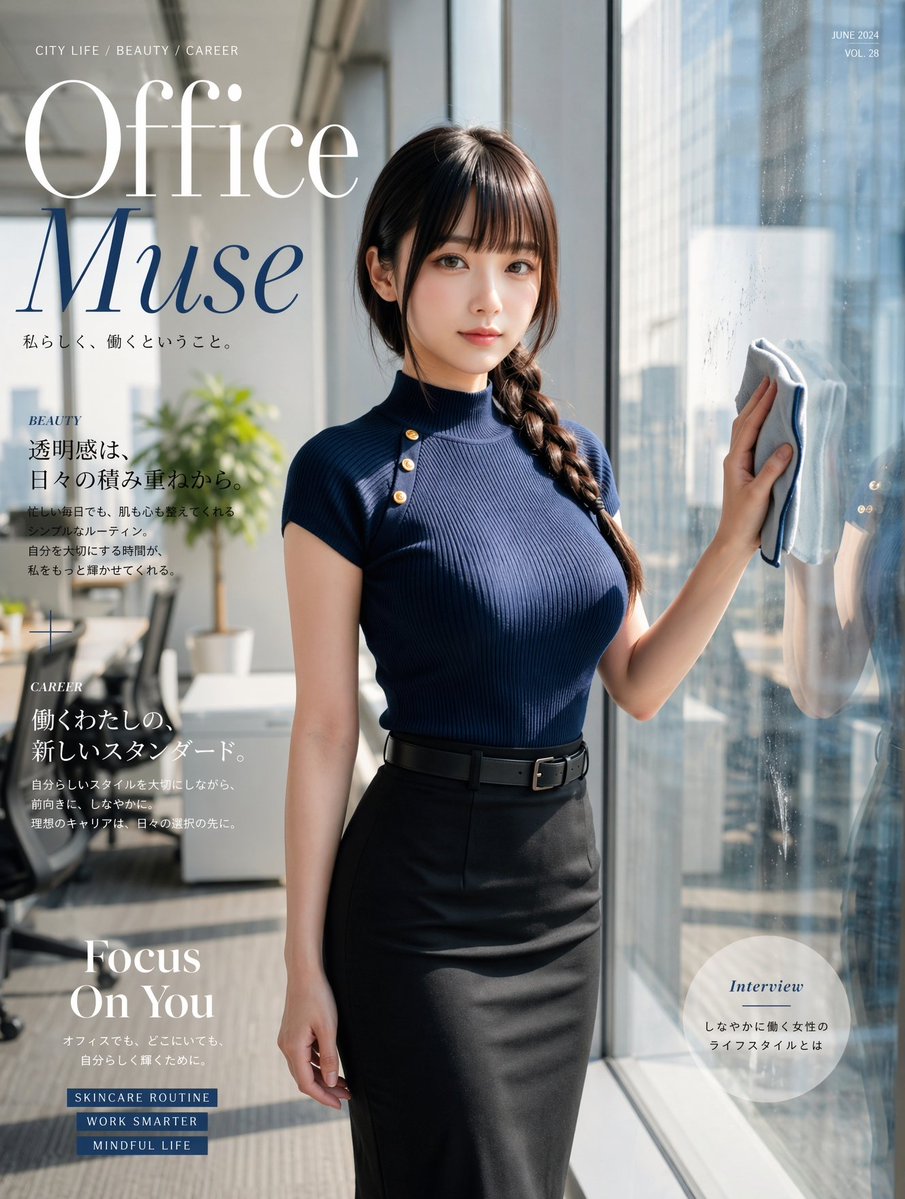
Office Muse Fashion Cover
This prompt generates a sophisticated Japanese-style fashion magazine cover featuring a stylish office woman in a sunlit corporate setting, ideal for editorial and lifestyle branding visuals.
This is a GPT Image 2 prompt case for Fashion & Beauty. Use the copy-ready prompt below to generate similar visuals, and review Awesome GPT Image 2 Prompts attribution plus commercial-use rights before reuse.
Free 1K preview
Generate one preview image instantly, no sign-up required.
Prompt
Copy-ready prompt
A polished high-fashion magazine cover portrait of a beautiful young office woman standing beside a floor-to-ceiling window in a bright modern corporate office, photographed in a refined editorial style. She faces slightly toward the camera with a calm, elegant, confident expression, Show every face clearly with natural, detailed facial features. She has long dark brown hair styled in a thick side braid draped over one shoulder. She wears a fitted ribbed mock-neck knit top in {argument name="top color" default="deep navy blue"} with short sleeves and three gold shoulder buttons on the left side, tucked into a high-waisted black pencil skirt with a slim black belt. Her right hand is raised, holding a folded light-colored cleaning cloth against the glass, suggesting a symbolic lifestyle-fashion scene rather than literal cleaning; her left arm rests naturally by her side. Warm daylight streams in from the window, creating soft highlights on her clothing and skin, subtle reflections on the glass, and a luminous cityscape of tall office buildings outside. The interior background is softly blurred, showing a minimalist office with 1 potted plant, 1 desk, and 1 office chair. Compose the image vertically like a premium magazine cover, full body cropped around mid-calf, with the model centered slightly right to leave room for typography on the left. Add elegant editorial cover text in a Japanese fashion-magazine style: a very large serif masthead reading {argument name="main title" default="Office Muse"} across the upper left, with "Office" in white and "Muse" in deep blue; small uppercase text at the top left reading "CITY LIFE / BEAUTY / CAREER"; small issue text at the top right reading "JUNE 2024" and "VOL. 28". Include 5 additional text blocks: 1 Japanese subtitle under the main title, 1 left-column beauty section with the heading "BEAUTY" and Japanese body text, 1 left-column career section with the heading "CAREER" and Japanese body text, 1 large lower-left headline reading "Focus On You" with a short Japanese subline, and 1 lower-right circular callout with the heading "Interview" and Japanese text inside a translucent pale circle. Add 3 small blue rectangular tags near the lower left reading {argument name="tag line 1" default="SKINCARE ROUTINE"}, {argument name="tag line 2" default="WORK SMARTER"}, and {argument name="tag line 3" default="MINDFUL LIFE"}. Overall mood: sophisticated, feminine, aspirational, urban, graceful, professional, luxurious, clean natural light, realistic digital photography with subtle fashion-retouching, premium Japanese magazine cover design.Prompt variables
Editable argument placeholders found in the prompt, with their default values.
Best for
- - Fashion & Beauty visual exploration
- - Image generation and reference-image edits
- - Reusable briefs that keep source attribution visible
Change these parts
- - Subject, product, character, or scene
- - Aspect ratio, camera, lighting, and background
- - Brand, text, color, and output constraints
Recommended model and settings
- - Model: gpt-image-2
- - Input mode: Text to Image
- - Aspect ratio: source
- - Commercial status: review original source
How to use this prompt
- 1. Copy the prompt and preserve its structure for the first test.
- 2. Replace the subject, context, and publishing channel.
- 3. Change one camera, lighting, or style variable per iteration.
- 4. Inspect the output, source, text, and rights before reuse.
Limitations, source, and reuse cautions
- - Generated output is an editable draft, not factual, legal, or rights evidence.
- - Review the linked source, people, brands, logos, text, and third-party media before commercial use.
More cases in this category
Prioritized by category, input mode compatibility, quality, and lower risk.

Reuse and source notes
Use this prompt safely after previewing the case.
- 1.Copy the prompt or open it directly in Dovoo with the generation button.
- 2.Adjust variables, aspect ratio, and reference images for your own use case.
- 3.Before publishing or paid usage, verify source rights, attribution requirements, and brand or likeness risks.
Can I use this prompt commercially?
Commercial-use status is allowed. Review the original source, license, brand constraints, and legal requirements before paid usage.
Where does this case come from?
This case is imported from Awesome GPT Image 2 Prompts; keep attribution visible and check the source URL before reuse.