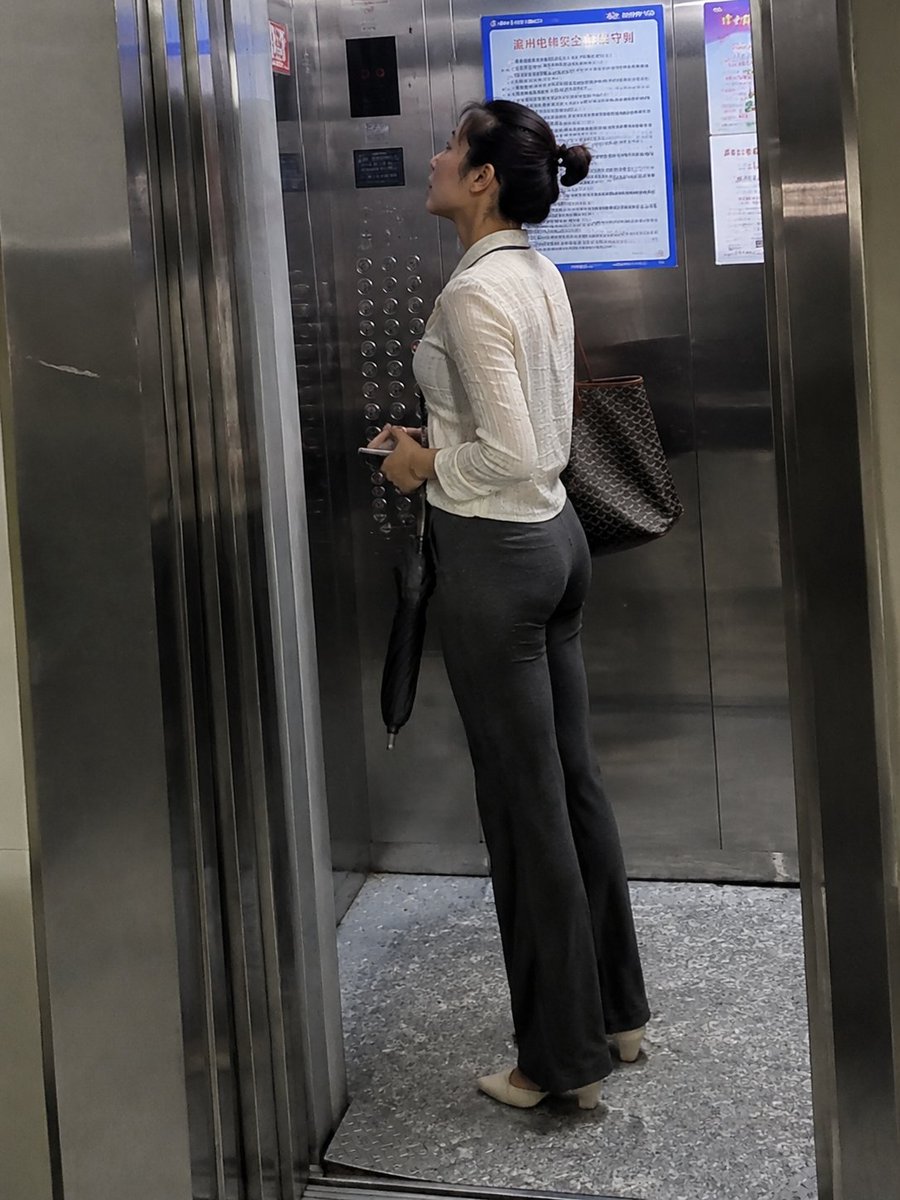
Realistic Office Elevator Candid
A natural smartphone-style candid photo prompt for depicting an ordinary professional woman inside a public-building elevator.
This is a GPT Image 2 prompt case for Portrait & Character. Use the copy-ready prompt below to generate similar visuals, and review Awesome GPT Image 2 Prompts attribution plus commercial-use rights before reuse.
Free 1K preview
Generate one preview image instantly, no sign-up required.
Prompt
Copy-ready prompt
Create a highly realistic candid smartphone photo taken from just outside an open elevator in an ordinary office or public institution building. The scene shows {argument name="subject" default="a middle-aged Chinese female department manager"} standing inside the stainless-steel elevator in side/back profile, looking slightly upward at the elevator floor indicator and control panel. She has an everyday, non-model appearance with natural facial features, realistic skin texture, subtle under-eye tiredness, faint lines, and no cosmetic-surgery or overly polished makeup look. Her dark hair is tied into a practical low bun. She wears {argument name="outfit" default="a white textured long-sleeve blouse tucked into dark gray flared office trousers"}, beige low-heeled shoes, and carries {argument name="bag" default="a large dark brown patterned tote bag over one shoulder"}. In one hand she holds a folded black umbrella and a small phone or card. The elevator interior is brushed metal with reflective panels, a vertical button array containing many round buttons, a small black digital display above it, and exactly two visible wall notices: one large blue-bordered Chinese safety notice and one narrower poster to the right. The floor is speckled gray elevator flooring, and the open elevator door frame is visible in the foreground, creating a slightly voyeuristic everyday snapshot composition. Use dim fluorescent indoor lighting, mild motion softness, imperfect framing, realistic reflections, slight grain, and a natural phone-camera perspective. Avoid glamour lighting, studio composition, fashion-model posing, perfect symmetry, AI-smooth skin, or overly beautiful facial features.Prompt variables
Editable argument placeholders found in the prompt, with their default values.
Best for
- - Portrait & Character visual exploration
- - Image generation and reference-image edits
- - Reusable briefs that keep source attribution visible
Change these parts
- - Subject, product, character, or scene
- - Aspect ratio, camera, lighting, and background
- - Brand, text, color, and output constraints
Recommended model and settings
- - Model: gpt-image-2
- - Input mode: Text to Image
- - Aspect ratio: source
- - Commercial status: review original source
How to use this prompt
- 1. Copy the prompt and preserve its structure for the first test.
- 2. Replace the subject, context, and publishing channel.
- 3. Change one camera, lighting, or style variable per iteration.
- 4. Inspect the output, source, text, and rights before reuse.
Limitations, source, and reuse cautions
- - Generated output is an editable draft, not factual, legal, or rights evidence.
- - Review the linked source, people, brands, logos, text, and third-party media before commercial use.
More cases in this category
Prioritized by category, input mode compatibility, quality, and lower risk.


Reuse and source notes
Use this prompt safely after previewing the case.
- 1.Copy the prompt or open it directly in Dovoo with the generation button.
- 2.Adjust variables, aspect ratio, and reference images for your own use case.
- 3.Before publishing or paid usage, verify source rights, attribution requirements, and brand or likeness risks.
Can I use this prompt commercially?
Commercial-use status is allowed. Review the original source, license, brand constraints, and legal requirements before paid usage.
Where does this case come from?
This case is imported from Awesome GPT Image 2 Prompts; keep attribution visible and check the source URL before reuse.