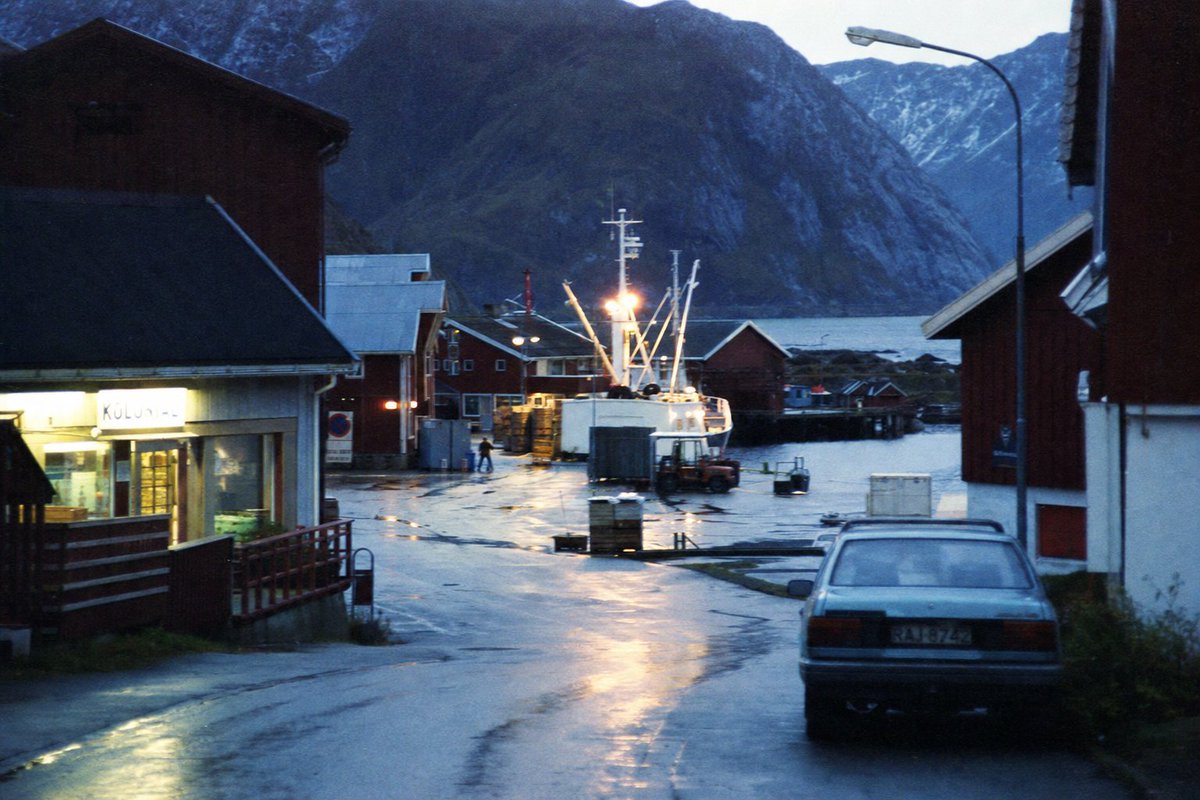
Rainy Norwegian Fjord Harbor
A cinematic photorealistic prompt for generating a rainy blue-hour fishing village harbor with fjord mountains and analog film atmosphere.
This is a GPT Image 2 prompt case for Landscape & Nature. Use the copy-ready prompt below to generate similar visuals, and review Awesome GPT Image 2 Prompts attribution plus commercial-use rights before reuse.
Free 1K preview
Generate one preview image instantly, no sign-up required.
Prompt
Copy-ready prompt
Create a moody photorealistic 35mm film photograph of a small {argument name="location" default="Norwegian fjord fishing village"} at blue hour after rain. The view looks down a wet harbor road toward the water, with glossy asphalt reflecting warm yellow lights. Include exactly 1 parked older silver sedan in the right foreground seen from behind, exactly 1 brightly lit fishing boat at the dock in the center with tall white masts and rigging, exactly 1 tall curved streetlamp on the right, and exactly 6 prominent buildings: a lit shop with a glowing sign on the left foreground, a dark wooden warehouse above it, a small red building near the center-left dock, a red boathouse behind the boat, a white building with red trim on the right foreground, and a dark cropped wooden wall at the far right edge. In the background, place a cold blue fjord and steep dark mountains with patches of snow, partially silhouetted by fading evening light. Use a quiet cinematic documentary style, natural perspective from street level, slightly grainy analog texture, subtle motionless atmosphere, damp surfaces, cool blue color grading contrasted with warm harbor lights, realistic shadows, no people except at most one tiny distant dock worker silhouette. Make the scene feel remote, cold, and lived-in, with high detail but no modern tourist elements. Use {argument name="time of day" default="dusk blue hour"}, {argument name="weather" default="recent rain, overcast"}, {argument name="film stock look" default="grainy 1980s Kodak documentary film"}, and {argument name="aspect ratio" default="3:2 landscape"}.Prompt variables
Editable argument placeholders found in the prompt, with their default values.
Best for
- - Landscape & Nature visual exploration
- - Image generation and reference-image edits
- - Reusable briefs that keep source attribution visible
Change these parts
- - Subject, product, character, or scene
- - Aspect ratio, camera, lighting, and background
- - Brand, text, color, and output constraints
Recommended model and settings
- - Model: gpt-image-2
- - Input mode: Text to Image
- - Aspect ratio: source
- - Commercial status: review original source
How to use this prompt
- 1. Copy the prompt and preserve its structure for the first test.
- 2. Replace the subject, context, and publishing channel.
- 3. Change one camera, lighting, or style variable per iteration.
- 4. Inspect the output, source, text, and rights before reuse.
Limitations, source, and reuse cautions
- - Generated output is an editable draft, not factual, legal, or rights evidence.
- - Review the linked source, people, brands, logos, text, and third-party media before commercial use.
More cases in this category
Prioritized by category, input mode compatibility, quality, and lower risk.

Reuse and source notes
Use this prompt safely after previewing the case.
- 1.Copy the prompt or open it directly in Dovoo with the generation button.
- 2.Adjust variables, aspect ratio, and reference images for your own use case.
- 3.Before publishing or paid usage, verify source rights, attribution requirements, and brand or likeness risks.
Can I use this prompt commercially?
Commercial-use status is allowed. Review the original source, license, brand constraints, and legal requirements before paid usage.
Where does this case come from?
This case is imported from Awesome GPT Image 2 Prompts; keep attribution visible and check the source URL before reuse.