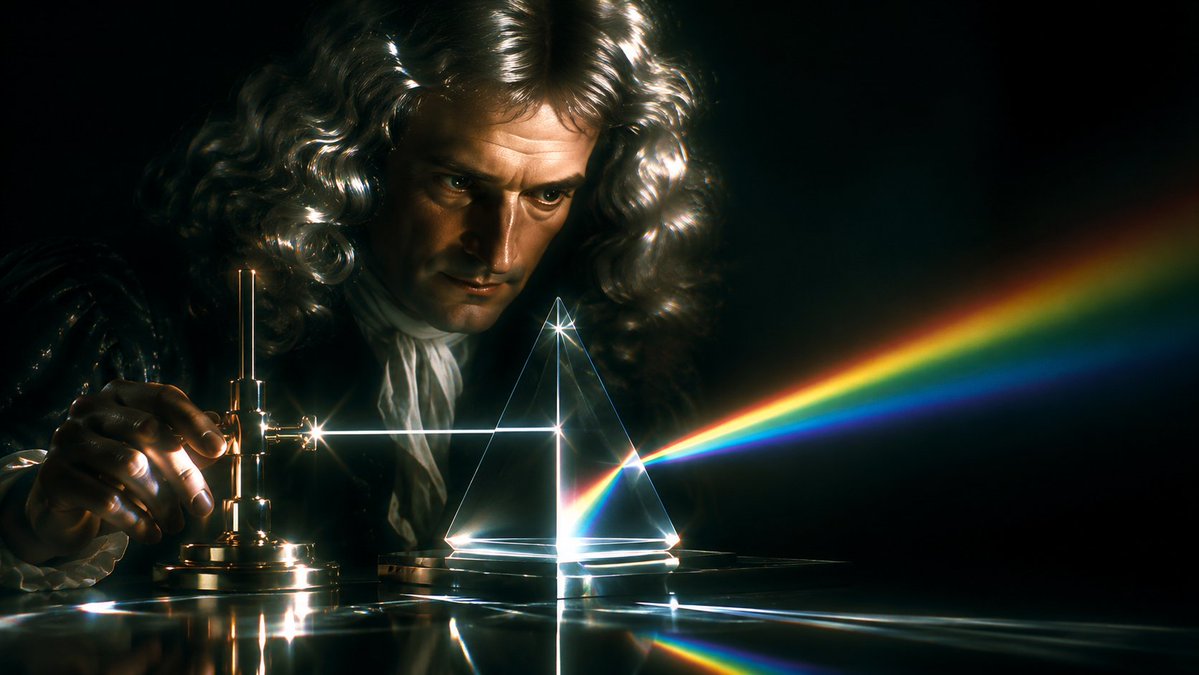
Newton Prism Experiment Portrait
A cinematic photorealistic scene of an 18th-century scientist demonstrating a prism splitting white light into a rainbow spectrum.
This is a GPT Image 2 prompt case for Portrait & Character. Use the copy-ready prompt below to generate similar visuals, and review Awesome GPT Image 2 Prompts attribution plus commercial-use rights before reuse.
Free 1K preview
Generate one preview image instantly, no sign-up required.
Prompt
Copy-ready prompt
Create a cinematic photorealistic 18th-century science laboratory scene inspired by Newton’s prism experiment. A {argument name="scientist" default="Sir Isaac Newton"} figure sits in deep darkness behind a polished table, wearing a voluminous {argument name="wig color" default="silvery white"} curly powdered wig and period clothing with ruffled cuffs; Show every face clearly with natural, detailed facial features. On the left, one hand adjusts a small antique brass optical apparatus with screws and a vertical rod, producing a bright white horizontal beam of light. The beam travels across the table into a transparent triangular glass prism at center-right, where it refracts into a vivid rainbow spectrum extending diagonally to the right, with clearly separated red, orange, yellow, green, blue, and violet bands. Use a black background, strong chiaroscuro, dramatic lens flares, glowing caustics, reflections on the glossy tabletop, delicate glass outlines, and a moody historical-scientific atmosphere. Wide cinematic aspect ratio, high contrast, realistic materials, shallow depth of field, dark teal and gold color grading, no text.Prompt variables
Editable argument placeholders found in the prompt, with their default values.
Best for
- - Portrait & Character visual exploration
- - Image generation and reference-image edits
- - Reusable briefs that keep source attribution visible
Change these parts
- - Subject, product, character, or scene
- - Aspect ratio, camera, lighting, and background
- - Brand, text, color, and output constraints
Recommended model and settings
- - Model: gpt-image-2
- - Input mode: Text to Image
- - Aspect ratio: source
- - Commercial status: review original source
How to use this prompt
- 1. Copy the prompt and preserve its structure for the first test.
- 2. Replace the subject, context, and publishing channel.
- 3. Change one camera, lighting, or style variable per iteration.
- 4. Inspect the output, source, text, and rights before reuse.
Limitations, source, and reuse cautions
- - Generated output is an editable draft, not factual, legal, or rights evidence.
- - Review the linked source, people, brands, logos, text, and third-party media before commercial use.
More cases in this category
Prioritized by category, input mode compatibility, quality, and lower risk.


Reuse and source notes
Use this prompt safely after previewing the case.
- 1.Copy the prompt or open it directly in Dovoo with the generation button.
- 2.Adjust variables, aspect ratio, and reference images for your own use case.
- 3.Before publishing or paid usage, verify source rights, attribution requirements, and brand or likeness risks.
Can I use this prompt commercially?
Commercial-use status is allowed. Review the original source, license, brand constraints, and legal requirements before paid usage.
Where does this case come from?
This case is imported from Awesome GPT Image 2 Prompts; keep attribution visible and check the source URL before reuse.