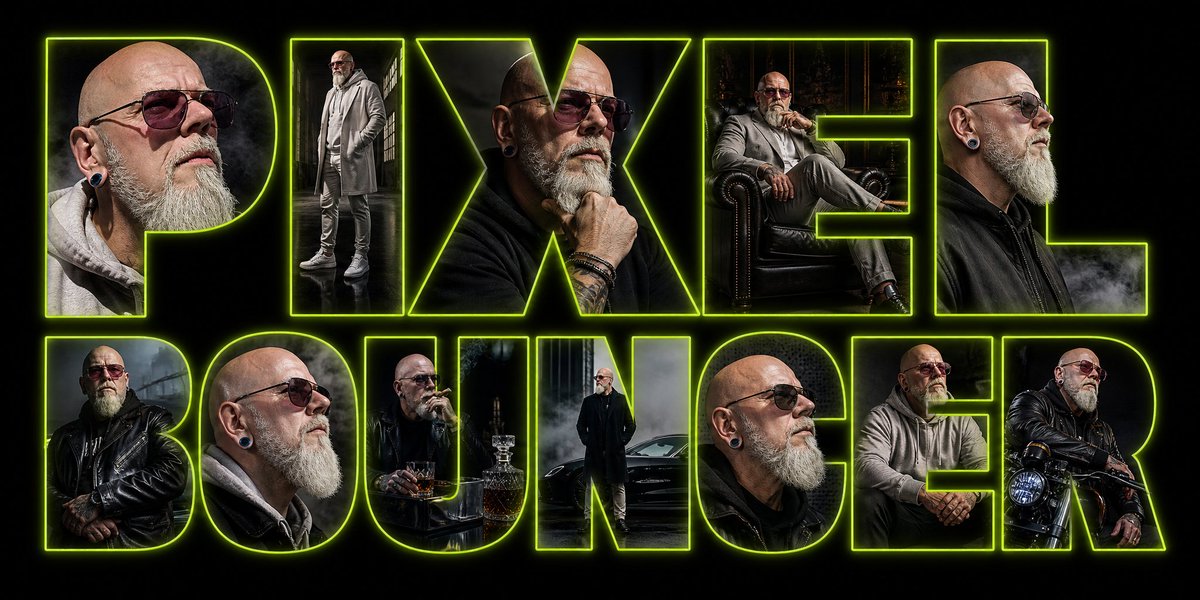
Neon Portrait Typography Poster
Generates a wide cyberpunk-style poster with giant neon outlined typography filled with cinematic character portraits.
This is a GPT Image 2 prompt case for Graphic & Poster. Use the copy-ready prompt below to generate similar visuals, and review Awesome GPT Image 2 Prompts attribution plus commercial-use rights before reuse.
Free 1K preview
Generate one preview image instantly, no sign-up required.
Prompt
Copy-ready prompt
Goal: Create a wide cinematic typographic poster for {argument name="headline text" default="PIXEL BOUNCER"}, where the words themselves are huge hollow block letters outlined in neon acid green and filled with dark photographic portraits of the same character.

Canvas: Ultra-wide horizontal banner, approximately 2:1 aspect ratio, black background, high contrast, moody cyberpunk/nightclub atmosphere.

Layout: Two-line composition with exactly 12 oversized uppercase letters: top row has 5 letters spelling “PIXEL”; bottom row has 7 letters spelling “BOUNCER.” Use a bold condensed geometric sans-serif display font with thick strokes and transparent interiors. Each letter acts as a clipping mask containing a different portrait vignette. Add a bright lime-green neon outline around every letter, with a soft outer glow and subtle inner rim light. Keep the letters tightly spaced and nearly filling the frame from left to right.

Letter contents, exactly 12 distinct vignettes:
1. P: close-up side portrait of a bald, bearded man in a gray hoodie, ear plug visible, smoky dark background.
2. I: full-body standing portrait in a gray coat and layered streetwear, industrial window light.
3. X: close-up of the same man in a black jacket, hand near chin, tattoos and bracelets visible.
4. E: seated portrait in a leather armchair, gray outfit, dark forest or gothic interior behind him.
5. L: close side portrait in a black jacket with smoke drifting across the lower edge.
6. B: man in a black leather jacket with crossed arms, rainy industrial background.
7. O: close-up profile portrait in gray hoodie, bald head, beard, ear plug, dramatic side lighting.
8. U: seated at a small table with a whiskey glass and bottle, dark bar-like setting.
9. N: full-body portrait standing beside a black car in fog, wearing a long dark coat.
10. C: close-up portrait with shaved head, gray beard, ear plug, black jacket.
11. E: seated forward with hands clasped, gray hoodie, dim urban interior.
12. R: man sitting on or leaning against a motorcycle, black leather jacket, headlight visible.

Character details: The character is {argument name="character description" default="a bald middle-aged man with a gray beard, ear gauges, tattoos, rugged bouncer energy"}. Wardrobe should be {argument name="wardrobe style" default="dark leather jackets, gray hoodies, long coats, boots, bracelets, and layered streetwear"}. The mood is {argument name="visual mood" default="gritty, cinematic, smoky, masculine, high-contrast, urban noir"}.

Visual style: Photorealistic composite poster, dramatic low-key lighting, smoky haze, rain reflections, subtle film grain, sharp neon typography, glossy black shadows, premium album-cover or nightclub flyer aesthetic. The neon outline color should be {argument name="neon outline color" default="electric lime green"}.

Constraints: Make the text perfectly readable as “PIXEL BOUNCER.” Do not add extra words, logos, watermarks, captions, borders, or UI elements. Keep the background pure black outside the glowing letterforms. Ensure every letter contains a unique cinematic portrait crop while maintaining one consistent character identity.
Prompt variables
Editable argument placeholders found in the prompt, with their default values.
Best for
- - Graphic & Poster visual exploration
- - Image generation and reference-image edits
- - Reusable briefs that keep source attribution visible
Change these parts
- - Subject, product, character, or scene
- - Aspect ratio, camera, lighting, and background
- - Brand, text, color, and output constraints
Recommended model and settings
- - Model: gpt-image-2
- - Input mode: Text to Image
- - Aspect ratio: source
- - Commercial status: review original source
How to use this prompt
- 1. Copy the prompt and preserve its structure for the first test.
- 2. Replace the subject, context, and publishing channel.
- 3. Change one camera, lighting, or style variable per iteration.
- 4. Inspect the output, source, text, and rights before reuse.
Limitations, source, and reuse cautions
- - Generated output is an editable draft, not factual, legal, or rights evidence.
- - Review the linked source, people, brands, logos, text, and third-party media before commercial use.
More cases in this category
Prioritized by category, input mode compatibility, quality, and lower risk.





Reuse and source notes
Use this prompt safely after previewing the case.
- 1.Copy the prompt or open it directly in Dovoo with the generation button.
- 2.Adjust variables, aspect ratio, and reference images for your own use case.
- 3.Before publishing or paid usage, verify source rights, attribution requirements, and brand or likeness risks.
Can I use this prompt commercially?
Commercial-use status is allowed. Review the original source, license, brand constraints, and legal requirements before paid usage.
Where does this case come from?
This case is imported from Awesome GPT Image 2 Prompts; keep attribution visible and check the source URL before reuse.