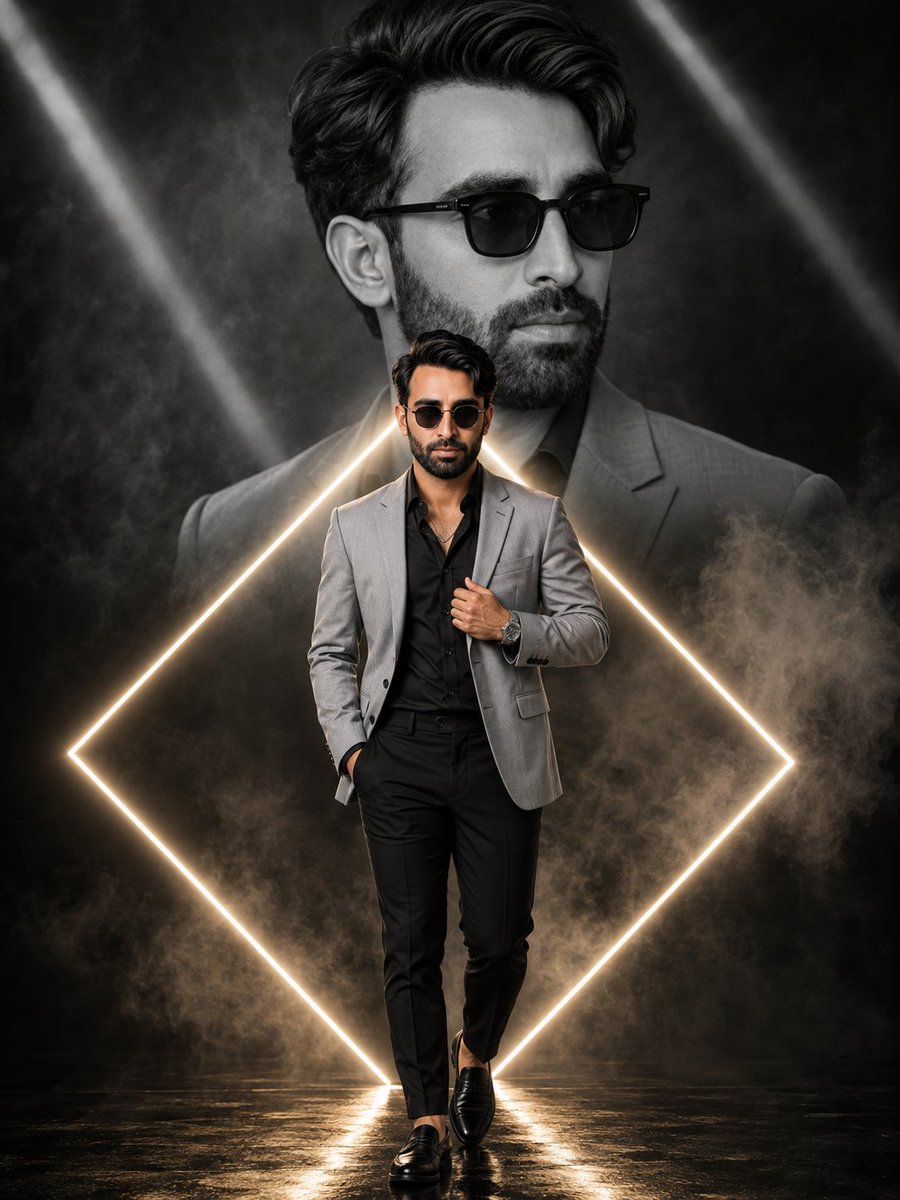
Neon Diamond Double Portrait Composite
A sophisticated studio portrait prompt combining a monochrome ghost portrait with a full-color foreground subject framed by a glowing neon diamond.
This is a GPT Image 2 prompt case for Portrait & Character. Use the copy-ready prompt below to generate similar visuals, and review Awesome GPT Image 2 Prompts attribution plus commercial-use rights before reuse.
Free 1K preview
Generate one preview image instantly, no sign-up required.
Prompt
Copy-ready prompt
Hyper-realistic cinematic double portrait composite — photorealistic large monochrome ghost portrait combined with a sharp full-color full-body walking portrait of the same man, framed within a glowing neon diamond outline, moody smoky studio backdrop, zero flat AI look.\n\nCONCEPT — EXACT: A layered composite where a large black-and-white close-up portrait fills the upper background against a smoky dark backdrop with diagonal light-beam accents, a glowing warm-white neon diamond outline frames the lower two-thirds of the frame, and a smaller sharp full-color full-body walking portrait of the same man stands centered within the diamond frame in the foreground.\n\nBACKGROUND GHOST PORTRAIT — EXACT: Large black-and-white close-up portrait, head turned slightly to the side, calm composed gaze, voluminous tousled dark hair, dark square-frame sunglasses, wearing a suit jacket collar visible at the shoulder, rendered entirely in monochrome grey tones, softly blended into the smoky backdrop.\n\nMAIN SUBJECT — FOREGROUND — EXACT: Full-body walking portrait, man standing with one hand tucked into his trouser pocket, other hand adjusting the lapel of his jacket with a wristwatch visible, voluminous tousled dark hair, dark round sunglasses, calm confident expression, thin necklace chain visible at the open collar.\n\nBODY: Lean athletic build, natural proportionate physique, relaxed confident standing posture.\n\nOUTFIT: {argument name="outfit" default="Light-grey tailored blazer worn open over a black button-up shirt, black tailored trousers, black leather loafers, dark round sunglasses, silver wristwatch, thin necklace chain."}\n\nNEON DIAMOND FRAME DETAIL — EXACT: A glowing {argument name="neon color" default="warm-white"} neon diamond-shaped outline surrounding the lower two-thirds of the frame around the foreground subject, soft glow bloom along the neon line, diagonal light-beam streaks crossing the upper background at varying angles.\n\nLIGHTING — EXACT: Soft even studio lighting on the foreground subject from the front, flat neutral lighting on the monochrome background portrait, warm glow spill from the neon diamond outline onto the floor and lower body, drifting smoke/fog catching subtle light throughout the background, no harsh shadows on the face.\n\nBACKGROUND — EXACT: {argument name="background style" default="Dark charcoal-black smoky studio backdrop with soft drifting fog, diagonal light-beam streaks crossing the upper portion, reflective dark floor surface beneath the subject's feet."}Prompt variables
Editable argument placeholders found in the prompt, with their default values.
Best for
- - Portrait & Character visual exploration
- - Image generation and reference-image edits
- - Reusable briefs that keep source attribution visible
Change these parts
- - Subject, product, character, or scene
- - Aspect ratio, camera, lighting, and background
- - Brand, text, color, and output constraints
Recommended model and settings
- - Model: gpt-image-2
- - Input mode: Text to Image
- - Aspect ratio: source
- - Commercial status: review original source
How to use this prompt
- 1. Copy the prompt and preserve its structure for the first test.
- 2. Replace the subject, context, and publishing channel.
- 3. Change one camera, lighting, or style variable per iteration.
- 4. Inspect the output, source, text, and rights before reuse.
Limitations, source, and reuse cautions
- - Generated output is an editable draft, not factual, legal, or rights evidence.
- - Review the linked source, people, brands, logos, text, and third-party media before commercial use.
More cases in this category
Prioritized by category, input mode compatibility, quality, and lower risk.


Reuse and source notes
Use this prompt safely after previewing the case.
- 1.Copy the prompt or open it directly in Dovoo with the generation button.
- 2.Adjust variables, aspect ratio, and reference images for your own use case.
- 3.Before publishing or paid usage, verify source rights, attribution requirements, and brand or likeness risks.
Can I use this prompt commercially?
Commercial-use status is allowed. Review the original source, license, brand constraints, and legal requirements before paid usage.
Where does this case come from?
This case is imported from Awesome GPT Image 2 Prompts; keep attribution visible and check the source URL before reuse.