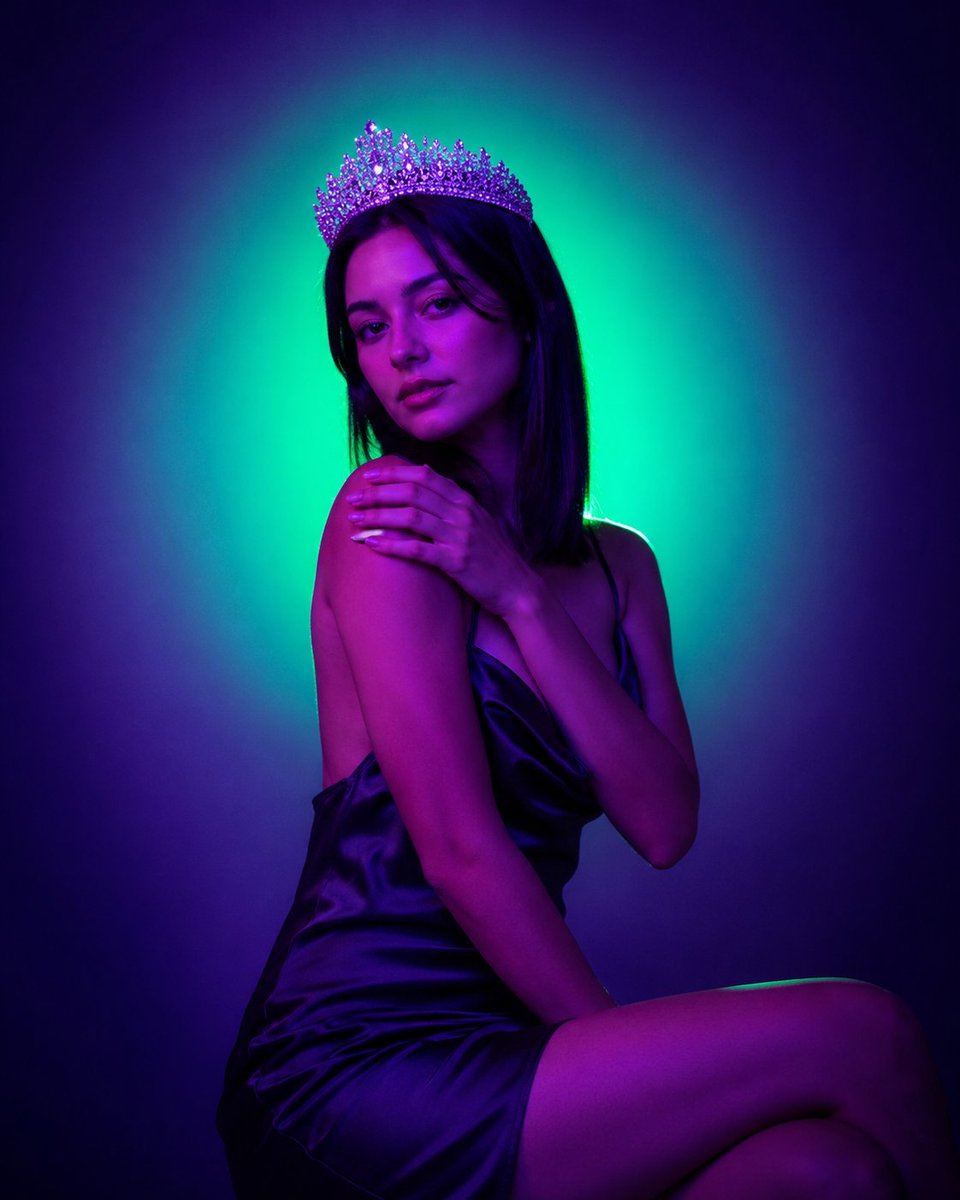
Neon Crown Fashion Portrait
Generates a moody neon studio fashion portrait of a crowned woman with a censored face and dramatic teal-magenta lighting.
This is a GPT Image 2 prompt case for 时尚美妆. Use the copy-ready prompt below to generate similar visuals, and review Awesome GPT Image 2 Prompts attribution plus commercial-use rights before reuse.
Need the full prompt set? Use the 时尚美妆 topic hub for more related examples, or open the GPT Image 2 prompt library for the full example index, reusable structures, and source attribution.
Prompt
Copy-ready prompt
创作一张电影质感的摄影棚肖像,画面中是一位迷人的年轻女性,以四分之三侧身姿势坐在深紫色背景前,她头后方有一个生动的青绿色圆形光环。她佩戴着一顶华丽闪耀的水晶皇冠(颜色:{argument name="crown color" default="紫银色"}),身穿一件丝滑缎面吊带裙(颜色:{argument name="dress color" default="深午夜紫"}),面料呈现出光泽感。她的 {argument name="hair style" default="黑色齐肩直发"} 勾勒出脸部轮廓,但面部被一个位于中心位置的实心方形遮挡块(颜色:{argument name="censor block color" default="Dark purple"})刻意遮住。她姿态优雅,一条腿弯曲在前景下方,一只手搭在对侧肩膀上,露出修长的浅色指甲。身体被戏剧性的洋红色和紫色光线照亮,边缘带有青色轮廓光。采用情绪化的霓虹时尚摄影美学,高对比度,柔和的大气光感,平滑的皮肤高光,浅景深,居中构图,竖构图肖像,奢华夜店配色,呈现逼真的摄影细节。Prompt variables
Editable argument placeholders found in the prompt, with their default values.
Variable
crown color
Default
Purple and silver
Variable
dress color
Default
Midnight Purple
Variable
hair style
Default
Black shoulder-length straight hair
Variable
censor block color
Default
Dark purple
More cases in this category
Prioritized by category, input mode compatibility, quality, and lower risk.
Reuse and source notes
Use this prompt safely after previewing the case.
- 1.Copy the prompt or open it directly in Dovoo with the generation button.
- 2.Adjust variables, aspect ratio, and reference images for your own use case.
- 3.Before publishing or paid usage, verify source rights, attribution requirements, and brand or likeness risks.
Can I use this prompt commercially?
Commercial-use status is allowed. Review the original source, license, brand constraints, and legal requirements before paid usage.
Where does this case come from?
This case is imported from Awesome GPT Image 2 Prompts; keep attribution visible and check the source URL before reuse.