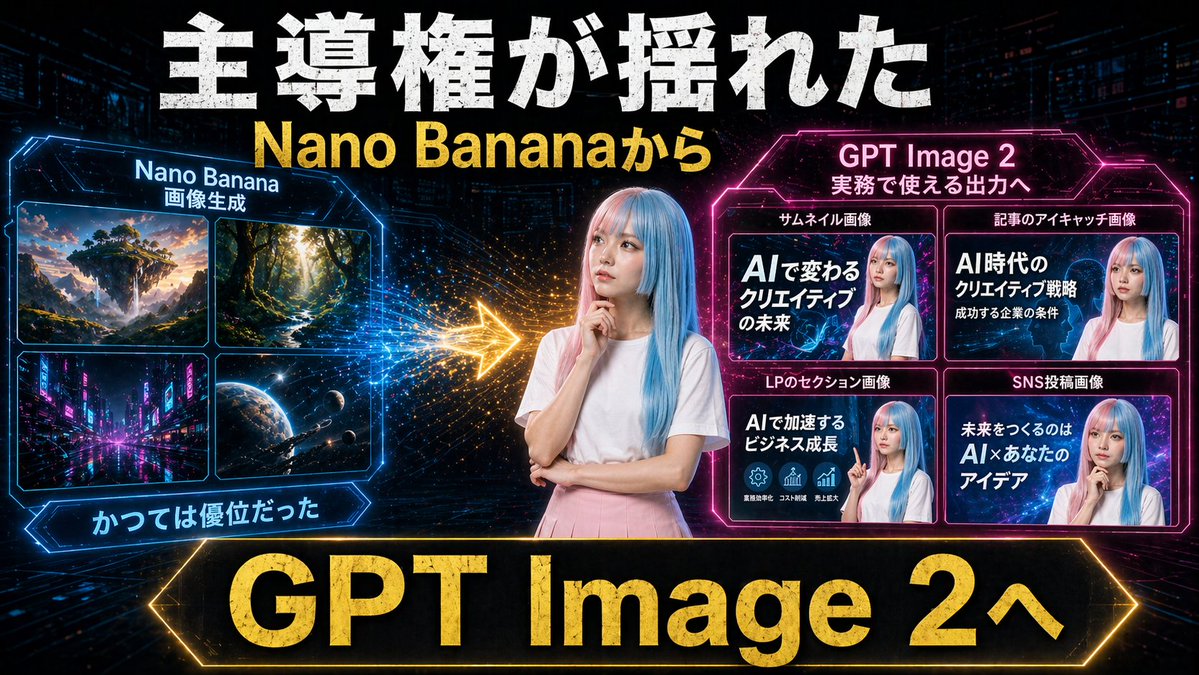
Neon AI Thumbnail Comparison
A bold cyberpunk comparison thumbnail showing a shift from Nano Banana image generation to GPT Image 2 with practical marketing output examples, ideal for YouTube or social media promos.
This is a GPT Image 2 prompt case for Graphic & Poster. Use the copy-ready prompt below to generate similar visuals, and review Awesome GPT Image 2 Prompts attribution plus commercial-use rights before reuse.
Free 1K preview
Generate one preview image instantly, no sign-up required.
Prompt
Copy-ready prompt
Create a dramatic Japanese YouTube thumbnail in a futuristic neon cyberpunk style, 16:9 landscape. Use a dark tech-city background with faint skyscrapers, digital grid lines, glowing particles, and high-contrast blue, pink, and gold lighting. In the exact center, place a young woman from the waist up with long straight pastel blue hair, wearing a plain white short-sleeve T-shirt and a light pink skirt, posing thoughtfully with one hand near her chin and the other arm folded; Show every face clearly with natural, detailed facial features. Across the very top, add huge distressed bold white Japanese headline text reading 主導権が揺れた, and directly below it add large bold yellow text reading {argument name="subheadline text" default="Nano Bananaから"}. On the left side, create a glowing blue hexagonal-framed panel titled Nano Banana with a smaller subtitle 画像生成. Inside that panel, include exactly 4 image tiles in a 2x2 grid: 1) a fantasy floating island landscape at sunset, 2) a sunlit forest path with tall trees, 3) a neon futuristic city street at night, 4) an outer-space planet scene with stars and a spacecraft. Beneath the left panel, add a blue glowing ribbon label reading かつては優位だった. On the right side, create a glowing magenta hexagonal-framed panel titled {argument name="right panel title" default="GPT Image 2"} with a smaller subtitle 実務で使える出力へ. Inside it, include exactly 4 example thumbnail cards in a 2x2 grid, Show every face clearly with natural, detailed facial features. The 4 card labels above the tiles are: サムネイル画像, 記事のアイキャッチ画像, LPのセクション画像, SNS投稿画像. The large text inside the 4 cards should read respectively: 1) AIで変わるクリエイティブの未来, 2) AI時代のクリエイティブ戦略 成功する企業の条件, 3) AIで加速するビジネス成長, 4) 未来をつくるのは AI×あなたのアイデア. Between the left and right panels, place a bright glowing gold arrow pointing from left to right with spark-like particle trails, indicating transition or superiority shift. Along the bottom, add a very large black banner with a glowing gold border and massive bold gold text reading {argument name="bottom banner text" default="GPT Image 2へ"}. Overall composition should feel like a comparison graphic showing a shift from older image generation to more practical commercial output, with aggressive thumbnail typography, strong glow effects, metallic texture on major text, and polished social-media marketing visuals.Prompt variables
Editable argument placeholders found in the prompt, with their default values.
Best for
- - Graphic & Poster visual exploration
- - Image generation and reference-image edits
- - Reusable briefs that keep source attribution visible
Change these parts
- - Subject, product, character, or scene
- - Aspect ratio, camera, lighting, and background
- - Brand, text, color, and output constraints
Recommended model and settings
- - Model: gpt-image-2
- - Input mode: Text to Image
- - Aspect ratio: source
- - Commercial status: review original source
How to use this prompt
- 1. Copy the prompt and preserve its structure for the first test.
- 2. Replace the subject, context, and publishing channel.
- 3. Change one camera, lighting, or style variable per iteration.
- 4. Inspect the output, source, text, and rights before reuse.
Limitations, source, and reuse cautions
- - Generated output is an editable draft, not factual, legal, or rights evidence.
- - Review the linked source, people, brands, logos, text, and third-party media before commercial use.
More cases in this category
Prioritized by category, input mode compatibility, quality, and lower risk.






Reuse and source notes
Use this prompt safely after previewing the case.
- 1.Copy the prompt or open it directly in Dovoo with the generation button.
- 2.Adjust variables, aspect ratio, and reference images for your own use case.
- 3.Before publishing or paid usage, verify source rights, attribution requirements, and brand or likeness risks.
Can I use this prompt commercially?
Commercial-use status is allowed. Review the original source, license, brand constraints, and legal requirements before paid usage.
Where does this case come from?
This case is imported from Awesome GPT Image 2 Prompts; keep attribution visible and check the source URL before reuse.