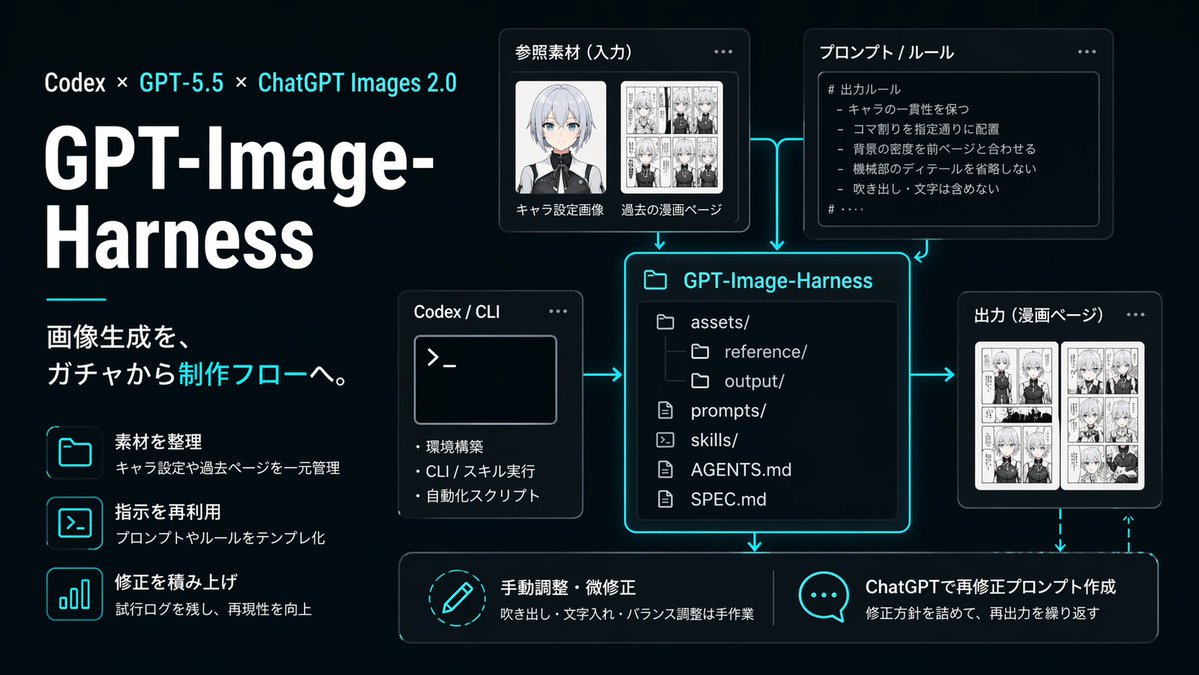
Neon AI Image Workflow Infographic
A sleek Japanese-language dark UI infographic showing a GPT-Image-Harness production workflow, suitable for tech presentations, product explainers, and social media posts about reproducible image-generation pipelines.
This is a GPT Image 2 prompt case for Graphic & Poster. Use the copy-ready prompt below to generate similar visuals, and review Awesome GPT Image 2 Prompts attribution plus commercial-use rights before reuse.
Free 1K preview
Generate one preview image instantly, no sign-up required.
Prompt
Copy-ready prompt
{
  "branding": {
    "subtitle": "画像生成を、ガチャから制作フローへ。",
    "title": "GPT-Image-Harness",
    "topline": "Codex × GPT-5.5 × ChatGPT Images 2.0"
  },
  "canvas": {
    "aspect_ratio": "16:9",
    "composition": "left-aligned title block with modular diagram on the right and bottom"
  },
  "diagram": {
    "connectors": "cyan glowing arrows connecting input, rules, and CLI into the central repository card; arrows from repository to output and downward to the two bottom action cards; dashed cyan feedback arrow looping from output back toward the bottom-right action area",
    "nodes": [
      {
        "kind": "input card",
        "title": "Reference Material (Input)",
        "visual": "two thumbnail areas, Show every face clearly with natural, detailed facial features, one black-and-white manga page collage"
      },
      {
        "body_text": [
          "# 出力ルール",
          "- キャラの一貫性を保つ",
          "- コマ割りを指定通りに配置",
          "- 背景の密度を前ページと合わせる",
          "- 機械部のディテールを省略しない",
          "- 吹き出し・文字は含めない"
        ],
        "kind": "rule card",
        "title": "プロンプト / ルール",
        "visual": "bullet list inside code-like panel"
      },
      {
        "kind": "tool card",
        "title": "Codex / CLI",
        "visual": "terminal window with prompt symbol >_ and three bullet points"
      },
      {
        "kind": "repository card",
        "title": "GPT-Image-Harness",
        "visual": "large central file-tree panel with glowing cyan border"
      },
      {
        "kind": "output card",
        "title": "出力(漫画ページ)",
        "visual": "two manga page thumbnails side by side"
      },
      {
        "description": "吹き出し・文字入れ・バランス調整は手作業",
        "kind": "action card",
        "title": "手動調整・微修正",
        "visual": "circular pencil icon"
      },
      {
        "description": "修正方針を詰めて、再出力を繰り返す",
        "kind": "action card",
        "title": "ChatGPTで再修正プロンプト作成",
        "visual": "speech bubble icon with three dots"
      }
    ]
  },
  "layout": {
    "sections": [
      {
        "count": 3,
        "labels": [
          "素材を整理",
          "指示を再利用",
          "修正を積み上げ"
        ],
        "position": "left column",
        "title": "left feature list"
      },
      {
        "count": 2,
        "labels": [
          "キャラ設定画像",
          "過去の漫画ページ"
        ],
        "position": "upper center-left",
        "title": "Reference Material (Input)"
      },
      {
        "count": 1,
        "labels": [
          "# 出力ルール"
        ],
        "position": "upper center-right",
        "title": "プロンプト / ルール"
      },
      {
        "count": 3,
        "labels": [
          "Environment Setup",
          "CLI / スキル実行",
          "自動化スクリプト"
        ],
        "position": "middle left of center",
        "title": "Codex / CLI"
      },
      {
        "count": 6,
        "labels": [
          "assets/",
          "reference/",
          "output/",
          "prompts/",
          "skills/",
          "AGENTS.md",
          "SPEC.md"
        ],
        "position": "center",
        "title": "GPT-Image-Harness"
      },
      {
        "count": 1,
        "labels": [
          "漫画ページ"
        ],
        "position": "middle right",
        "title": "出力(漫画ページ)"
      },
      {
        "count": 2,
        "labels": [
          "手動調整・微修正",
          "ChatGPTで再修正プロンプト作成"
        ],
        "position": "bottom row",
        "title": "bottom actions"
      }
    ]
  },
  "left_panel": {
    "decorative_line": "short horizontal cyan line under title block",
    "feature_items": [
      {
        "description": "キャラ設定や過去ページを一元管理",
        "icon": "folder outline glowing cyan",
        "title": "素材を整理"
      },
      {
        "description": "プロンプトやルールをテンプレ化",
        "icon": "terminal window outline glowing cyan",
        "title": "指示を再利用"
      },
      {
        "description": "試行ログを残し、再現性を向上",
        "icon": "bar chart outline glowing cyan",
        "title": "修正を積み上げ"
      }
    ],
    "headline_scale": "very large",
    "title_weight": "bold extra-heavy"
  },
  "lighting": "soft neon edge glow around cards and icons",
  "quality": "crisp vector-like infographic, presentation-ready, precise alignment, no watermarks",
  "style": "clean futuristic presentation slide, black to deep navy gradient background, neon cyan glow accents, thin cyan connector arrows, modern UI cards with rounded corners, subtle shadows, high contrast white typography, polished startup branding aesthetic",
  "type": "dark tech workflow infographic",
  "typography": {
    "accent_color": "bright cyan",
    "body_color": "light gray-white",
    "language": "Japanese",
    "title_color": "white"
  }
}
Best for
- - Graphic & Poster visual exploration
- - Image generation and reference-image edits
- - Reusable briefs that keep source attribution visible
Change these parts
- - Subject, product, character, or scene
- - Aspect ratio, camera, lighting, and background
- - Brand, text, color, and output constraints
Recommended model and settings
- - Model: gpt-image-2
- - Input mode: Text to Image
- - Aspect ratio: source
- - Commercial status: review original source
How to use this prompt
- 1. Copy the prompt and preserve its structure for the first test.
- 2. Replace the subject, context, and publishing channel.
- 3. Change one camera, lighting, or style variable per iteration.
- 4. Inspect the output, source, text, and rights before reuse.
Limitations, source, and reuse cautions
- - Generated output is an editable draft, not factual, legal, or rights evidence.
- - Review the linked source, people, brands, logos, text, and third-party media before commercial use.
More cases in this category
Prioritized by category, input mode compatibility, quality, and lower risk.
Reuse and source notes
Use this prompt safely after previewing the case.
- 1.Copy the prompt or open it directly in Dovoo with the generation button.
- 2.Adjust variables, aspect ratio, and reference images for your own use case.
- 3.Before publishing or paid usage, verify source rights, attribution requirements, and brand or likeness risks.
Can I use this prompt commercially?
Commercial-use status is allowed. Review the original source, license, brand constraints, and legal requirements before paid usage.
Where does this case come from?
This case is imported from Awesome GPT Image 2 Prompts; keep attribution visible and check the source URL before reuse.