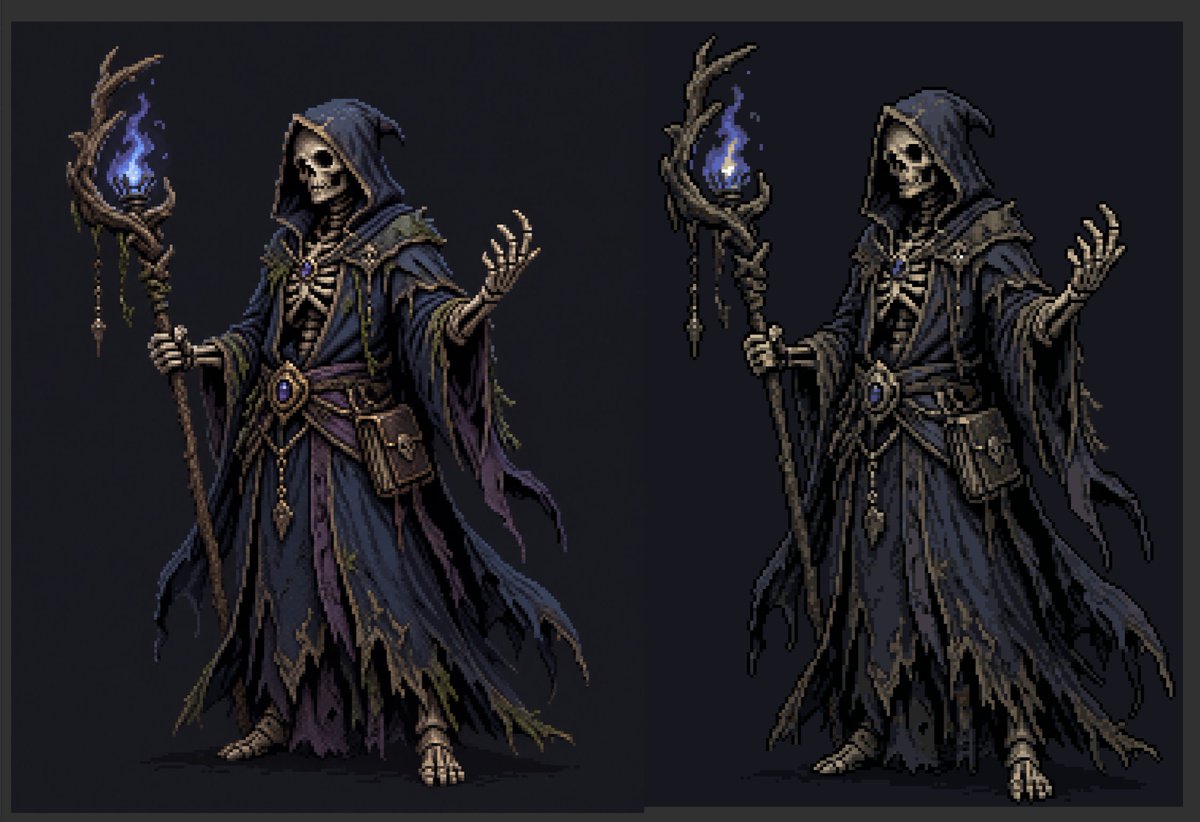
Necromancer Pixel Art Comparison
Generates a side-by-side dark fantasy necromancer sprite comparison showing a soft mixel version and a sharper pixelated version for pixel-art workflow demonstrations.
This is a GPT Image 2 prompt case for Anime & Game. Use the copy-ready prompt below to generate similar visuals, and review Awesome GPT Image 2 Prompts attribution plus commercial-use rights before reuse.
Free 1K preview
Generate one preview image instantly, no sign-up required.
Prompt
Copy-ready prompt
Create a dark fantasy pixel-art character comparison on a wide horizontal canvas with a charcoal-black background and a subtle dark gray border. Show exactly 2 full-body necromancer figures side by side: the left figure is a softer near-pixel-art/mixel version, and the right figure is a crisper pixelated version with stronger black contours and clearer blocky edges. Both figures depict the same undead wizard: a hooded skeletal necromancer in layered, tattered robes, holding a twisted wooden staff topped with a blue ghost flame. The left figure has an obscured shadowy blank face under the hood, while the right figure has a visible skull face with hollow eye sockets and bared teeth. The character wears a deep {argument name="robe color" default="midnight blue and muted purple"} hooded robe with ragged hems, layered sleeves, torn trailing cloth strips, bone-like chest armor, a rope-and-leather belt, dangling gold ornaments, a central oval blue gemstone, small pouches, and exposed skeletal hands and feet. Each figure holds exactly 1 gnarled staff in the left hand; each staff has exactly 1 blue flame surrounded by twisted branches, with small hanging charms and bead-like ornaments. The right hand of each figure is raised in a spellcasting gesture with splayed skeletal fingers. Use a limited pixel-art palette, high contrast rim shadows, muted brown wood, bone ivory skeleton details, dark navy folds, and glowing electric-blue flame highlights. Keep the pose nearly identical between the 2 figures, centered vertically, with the left character slightly softer and painterly and the right character more sharply pixelated. No text, no labels, no watermark, no extra characters, no background scenery beyond the flat dark backdrop.Prompt variables
Editable argument placeholders found in the prompt, with their default values.
Best for
- - Anime & Game visual exploration
- - Image generation and reference-image edits
- - Reusable briefs that keep source attribution visible
Change these parts
- - Subject, product, character, or scene
- - Aspect ratio, camera, lighting, and background
- - Brand, text, color, and output constraints
Recommended model and settings
- - Model: gpt-image-2
- - Input mode: Text to Image
- - Aspect ratio: source
- - Commercial status: review original source
How to use this prompt
- 1. Copy the prompt and preserve its structure for the first test.
- 2. Replace the subject, context, and publishing channel.
- 3. Change one camera, lighting, or style variable per iteration.
- 4. Inspect the output, source, text, and rights before reuse.
Limitations, source, and reuse cautions
- - Generated output is an editable draft, not factual, legal, or rights evidence.
- - Review the linked source, people, brands, logos, text, and third-party media before commercial use.
More cases in this category
Prioritized by category, input mode compatibility, quality, and lower risk.

Reuse and source notes
Use this prompt safely after previewing the case.
- 1.Copy the prompt or open it directly in Dovoo with the generation button.
- 2.Adjust variables, aspect ratio, and reference images for your own use case.
- 3.Before publishing or paid usage, verify source rights, attribution requirements, and brand or likeness risks.
Can I use this prompt commercially?
Commercial-use status is allowed. Review the original source, license, brand constraints, and legal requirements before paid usage.
Where does this case come from?
This case is imported from Awesome GPT Image 2 Prompts; keep attribution visible and check the source URL before reuse.