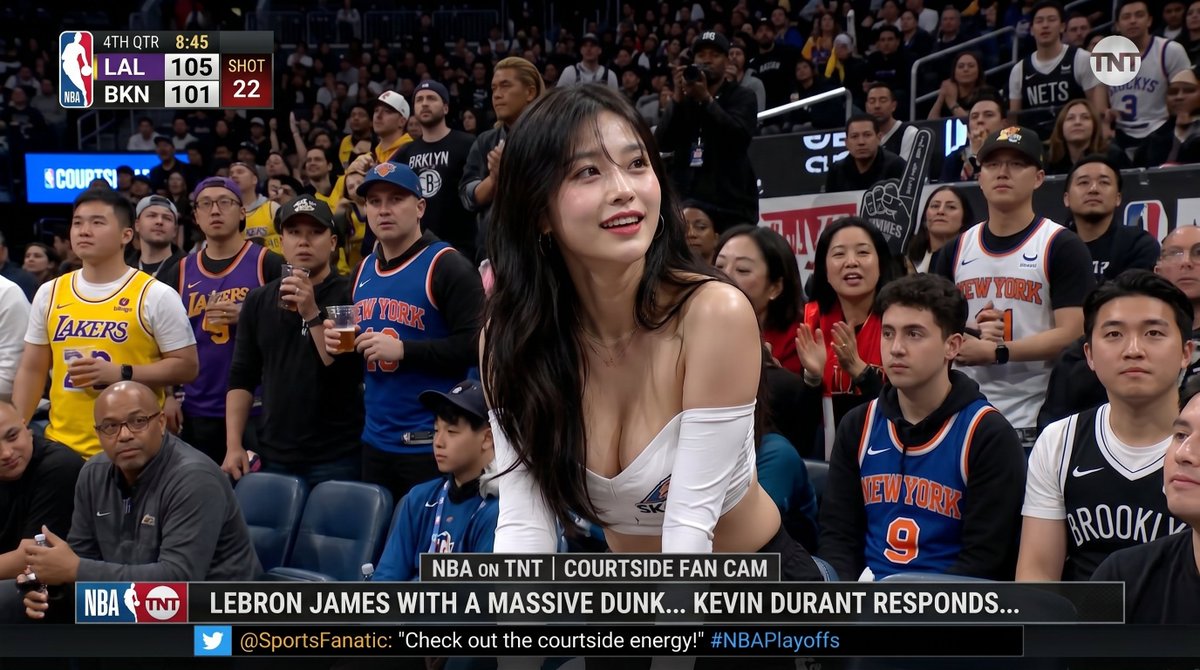
NBA Courtside Fan Cam Broadcast
Generates a realistic NBA on TNT courtside fan-cam broadcast screenshot with scoreboard, ticker graphics, crowd blur anonymization, and a central courtside fan.
This is a GPT Image 2 prompt case for 其他灵感. Use the copy-ready prompt below to generate similar visuals, and review Awesome GPT Image 2 Prompts attribution plus commercial-use rights before reuse.
Prompt
Copy-ready prompt
{
  "type": "超写实 NBA on TNT 转播截图照片",
  "scene": "现场职业篮球赛期间的场边球迷镜头,由电视转播摄像机拍摄,具有浅景深长焦压缩感,背景为座无虚席的球场观众,逼真的体育馆灯光,地道的体育转播色彩分级,16:9 横向画幅",
  "main_subject": {
    "position": "中央前景,身体前倾靠在场边座位上",
    "description": "{argument name=\"central fan description\" default=\"一位迷人的成年女性,留着深色长波浪卷发,身穿白色露肩短款上衣,坐在场边看向镜头\"}",
    "face": "被柔和的矩形隐私模糊遮盖,与人群匿名化风格一致"
  },
  "crowd": {
    "description": "主体后方及周围密集的场边观众,球迷们站立、鼓掌、手持饮料,身穿各式篮球服饰",
    "visible_team_apparel_count": 14,
    "team_apparel_breakdown": [
      "4 件湖人队主题衬衫或球衣(黄色/紫色)",
      "6 件纽约尼克斯队主题衬衫或球衣(蓝色/橙色/白色)",
      "4 件布鲁克林篮网队主题衬衫或球衣(黑色/白色)"
    ],
    "privacy_blurs": {
      "count": 24,
      "style": "覆盖在人群中个人面部上的肤色柔和矩形遮挡模糊块"
    }
  },
  "broadcast_graphics": {
    "count": 5,
    "components": [
      {
        "name": "左上角记分牌",
        "content": "NBA 标志垂直条,第四节,比赛时间 {argument name=\"game clock\" default=\"8:45\"},队伍 {argument name=\"scoreboard teams and score\" default=\"LAL 105, BKN 101\"},红色进攻时间框显示 SHOT 22"
      },
      {
        "name": "右上角频道水印",
        "content": "半透明圆形 TNT 标志"
      },
      {
        "name": "中央下方片段标签",
        "content": "NBA ON TNT | COURTSIDE FAN CAM"
      },
      {
        "name": "底部滚动新闻条",
        "content": "{argument name=\"headline text\" default=\"勒布朗·詹姆斯完成精彩扣篮... 凯文·杜兰特做出回应...\"}"
      },
      {
        "name": "底部社交媒体滚动条",
        "content": "Twitter 风格图标后接 @SportsFanatic: {argument name=\"social ticker quote\" default=\"感受一下场边的活力!#NBAPlayoffs\"}"
      }
    ]
  },
  "composition": "使其看起来像是一张暂停的现场电视转播截图,主体居中,人群在边缘自然裁剪,底部可见场边座位,记分牌位于左上角,水印位于右上角,底部有两条堆叠的下三分之一横幅",
  "style": "照片级真实感,高细节转播静帧,逼真的球场深度,轻微的压缩伪影,清晰锐利的排版,令人信服的 TNT/NBA 风格图形,无插画或卡通感"
}
Prompt variables
Editable argument placeholders found in the prompt, with their default values.
More cases in this category
Prioritized by category, input mode compatibility, quality, and lower risk.
Reuse and source notes
Use this prompt safely after previewing the case.
- 1.Copy the prompt or open it directly in Dovoo with the generation button.
- 2.Adjust variables, aspect ratio, and reference images for your own use case.
- 3.Before publishing or paid usage, verify source rights, attribution requirements, and brand or likeness risks.
Can I use this prompt commercially?
Commercial-use status is allowed. Review the original source, license, brand constraints, and legal requirements before paid usage.
Where does this case come from?
This case is imported from Awesome GPT Image 2 Prompts; keep attribution visible and check the source URL before reuse.