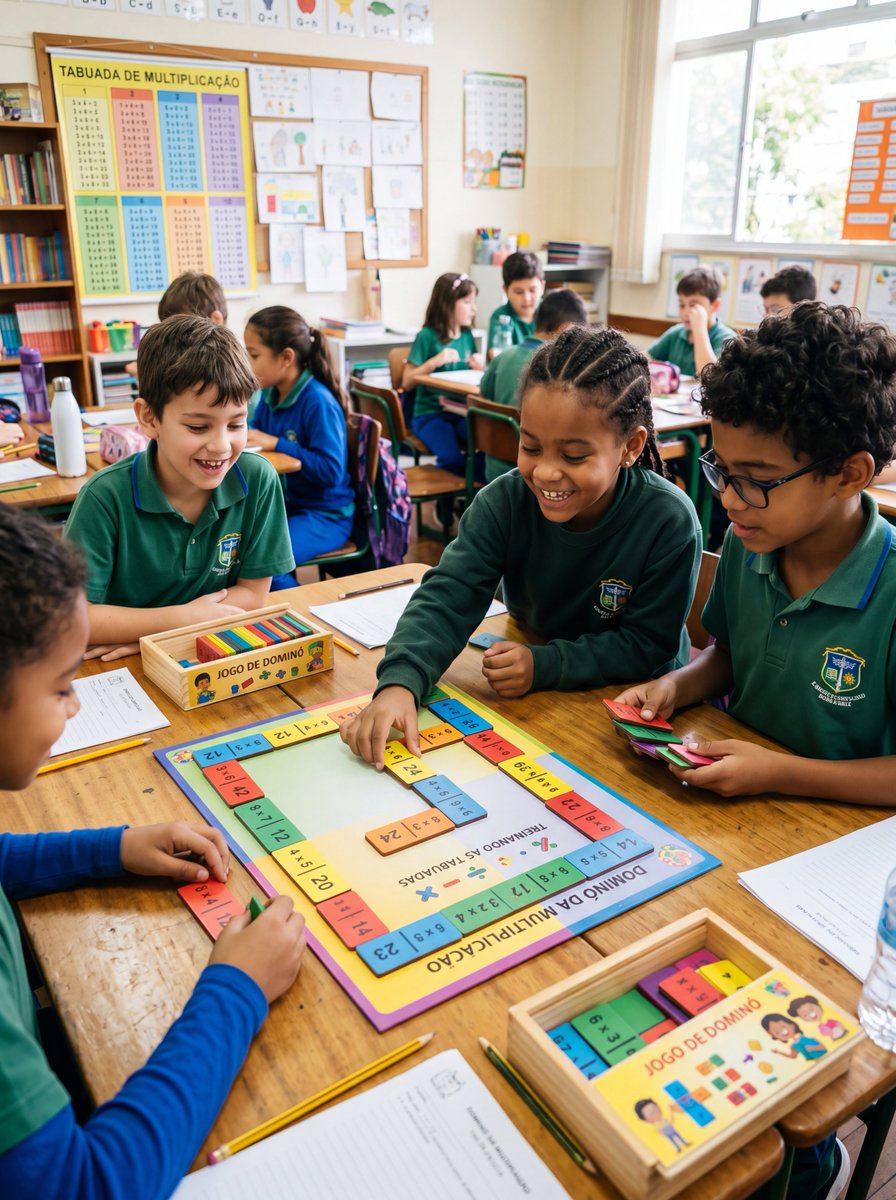
Multiplication Domino Classroom Activity
A realistic classroom photo showing children using a colorful multiplication domino board game, ideal for educational materials, school promotions, or math activity visuals.
This is a GPT Image 2 prompt case for Interior & Architecture. Use the copy-ready prompt below to generate similar visuals, and review Awesome GPT Image 2 Prompts attribution plus commercial-use rights before reuse.
Free 1K preview
Generate one preview image instantly, no sign-up required.
Prompt
Copy-ready prompt
A realistic documentary-style photo of an elementary school classroom during a math activity, with about 10 children seated around grouped wooden desks, wearing green and blue school uniforms, actively playing a colorful multiplication domino game. The camera is at child eye level, slightly angled downward toward the main table in the foreground. Center the scene on one square educational board game labeled in Portuguese, with the title "DOMINÓ DA MULTIPLICAÇÃO" on the lower edge and "TREINANDO AS TABUADAS" in the center, surrounded by a border of brightly colored domino-style multiplication tiles. Show 4 children clearly engaged around this main board: one child placing a yellow tile onto the board, one child holding a stack of multicolored tiles, one child watching from the left, and one child in a blue sleeve at the bottom edge arranging pieces. Include 2 shallow wooden boxes labeled "JOGO DE DOMINÓ," one near the center-left and one at the bottom-right, each containing colorful rectangular domino pieces. Scatter school materials naturally on the desks: 3 pencils, 2 worksheets, 1 water bottle, pencil cases, notebooks, and extra game tiles. In the background, show the rest of the classroom softly out of focus with additional students at desks, a bookshelf, a corkboard filled with children’s drawings, and a large multiplication chart poster on the left wall reading "TABUADA DE MULTIPLICAÇÃO." Bright natural daylight enters from tall windows on the right, giving the room a warm, lively, authentic school atmosphere. The educational board and tiles should use vivid classroom colors like yellow, blue, pink, green, and orange. Faces should be unobtrusive or de-emphasized, with the focus on hands-on learning, collaboration, and the multiplication domino activity. Vertical composition, highly realistic photography, candid classroom moment, sharp foreground details, soft depth of field in the background.
Best for
- - Interior & Architecture visual exploration
- - Image generation and reference-image edits
- - Reusable briefs that keep source attribution visible
Change these parts
- - Subject, product, character, or scene
- - Aspect ratio, camera, lighting, and background
- - Brand, text, color, and output constraints
Recommended model and settings
- - Model: gpt-image-2
- - Input mode: Text to Image
- - Aspect ratio: source
- - Commercial status: review original source
How to use this prompt
- 1. Copy the prompt and preserve its structure for the first test.
- 2. Replace the subject, context, and publishing channel.
- 3. Change one camera, lighting, or style variable per iteration.
- 4. Inspect the output, source, text, and rights before reuse.
Limitations, source, and reuse cautions
- - Generated output is an editable draft, not factual, legal, or rights evidence.
- - Review the linked source, people, brands, logos, text, and third-party media before commercial use.
More cases in this category
Prioritized by category, input mode compatibility, quality, and lower risk.
Reuse and source notes
Use this prompt safely after previewing the case.
- 1.Copy the prompt or open it directly in Dovoo with the generation button.
- 2.Adjust variables, aspect ratio, and reference images for your own use case.
- 3.Before publishing or paid usage, verify source rights, attribution requirements, and brand or likeness risks.
Can I use this prompt commercially?
Commercial-use status is allowed. Review the original source, license, brand constraints, and legal requirements before paid usage.
Where does this case come from?
This case is imported from Awesome GPT Image 2 Prompts; keep attribution visible and check the source URL before reuse.