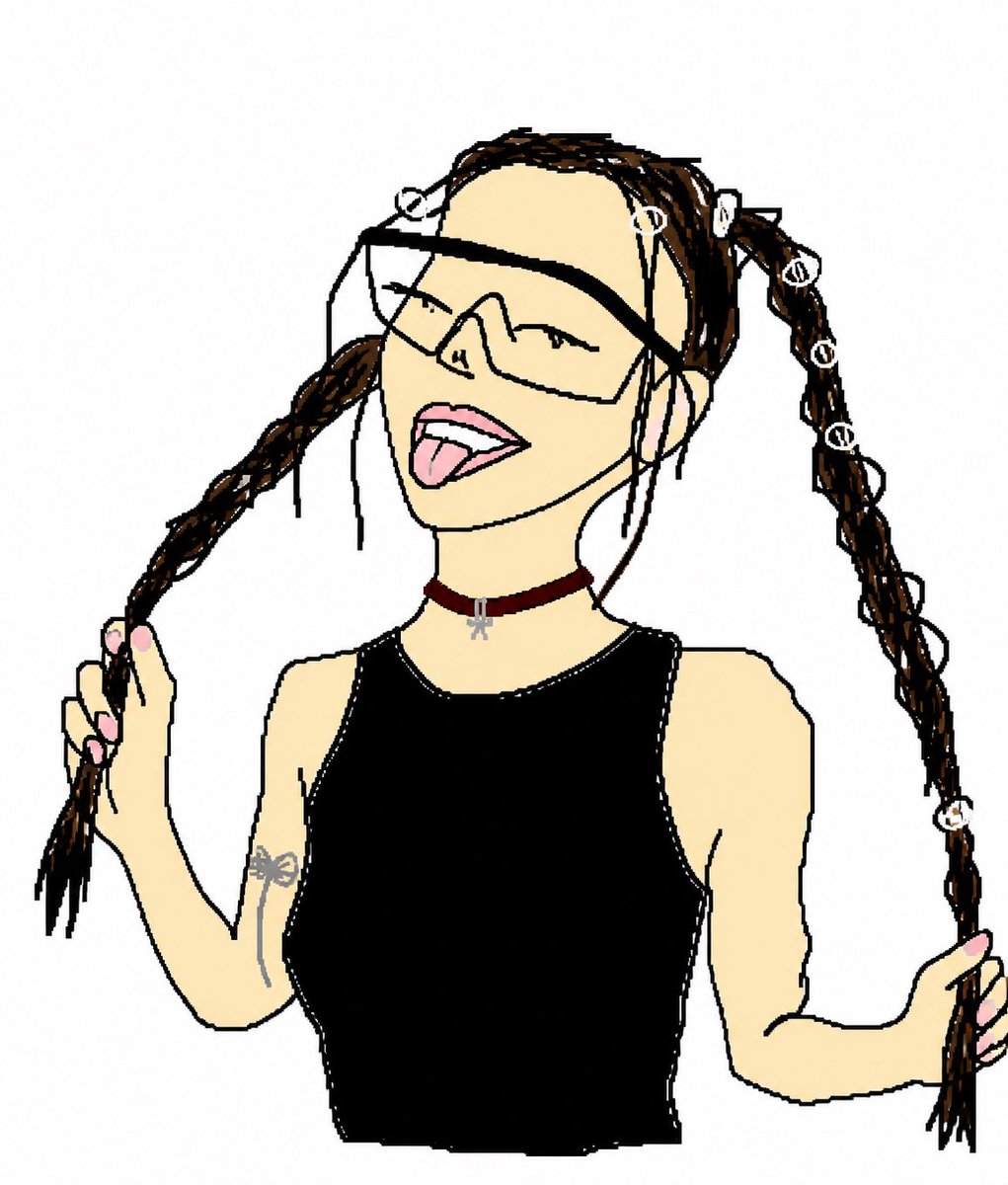
Crude MS Paint Photo Doodle
Transforms a reference photo into a funny hand-drawn doodle while preserving the subject’s pose, outfit, and key accessories.
This is a GPT Image 2 prompt case for Portrait & Character. Use the copy-ready prompt below to generate similar visuals, and review Awesome GPT Image 2 Prompts attribution plus commercial-use rights before reuse.
Free 1K preview
Generate one preview image instantly, no sign-up required.
Free text preview doesn’t preserve reference-image consistency.
Prompt
Copy-ready prompt
Using REFERENCE_0 as the subject and pose reference, transform the photo into an intentionally crude hand-drawn digital doodle, like a simple MS Paint/cartoon trace made with thick uneven black lines, flat colors, minimal shading, and a plain white background. Preserve the same upper-body framing, twin braided pigtail pose with both hands holding the braids, black sleeveless top, burgundy choker with small silver charm, arm tattoo, pink nails, and the seven visible white loop hair accessories: top-left loop, forehead loop, right-top loop, and four loops down the right braid. Show every face clearly with natural, detailed facial features: oversized angular wraparound sunglasses, closed smiling eyes, open mouth, and tongue sticking out. Remove the concrete wall and street background completely. Make the result look deliberately imperfect, loose, funny, and hand-drawn rather than polished.
Best for
- - Portrait & Character visual exploration
- - Image generation and reference-image edits
- - Reusable briefs that keep source attribution visible
Change these parts
- - Subject, product, character, or scene
- - Aspect ratio, camera, lighting, and background
- - Brand, text, color, and output constraints
Recommended model and settings
- - Model: gpt-image-2
- - Input mode: Image to Image
- - Aspect ratio: source
- - Commercial status: review original source
How to use this prompt
- 1. Copy the prompt and preserve its structure for the first test.
- 2. Replace the subject, context, and publishing channel.
- 3. Change one camera, lighting, or style variable per iteration.
- 4. Inspect the output, source, text, and rights before reuse.
Limitations, source, and reuse cautions
- - Generated output is an editable draft, not factual, legal, or rights evidence.
- - Review the linked source, people, brands, logos, text, and third-party media before commercial use.
More cases in this category
Prioritized by category, input mode compatibility, quality, and lower risk.


Reuse and source notes
Use this prompt safely after previewing the case.
- 1.Copy the prompt or open it directly in Dovoo with the generation button.
- 2.Adjust variables, aspect ratio, and reference images for your own use case.
- 3.Before publishing or paid usage, verify source rights, attribution requirements, and brand or likeness risks.
Can I use this prompt commercially?
Commercial-use status is allowed. Review the original source, license, brand constraints, and legal requirements before paid usage.
Where does this case come from?
This case is imported from Awesome GPT Image 2 Prompts; keep attribution visible and check the source URL before reuse.