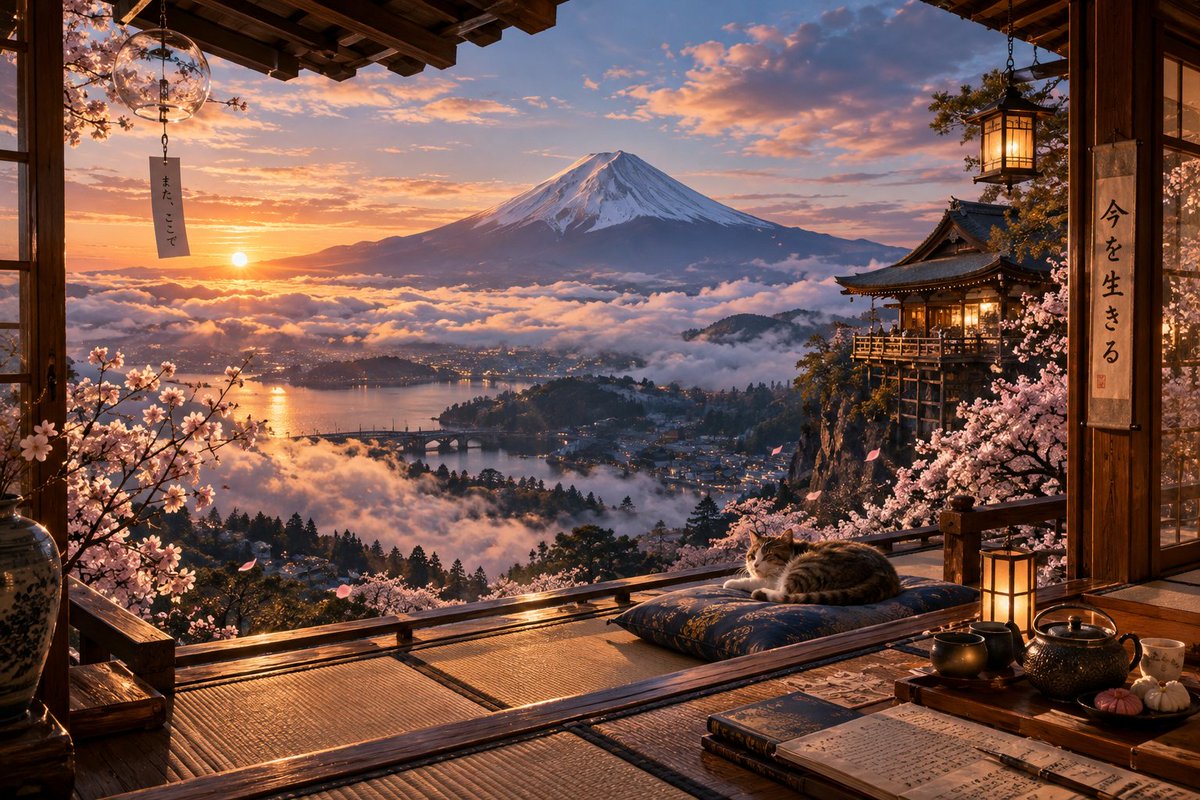
Mount Fuji Ryokan Sunset View
A cinematic photorealistic Japanese veranda scene overlooking Mount Fuji, ideal for serene travel, wallpaper, or atmospheric concept art.
This is a GPT Image 2 prompt case for Landscape & Nature. Use the copy-ready prompt below to generate similar visuals, and review Awesome GPT Image 2 Prompts attribution plus commercial-use rights before reuse.
Free 1K preview
Generate one preview image instantly, no sign-up required.
Prompt
Copy-ready prompt
Create a highly detailed cinematic landscape scene from the veranda of a traditional Japanese mountain inn overlooking Mount Fuji at sunset. The composition is framed by dark wooden beams, sliding glass doors, tatami mats, and an open balcony railing in the foreground, looking out across a mist-filled valley with a lake, small town lights, bridges, forested hills, and Mount Fuji centered in the distance with snow on its summit. The sky glows with warm orange, pink, and violet clouds as the low sun reflects on the water and sea of clouds. Add abundant cherry blossoms in bloom on both sides of the veranda, with a few petals floating in the air. On the right, include a warmly lit temple or ryokan pavilion perched on a cliff, with traditional rooflines and lantern light. In the foreground, place exactly 6 distinct cozy objects: 1 sleeping tabby cat on a dark patterned floor cushion, 1 glowing square paper lantern, 1 black cast-iron teapot, 1 shallow tea tray with cups, 1 open notebook filled with Japanese handwriting, and 1 closed dark book beside it. Include exactly 2 visible hanging text elements: a narrow vertical wind chime tag on the left reading 「また、ここで」 and a vertical calligraphy scroll on the right reading 「今を生きる」. Use photorealistic ultra-high-detail rendering, warm lantern illumination, polished wood reflections, intricate textures, serene atmosphere, deep depth of field, 16:9 horizontal composition, no people, no modern objects, no watermark.
Best for
- - Landscape & Nature visual exploration
- - Image generation and reference-image edits
- - Reusable briefs that keep source attribution visible
Change these parts
- - Subject, product, character, or scene
- - Aspect ratio, camera, lighting, and background
- - Brand, text, color, and output constraints
Recommended model and settings
- - Model: gpt-image-2
- - Input mode: Text to Image
- - Aspect ratio: source
- - Commercial status: review original source
How to use this prompt
- 1. Copy the prompt and preserve its structure for the first test.
- 2. Replace the subject, context, and publishing channel.
- 3. Change one camera, lighting, or style variable per iteration.
- 4. Inspect the output, source, text, and rights before reuse.
Limitations, source, and reuse cautions
- - Generated output is an editable draft, not factual, legal, or rights evidence.
- - Review the linked source, people, brands, logos, text, and third-party media before commercial use.
More cases in this category
Prioritized by category, input mode compatibility, quality, and lower risk.

Reuse and source notes
Use this prompt safely after previewing the case.
- 1.Copy the prompt or open it directly in Dovoo with the generation button.
- 2.Adjust variables, aspect ratio, and reference images for your own use case.
- 3.Before publishing or paid usage, verify source rights, attribution requirements, and brand or likeness risks.
Can I use this prompt commercially?
Commercial-use status is allowed. Review the original source, license, brand constraints, and legal requirements before paid usage.
Where does this case come from?
This case is imported from Awesome GPT Image 2 Prompts; keep attribution visible and check the source URL before reuse.