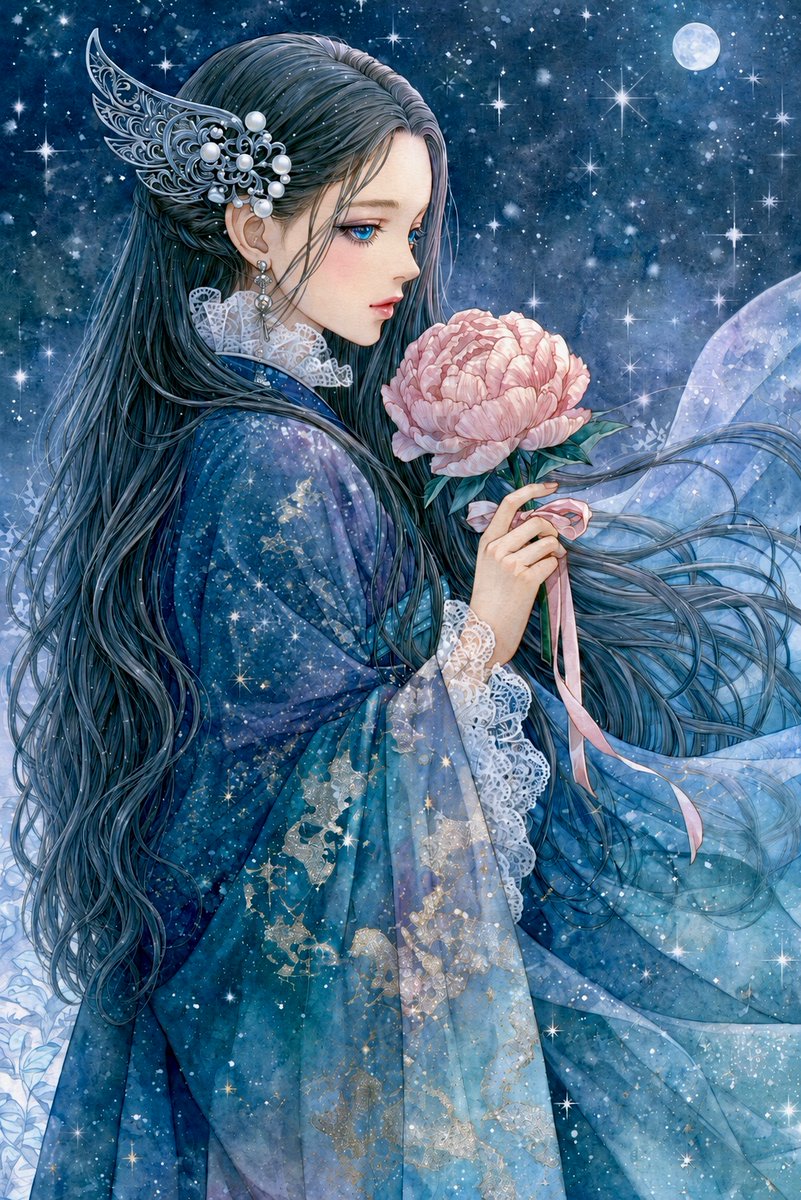
Moonlit Anime Woman with Peony
A detailed fantasy anime illustration prompt for creating a melancholic moonlit woman holding a pink peony beneath a starry night sky.
This is a GPT Image 2 prompt case for Anime & Game. Use the copy-ready prompt below to generate similar visuals, and review Awesome GPT Image 2 Prompts attribution plus commercial-use rights before reuse.
Free 1K preview
Generate one preview image instantly, no sign-up required.
Prompt
Copy-ready prompt
Create a vertical 2:3 fantasy anime-style illustration of one sorrowful young woman in left-facing side profile, standing under a star-filled midnight sky. She has very long flowing {argument name="hair color" default="deep blue-black"} hair streaming across the image, with countless fine strands, and her face is intentionally covered by one plain soft-edged taupe-gray rectangular blur centered over the facial area. She wears an ornate translucent layered {argument name="robe color" default="deep teal and icy blue"} robe with wide sleeves, white lace cuffs and collar, subtle gold floral embroidery, and a gauzy veil-like train blowing to the right. Add one elaborate silver filigree wing-shaped hair ornament behind her ear, decorated with multiple pearl beads, plus one dangling earring. In her hands she holds exactly one large pale pink peony blossom with green leaves and exactly two long pink ribbon tails hanging from the stem. The background is a dreamy cosmic night: dense blue nebula texture, many tiny snow-like specks, bright starbursts scattered throughout, and exactly one full moon in the upper right. Use delicate shoujo manga linework, luminous watercolor textures, intricate fabric and hair detail, melancholic romantic mood, cool blue palette with soft pink flower contrast, sparkling highlights, no text, no watermark.Prompt variables
Editable argument placeholders found in the prompt, with their default values.
Best for
- - Anime & Game visual exploration
- - Image generation and reference-image edits
- - Reusable briefs that keep source attribution visible
Change these parts
- - Subject, product, character, or scene
- - Aspect ratio, camera, lighting, and background
- - Brand, text, color, and output constraints
Recommended model and settings
- - Model: gpt-image-2
- - Input mode: Text to Image
- - Aspect ratio: source
- - Commercial status: review original source
How to use this prompt
- 1. Copy the prompt and preserve its structure for the first test.
- 2. Replace the subject, context, and publishing channel.
- 3. Change one camera, lighting, or style variable per iteration.
- 4. Inspect the output, source, text, and rights before reuse.
Limitations, source, and reuse cautions
- - Generated output is an editable draft, not factual, legal, or rights evidence.
- - Review the linked source, people, brands, logos, text, and third-party media before commercial use.
More cases in this category
Prioritized by category, input mode compatibility, quality, and lower risk.

Reuse and source notes
Use this prompt safely after previewing the case.
- 1.Copy the prompt or open it directly in Dovoo with the generation button.
- 2.Adjust variables, aspect ratio, and reference images for your own use case.
- 3.Before publishing or paid usage, verify source rights, attribution requirements, and brand or likeness risks.
Can I use this prompt commercially?
Commercial-use status is allowed. Review the original source, license, brand constraints, and legal requirements before paid usage.
Where does this case come from?
This case is imported from Awesome GPT Image 2 Prompts; keep attribution visible and check the source URL before reuse.