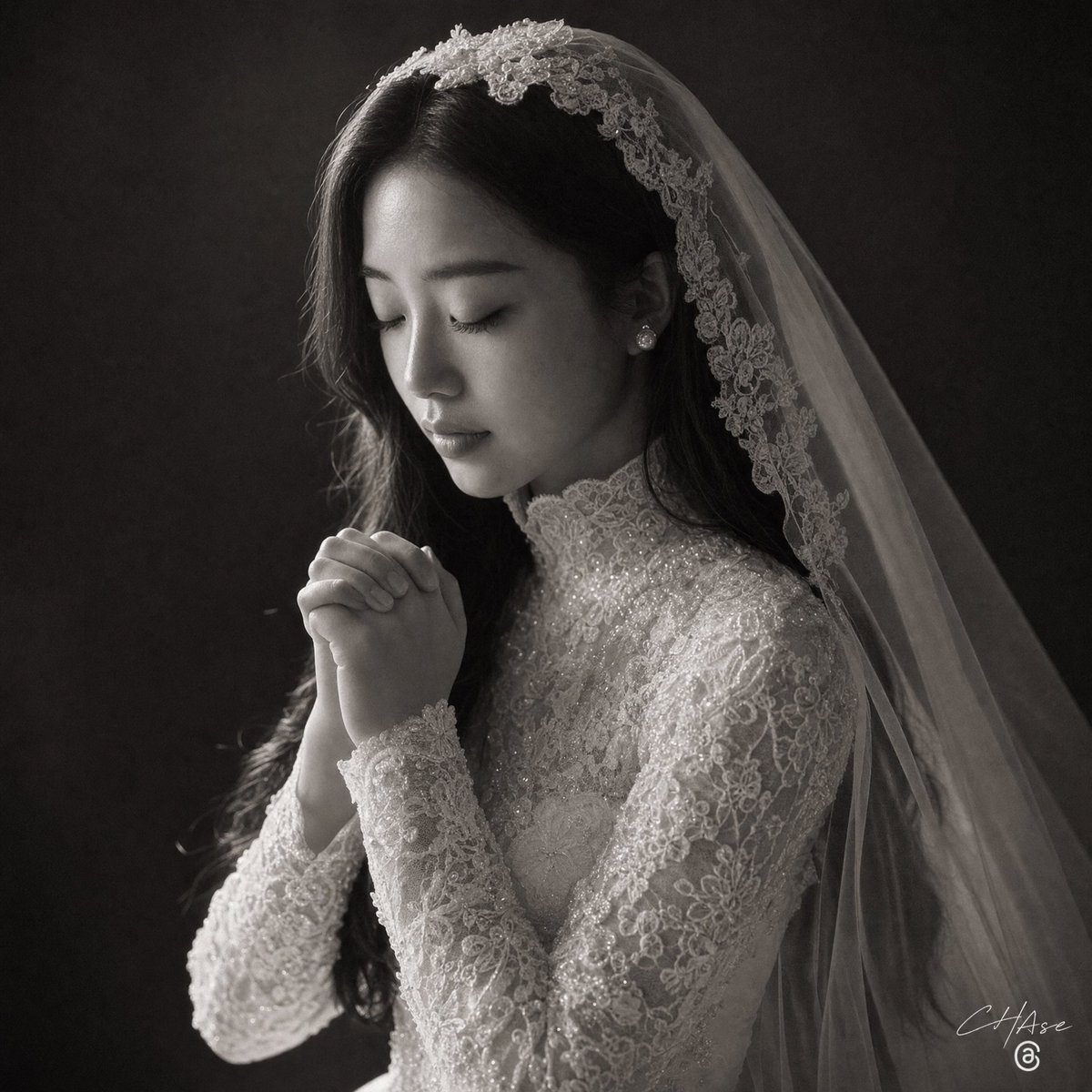
Monochrome Bridal Prayer Portrait
Generates a dramatic black-and-white fine-art wedding portrait of a veiled bride with clasped hands and an intentionally obscured face.
This is a GPT Image 2 prompt case for 人像角色. Use the copy-ready prompt below to generate similar visuals, and review Awesome GPT Image 2 Prompts attribution plus commercial-use rights before reuse.
Prompt
Copy-ready prompt
创作一张 1:1 正方形画幅的戏剧性黑白艺术风格新娘肖像。展示 {argument name="subject" default="一位新娘"} 的胸部以上部位,身体略微向右转,长长的深色头发部分隐藏在透明的大教堂式头纱下。她身穿一件华丽的高领长袖蕾丝婚纱,上面布满了花卉刺绣、珠饰和细微的闪光,并佩戴着小珍珠耳环。她的双手在下巴前合十,呈祈祷姿势,手指交错,营造出一种宁静虔诚的氛围。在她的面部中心添加一个巨大的不透明深灰色正方形,完全遮挡面部特征,同时保留头发、头纱、耳朵、颈部、肩膀和双手可见。头纱应从头顶的蕾丝花卉头饰垂下,斜向覆盖图像右侧,并露出精致的刺绣边缘。使用来自左上方的柔和定向影棚灯光、深邃的阴影、高对比度、浅景深以及深色纹理的炭灰色背景。渲染为一张优雅的单色婚礼照片,呈现真实的织物纹理、明亮的蕾丝细节、细微的胶片颗粒感,并在右下角添加一个白色手写摄影师签名,内容为 {argument name="signature text" default="C Hase"}。Prompt variables
Editable argument placeholders found in the prompt, with their default values.
More cases in this category
Prioritized by category, input mode compatibility, quality, and lower risk.

Reuse and source notes
Use this prompt safely after previewing the case.
- 1.Copy the prompt or open it directly in Dovoo with the generation button.
- 2.Adjust variables, aspect ratio, and reference images for your own use case.
- 3.Before publishing or paid usage, verify source rights, attribution requirements, and brand or likeness risks.
Can I use this prompt commercially?
Commercial-use status is allowed. Review the original source, license, brand constraints, and legal requirements before paid usage.
Where does this case come from?
This case is imported from Awesome GPT Image 2 Prompts; keep attribution visible and check the source URL before reuse.