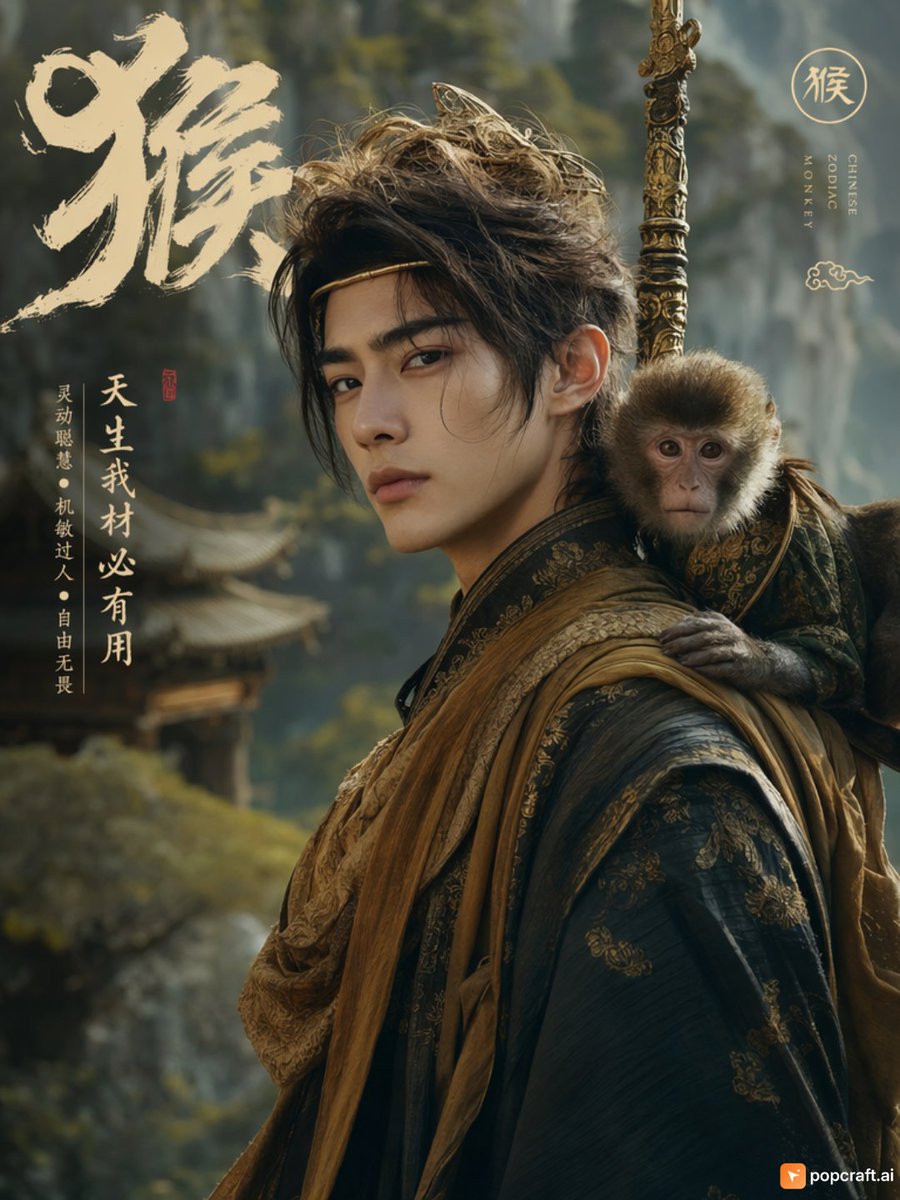
Handsome Young Man as Monkey Zodiac
A prompt to generate a realistic portrait of a young man styled as the Monkey zodiac sign, complete with a pet monkey and traditional attire.
This is a GPT Image 2 prompt case for Portrait & Character. Use the copy-ready prompt below to generate similar visuals, and review Awesome GPT Image 2 Prompts attribution plus commercial-use rights before reuse.
Free 1K preview
Generate one preview image instantly, no sign-up required.
Prompt
Copy-ready prompt
A cinematic, hyperrealistic portrait painting depicting a handsome young man representing the Year of the Monkey. He has messy dark brown hair, with a few strands falling on his forehead, and wears a thin golden headband. His expression is calm and confident, looking directly at the viewer. He is dressed in traditional Chinese robes, with a black fabric adorned with exquisite gold brocade patterns, and a rough-textured ochre sash diagonally across his chest. A small, lifelike monkey wearing a matching miniature vest is perched on his left shoulder. Behind him, a long and ornate golden staff (like the Ruyi Jingu Bang) extends vertically out of the frame. The background features softly focused misty mountains and the roofs of ancient temples. A large, bold calligraphy character “猴” (Monkey) is written in beige ink in the upper left corner. Vertical text on the right reads “CHINESE ZODIAC MONKEY”. Vertical white text on the left reads “天生我材必有用” (Born with talent, I must find a use for it), followed by smaller text “灵动聪慧·机敏过人·自由无畏” (Agile and intelligent, quick-witted and fearless). A red seal is visible near the text.
Best for
- - Portrait & Character visual exploration
- - Image generation and reference-image edits
- - Reusable briefs that keep source attribution visible
Change these parts
- - Subject, product, character, or scene
- - Aspect ratio, camera, lighting, and background
- - Brand, text, color, and output constraints
Recommended model and settings
- - Model: gpt-image-2
- - Input mode: Text to Image
- - Aspect ratio: source
- - Commercial status: review original source
How to use this prompt
- 1. Copy the prompt and preserve its structure for the first test.
- 2. Replace the subject, context, and publishing channel.
- 3. Change one camera, lighting, or style variable per iteration.
- 4. Inspect the output, source, text, and rights before reuse.
Limitations, source, and reuse cautions
- - Generated output is an editable draft, not factual, legal, or rights evidence.
- - Review the linked source, people, brands, logos, text, and third-party media before commercial use.
More cases in this category
Prioritized by category, input mode compatibility, quality, and lower risk.


Reuse and source notes
Use this prompt safely after previewing the case.
- 1.Copy the prompt or open it directly in Dovoo with the generation button.
- 2.Adjust variables, aspect ratio, and reference images for your own use case.
- 3.Before publishing or paid usage, verify source rights, attribution requirements, and brand or likeness risks.
Can I use this prompt commercially?
Commercial-use status is allowed. Review the original source, license, brand constraints, and legal requirements before paid usage.
Where does this case come from?
This case is imported from Awesome GPT Image 2 Prompts; keep attribution visible and check the source URL before reuse.