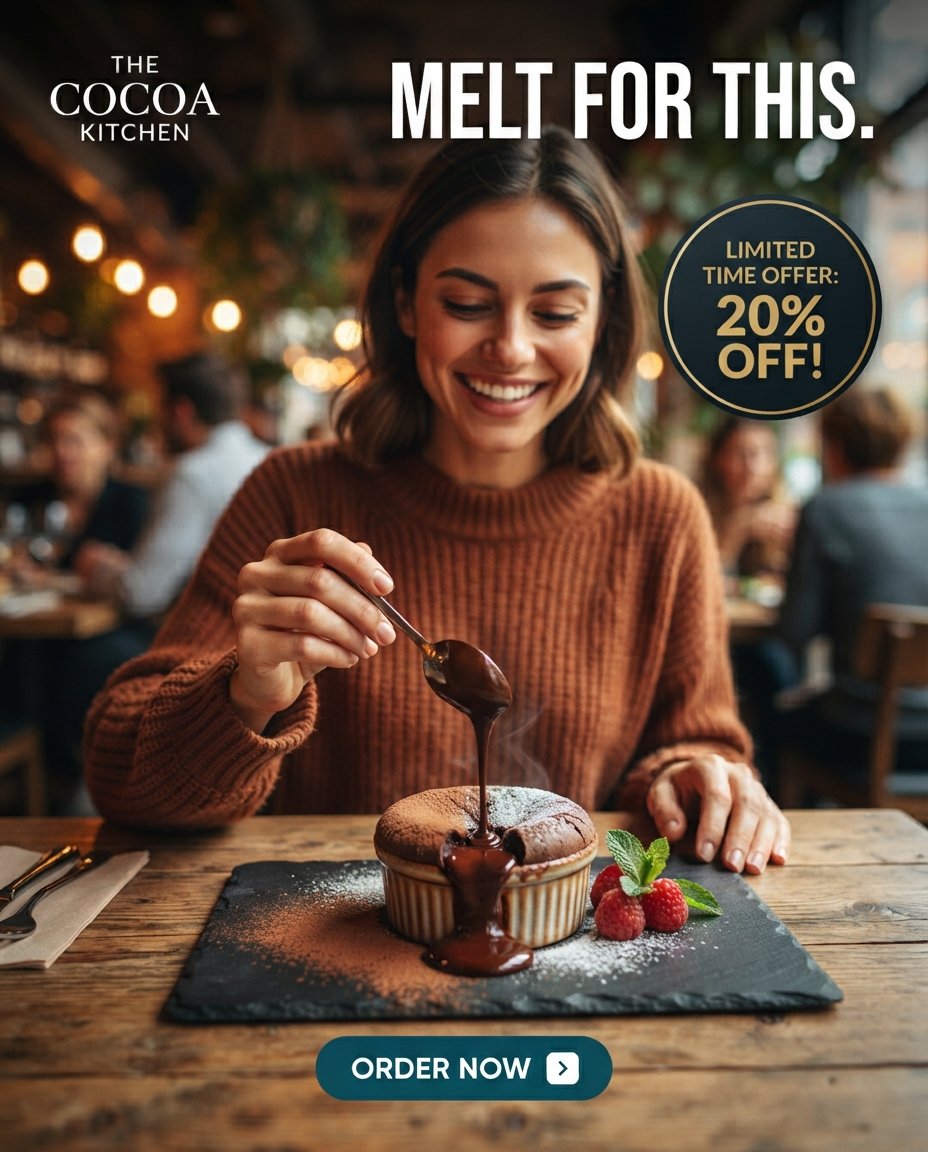
Molten Chocolate Dessert Café Ad
A warm photorealistic café advertisement featuring a woman pouring chocolate sauce over a molten dessert with promotional offer text.
This is a GPT Image 2 prompt case for Product & Commercial. Use the copy-ready prompt below to generate similar visuals, and review Awesome GPT Image 2 Prompts attribution plus commercial-use rights before reuse.
Free 1K preview
Generate one preview image instantly, no sign-up required.
Prompt
Copy-ready prompt
Create a square photorealistic restaurant dessert advertisement for {argument name="brand name" default="THE COCOA KITCHEN"}. Show one smiling young woman with shoulder-length brown hair wearing a warm rust-brown ribbed sweater, seated at a rustic wooden table in a cozy café with blurred diners, warm bokeh lights, greenery, and shallow depth of field. She is looking down happily while holding one spoon above a single small chocolate soufflé or molten cake in a ribbed ramekin; thick glossy chocolate sauce is dripping from the spoon into the center and overflowing down the front of the dessert. The dessert sits on one rectangular black slate serving board dusted with cocoa powder and powdered sugar. Include exactly three raspberries and a small mint garnish to the right of the dessert, plus a folded napkin and cutlery partially visible on the left edge of the table. Layout the ad with four visible text elements: top-left stacked white serif logo text reading {argument name="brand name" default="THE COCOA KITCHEN"}; large bold condensed all-caps white headline across the top reading {argument name="headline text" default="MELT FOR THIS."}; upper-right dark circular badge with a thin gold outline and gold text reading {argument name="offer text" default="LIMITED TIME OFFER: 20% OFF!"}; bottom-center teal rounded call-to-action button with white text reading {argument name="button text" default="ORDER NOW"} and a small white rounded square containing a right arrow icon. Use premium food photography lighting, warm cinematic color grading, crisp focus on the woman and dessert, soft background blur, appetizing chocolate texture, realistic hands, and clean commercial composition. No extra text, no watermark, no distorted typography.Prompt variables
Editable argument placeholders found in the prompt, with their default values.
Best for
- - Product & Commercial visual exploration
- - Image generation and reference-image edits
- - Reusable briefs that keep source attribution visible
Change these parts
- - Subject, product, character, or scene
- - Aspect ratio, camera, lighting, and background
- - Brand, text, color, and output constraints
Recommended model and settings
- - Model: gpt-image-2
- - Input mode: Text to Image
- - Aspect ratio: source
- - Commercial status: review original source
How to use this prompt
- 1. Copy the prompt and preserve its structure for the first test.
- 2. Replace the subject, context, and publishing channel.
- 3. Change one camera, lighting, or style variable per iteration.
- 4. Inspect the output, source, text, and rights before reuse.
Limitations, source, and reuse cautions
- - Generated output is an editable draft, not factual, legal, or rights evidence.
- - Review the linked source, people, brands, logos, text, and third-party media before commercial use.
More cases in this category
Prioritized by category, input mode compatibility, quality, and lower risk.


Reuse and source notes
Use this prompt safely after previewing the case.
- 1.Copy the prompt or open it directly in Dovoo with the generation button.
- 2.Adjust variables, aspect ratio, and reference images for your own use case.
- 3.Before publishing or paid usage, verify source rights, attribution requirements, and brand or likeness risks.
Can I use this prompt commercially?
Commercial-use status is allowed. Review the original source, license, brand constraints, and legal requirements before paid usage.
Where does this case come from?
This case is imported from Awesome GPT Image 2 Prompts; keep attribution visible and check the source URL before reuse.