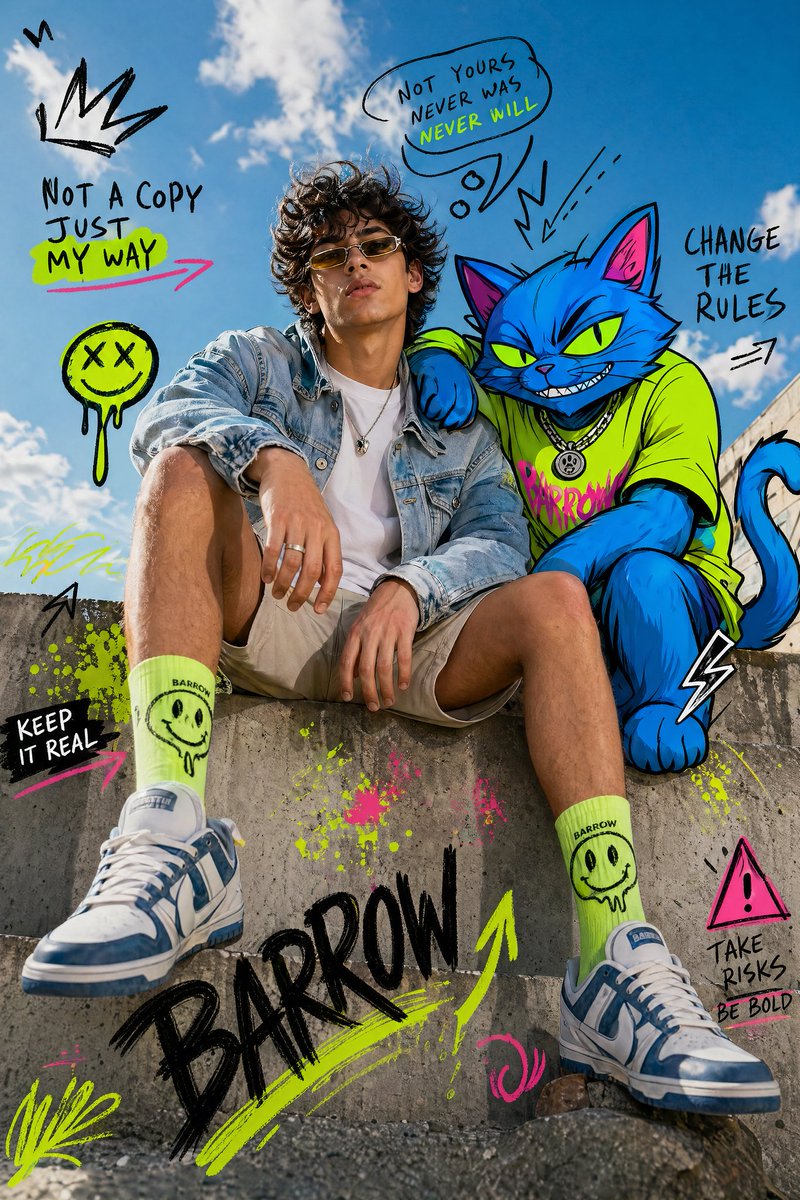
Mixed-Media Fashion Editorial with Neon Cartoon Interaction
A sophisticated prompt for a fashion editorial that seamlessly blends high-resolution photography of a model with a stylized, vibrant neon cartoon cat character.
This is a GPT Image 2 prompt case for Fashion & Beauty. Use the copy-ready prompt below to generate similar visuals, and review Awesome GPT Image 2 Prompts attribution plus commercial-use rights before reuse.
Free 1K preview
Generate one preview image instantly, no sign-up required.
Prompt
Copy-ready prompt
Full-body fashion editorial shot of a {argument name="subject" default="confident young person model"} sitting casually on a concrete ledge, legs slightly apart, one arm resting on knee, the other relaxed, looking straight at camera with a calm dominant expression.

Wearing a light denim jacket over a plain white t-shirt, neutral shorts, bright socks, and modern sneakers. Clean styling, natural pose, wind slightly moving hair and fabric.

Beside and partially interacting with a stylized cartoon {argument name="animal" default="Cat"}, positioned naturally as if sharing the same space.

The [ANIMAL] is illustrated in bold cartoon style with thick black outlines, vibrant neon color palette (blue, green, yellow accents), exaggerated proportions, expressive features, playful yet powerful presence.

Background: {argument name="background" default="bright outdoor urban setting with clear blue sky, soft clouds, sunlit concrete textures, strong natural daylight, crisp shadows"}.

Fusion of hyper-realistic photography and graphic illustration, seamless integration between subject and cartoon.

Add graphic overlay elements: doodle arrows, scribbles, abstract shapes, comic-style symbols, dynamic motion lines.

High contrast, HDR lighting, sharp focus, fashion editorial composition, surreal mixed-media aesthetic, ultra-detailed, 8k resolution.
Prompt variables
Editable argument placeholders found in the prompt, with their default values.
Best for
- - Fashion & Beauty visual exploration
- - Image generation and reference-image edits
- - Reusable briefs that keep source attribution visible
Change these parts
- - Subject, product, character, or scene
- - Aspect ratio, camera, lighting, and background
- - Brand, text, color, and output constraints
Recommended model and settings
- - Model: gpt-image-2
- - Input mode: Text to Image
- - Aspect ratio: source
- - Commercial status: review original source
How to use this prompt
- 1. Copy the prompt and preserve its structure for the first test.
- 2. Replace the subject, context, and publishing channel.
- 3. Change one camera, lighting, or style variable per iteration.
- 4. Inspect the output, source, text, and rights before reuse.
Limitations, source, and reuse cautions
- - Generated output is an editable draft, not factual, legal, or rights evidence.
- - Review the linked source, people, brands, logos, text, and third-party media before commercial use.
More cases in this category
Prioritized by category, input mode compatibility, quality, and lower risk.
Reuse and source notes
Use this prompt safely after previewing the case.
- 1.Copy the prompt or open it directly in Dovoo with the generation button.
- 2.Adjust variables, aspect ratio, and reference images for your own use case.
- 3.Before publishing or paid usage, verify source rights, attribution requirements, and brand or likeness risks.
Can I use this prompt commercially?
Commercial-use status is allowed. Review the original source, license, brand constraints, and legal requirements before paid usage.
Where does this case come from?
This case is imported from Awesome GPT Image 2 Prompts; keep attribution visible and check the source URL before reuse.